
In today's data-driven world, the continuity of database operations is not just a technical requirement; it's a cornerstone of business success. For applications built on CockroachDB, the inherent resilience provided by its distributed architecture and Raft replication offers a strong foundation for high availability. However, even with this robust fault tolerance, a comprehensive disaster recovery (DR) plan is essential to safeguard against unforeseen, large-scale incidents.
This blog post explores CockroachDB's disaster recovery features, with a particular emphasis on the newly introduced Physical Cluster Replication (PCR) for cloud functionality version 25.3. We'll explore why a DR strategy is non-negotiable, compare different recovery approaches, and walk through the process of setting up and monitoring PCR specifically on CockroachDB Cloud.
The Imperative of a Disaster Recovery Strategy
While CockroachDB's native resilience makes disasters far less likely to happen by protecting against common failures like node, availability zone, and even regional outages, a DR plan addresses less common but higher-impact scenarios such as the loss of an entire cluster, data corruption, or human error. To formulate an effective DR strategy, it's crucial to understand two key metrics:
Recovery Point Objective (RPO): This defines the maximum acceptable amount of data loss, measured in time. A low RPO means you can only tolerate losing a small amount of data.
Recovery Time Objective (RTO): This specifies the maximum acceptable downtime for your database. A low RTO means your database must be back online quickly after an incident.
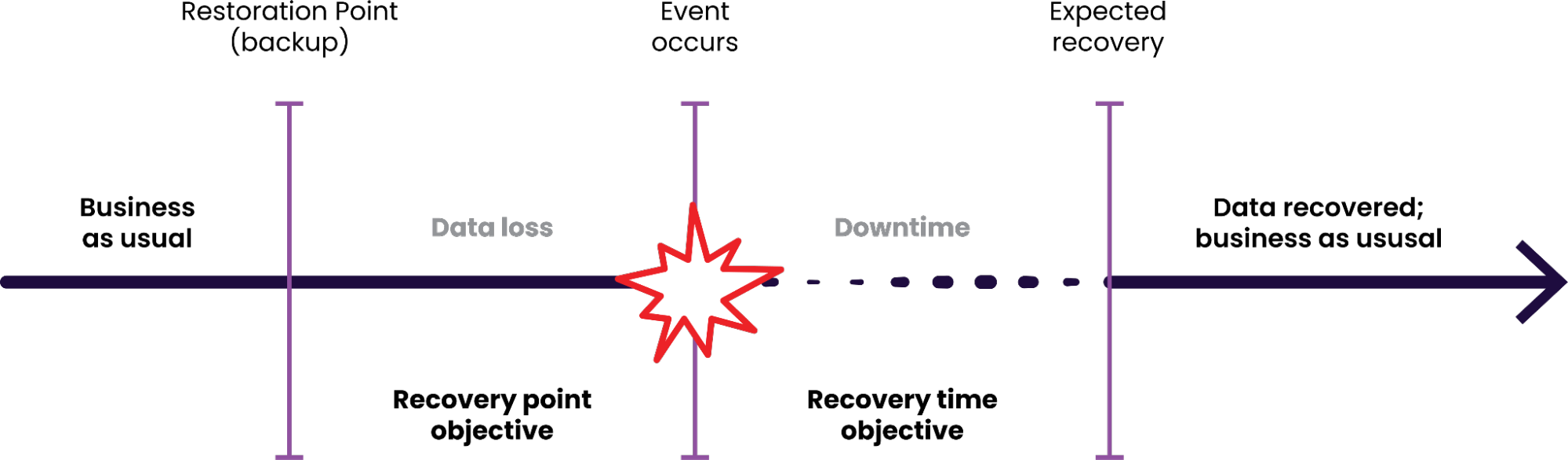
The goal of any DR strategy is to minimize both RPO and RTO. CockroachDB offers two primary approaches to achieve this: traditional backup and restore, and the more advanced Physical Cluster Replication.
Choosing Your DR Strategy: Backup/Restore vs. Physical Cluster Replication
When crafting your disaster recovery plan for CockroachDB, the fundamental choice often centers on how you’ll achieve resilience and data continuity. While there are multiple strategies available, such as traditional backup and restore, Logical Disaster Recovery (LDR), and the more advanced Physical Cluster Replication (PCR), your decision ultimately hinges on the specific Recovery Point Objective (RPO) and Recovery Time Objective (RTO) your application demands. For applications that can tolerate a higher RPO and RTO, a backup and restore strategy is a perfectly viable and cost-effective solution. This approach involves taking regular snapshots of your database. The RPO is dictated by how frequently you perform these backups, and the RTO is determined by the time it takes to provision a new cluster and restore the data from your backup, which can range from minutes to hours depending on the data volume.
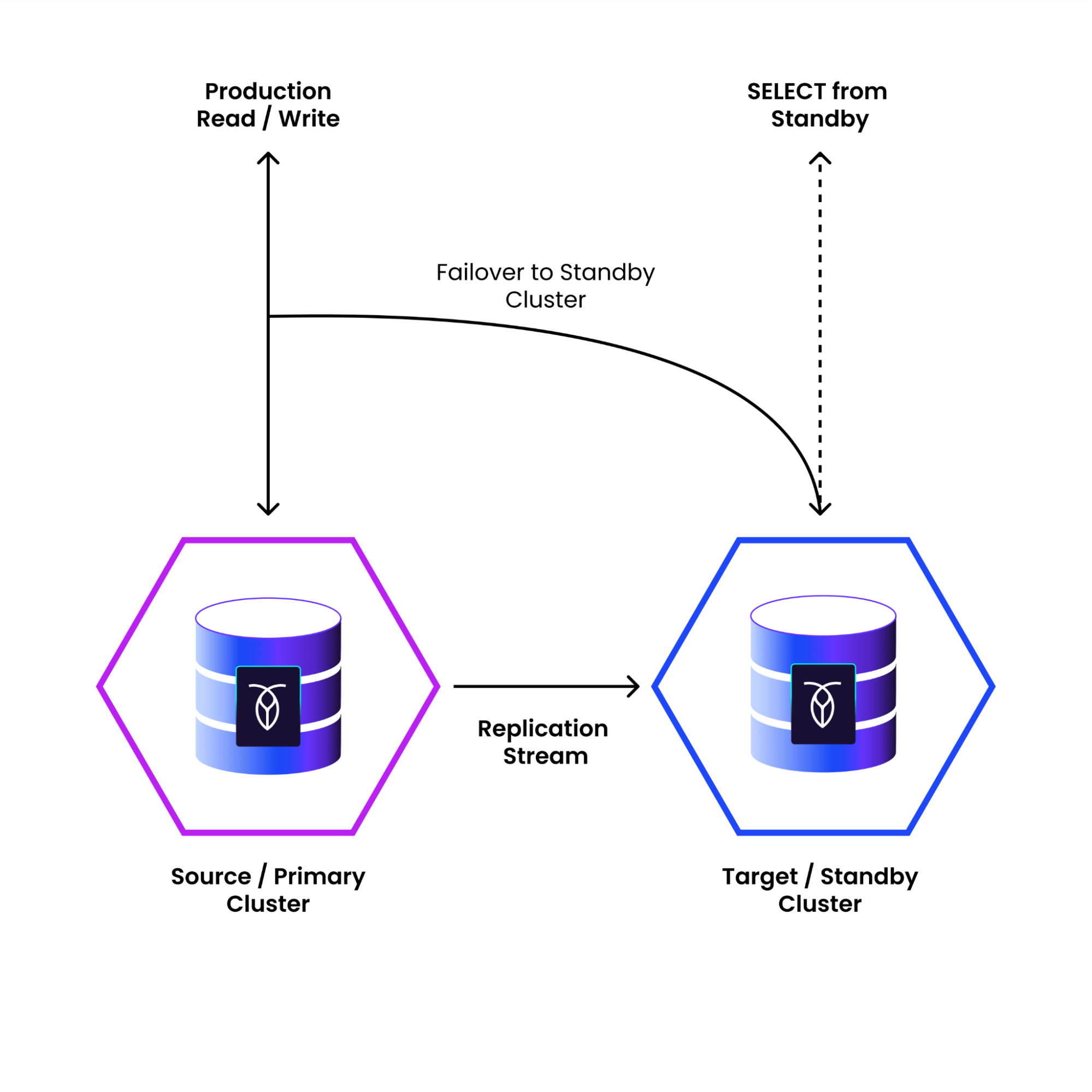
However, for mission-critical applications where data loss and downtime must be minimized to seconds, Physical Cluster Replication is the superior choice. PCR offers a near-synchronous replication of your entire cluster to a standby location. This "warm standby" approach provides a significantly lower RPO, typically in the tens of seconds, and a much faster RTO, as failing over to the standby cluster is a quicker process than a full restore. While it requires the additional investment of maintaining a standby cluster, PCR provides the highest level of business continuity and data protection, making it the go-to solution for workloads with the most stringent availability requirements.
Why Use Physical Cluster Replication? The Key Scenarios
Beyond simply offering a better RPO and RTO than traditional backups, PCR unlocks several powerful operational advantages that go well beyond recovery speed.
Architecturally, PCR provides an all-encompassing replica of your primary cluster, ensuring you can recover swiftly from a complete control plane or cluster-wide failure. It’s especially well-suited for organizations operating in a two-datacenter model that require robust protection against a full regional outage. Because PCR replicates data asynchronously from a single active region to a passive standby, applications benefit from consistently low write latencies. This design enables near-local write performance while continuously maintaining a replicated copy of your entire cluster in another region delivering both high performance and strong disaster resilience.
Operationally, PCR simplifies disaster recovery management by eliminating the need to maintain and monitor SQL-level replication. There’s no need to manually handle schema changes, remember to add newly created tables to replication streams, or track replication jobs. PCR automatically replicates data at the cluster level, making it a fully managed, low-maintenance DR solution.
The passive (standby) cluster also adds value beyond failover. It can be safely used for read-only workloads, such as analytics, reporting, or pre-production testing. This allows teams to offload heavy queries from the production environment while maintaining full data fidelity and performance isolation.
Finally, PCR acts as a powerful safeguard against human error. If a user accidentally drops a database or table, you can fail over to a point-in-time just before the incident occurred—essentially providing an “undo” button for your entire cluster. The standby environment also serves as an ideal, production-scale platform for blue-green deployments, allowing teams to test major upgrades or configuration changes without any risk to live workloads.
A Closer Look at PCR on CockroachDB Cloud
CockroachDB Physical Cluster Replication (PCR) continuously sends all data at the cluster level from a primary cluster to an independent standby cluster. Existing data and ongoing changes on the active primary cluster, which is serving application data, replicate asynchronously to the passive standby cluster. You can fail over from the primary cluster to the standby cluster. This will stop the replication stream, reset the standby cluster to a point in time (in the past or future) where all ingested data is consistent, and make the standby ready to accept application traffic.
On CockroachDB Cloud, setting this up is significantly streamlined as the platform handles the underlying complexities of network configuration, such as VPC peering and validating connectivity between the primary and standby clusters.
Before initiating the stream, it's important to ensure your clusters are correctly provisioned for optimal performance. For this example, we're using two clusters named pcr-primary (us-west-2) and pcr-secondary (us-east-2).

Best practices dictate that the standby cluster should run the same version as, or one version ahead of, the primary. Furthermore, both clusters should have similar hardware profiles, node counts, and overall size to prevent performance degradation in the replication stream. We recommend using an empty standby cluster when starting PCR.
When initiating the PCR stream, CockroachDB Cloud will first perform a full backup of the standby cluster, then clear its data, and finally begin the PCR process. This ensures the standby cluster achieves full consistency with the primary. For this reason, it is recommended to start PCR with an empty standby cluster.
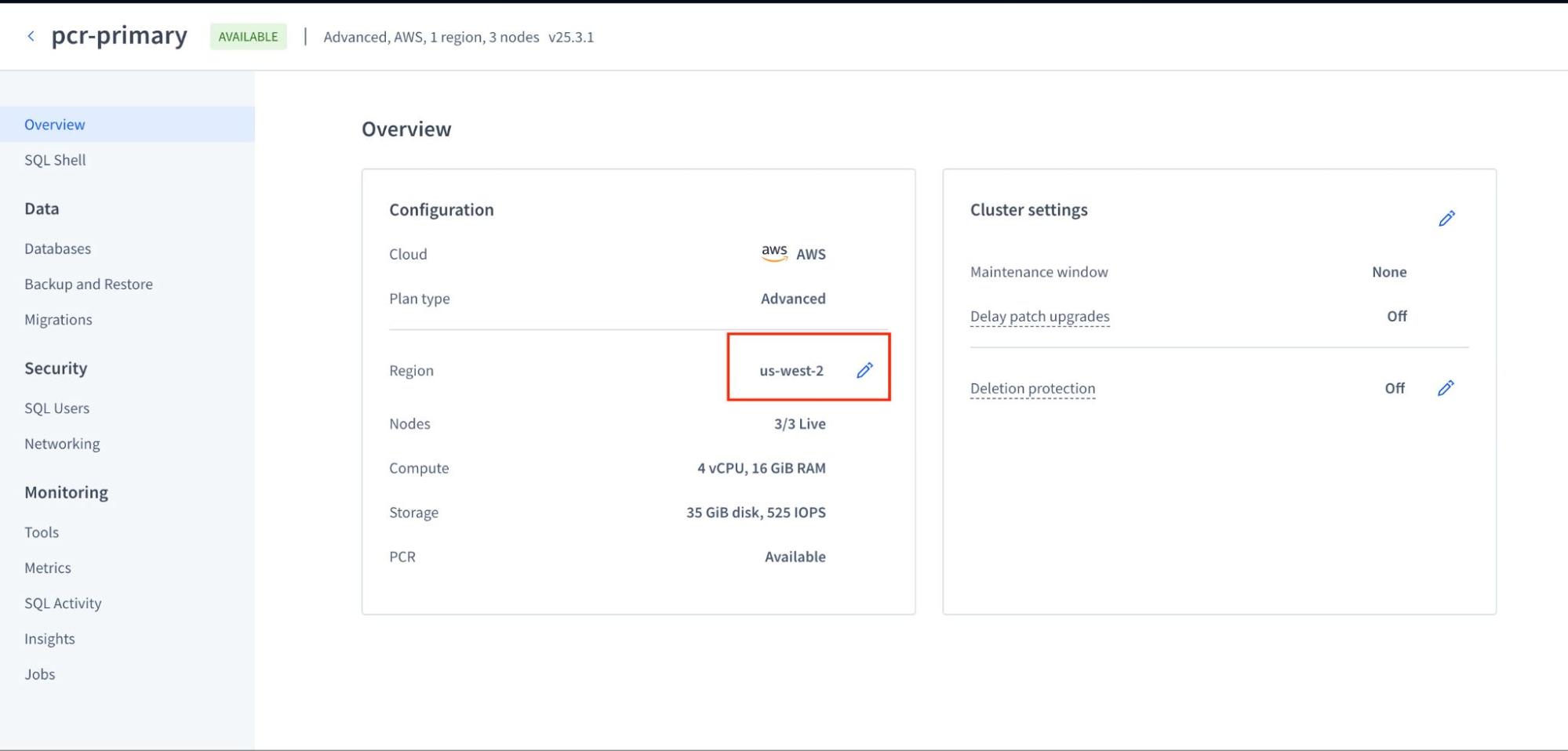
The screenshot above illustrates the primary cluster in us-west-2.
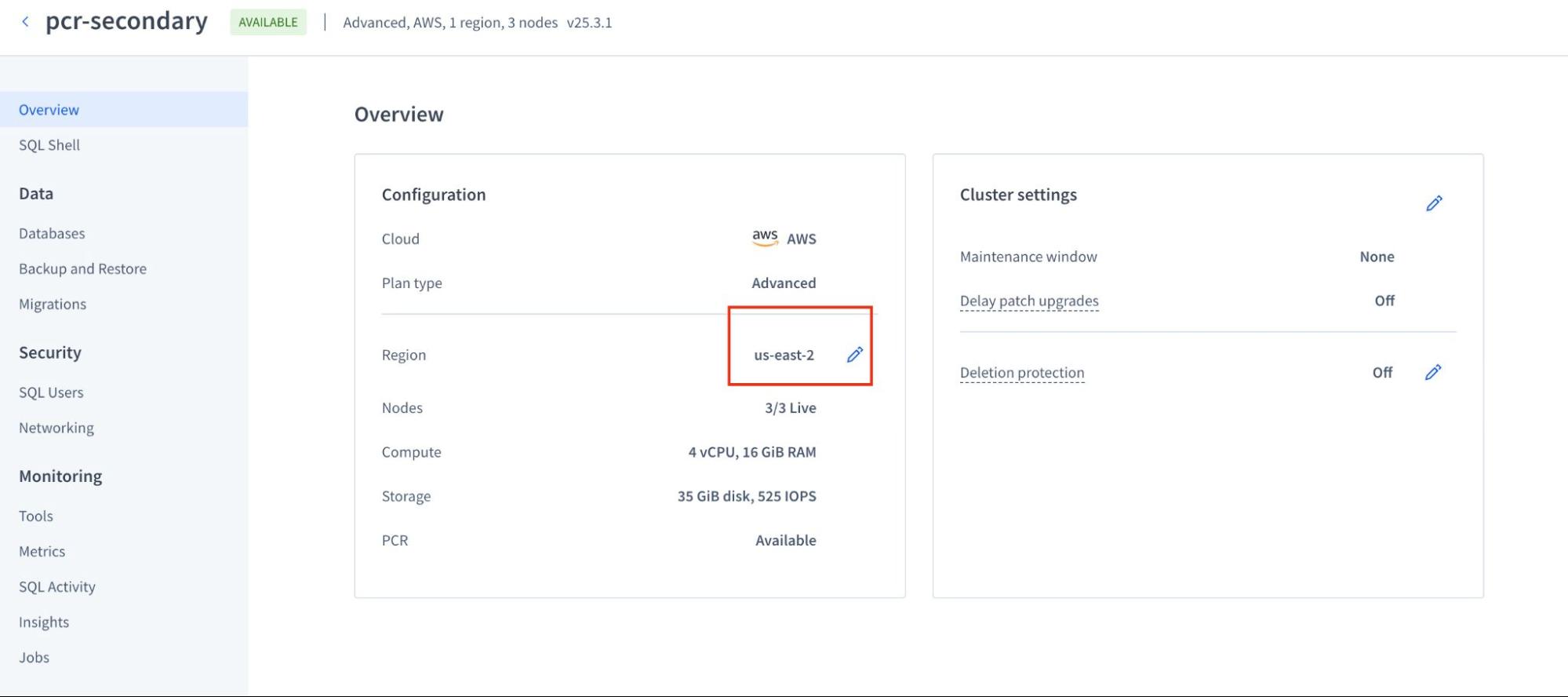
The screenshot above illustrates the stand by cluster in us-east-2.
You can enable a replication stream with a single call to the CockroachDB Cloud API, as shown in the example below. This abstracts away the complex setup, allowing you to establish a DR posture in minutes.
Let's break down this command. We are using curl to send a POST request to the specific Cloud API endpoint for creating replication streams. The --header provides your secret access token for authentication.
The $CC_API_ACCESS_TOKEN is a placeholder for your CockroachDB Cloud API Key, which you need to authenticate your curl request. You can get one by creating a service account in your CockroachDB Cloud organization.
Here are the steps:
Log in to your CockroachDB Cloud account.
Navigate to Access Management on the left-hand menu.
Select the Service Accounts tab.
Click Create Account, give it a descriptive name (like
pcr-manager), and assign it the necessary permissions (e.g.,Cluster Adminrole to manage replication streams).Once the account is created, click on its name in the list, and then click Create API Key.
The console will generate a Secret Key. This is the value you should use for
$CC_API_ACCESS_TOKEN. Make sure to copy it immediately and store it securely, as it will not be shown again.
You can then set it as an environment variable in your terminal before running the curl command: export CC_API_ACCESS_TOKEN='your-secret-key-goes-here'.
The core of the request is the --json payload, where you simply need to provide the unique IDs for your primary_cluster_id (the source of the data) and your standby_cluster_id (the destination). This single API call tells the Cloud platform to handle all the networking and configuration to establish the replication stream between the two clusters.
This command initiates the replication stream between your primary and standby clusters. The API response will provide the stream's ID and its initial status, often showing as STARTING while the cloud platform prepares the clusters and network links.
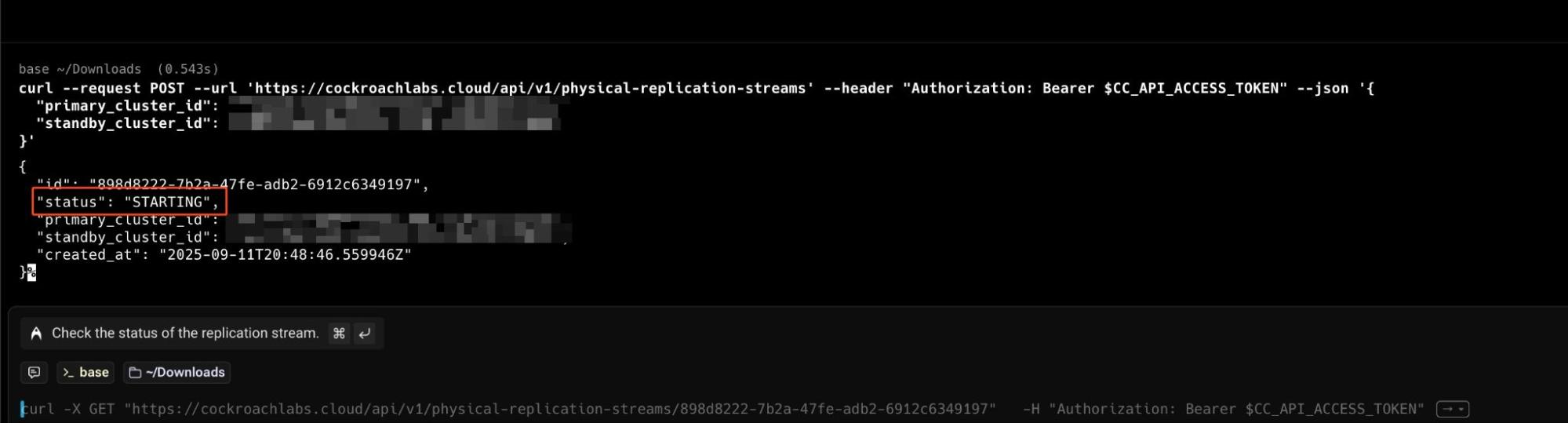
Upon navigating to your UI, you should observe that both the PCR primary and PCR standby are present within this PCR topology, confirming that CockroachDB is actively configuring the clusters in PCR.

Testing Your PCR Stream
Now that the replication stream is active, how can you verify it's working? The process is straightforward. We'll connect to the primary cluster, create some sample data, and then verify that this data appears on our standby cluster. This confirms that the asynchronous replication is flowing correctly.
First, connect to your primary cluster's SQL shell and run the following commands to create and populate a new table:
CREATE TABLE pcr_test ( id INT PRIMARY KEY, message STRING ); INSERT INTO pcr_test (id, message) VALUES (1, 'Hello from the primary cluster!'); 
After executing these commands on your pcr-primary (us-west-2) cluster, the new pcr_test table and its data are written. Behind the scenes, PCR captures these changes and streams them over to the pcr-secondary cluster. Depending on your network and workload, this happens within seconds.
A fantastic feature of PCR is the ability to use the standby cluster as a read-only replica. This is incredibly useful for offloading analytical queries or reporting workloads from your primary production database. Let's connect to our standby cluster and see if our data has arrived.
SELECT * FROM pcr_test;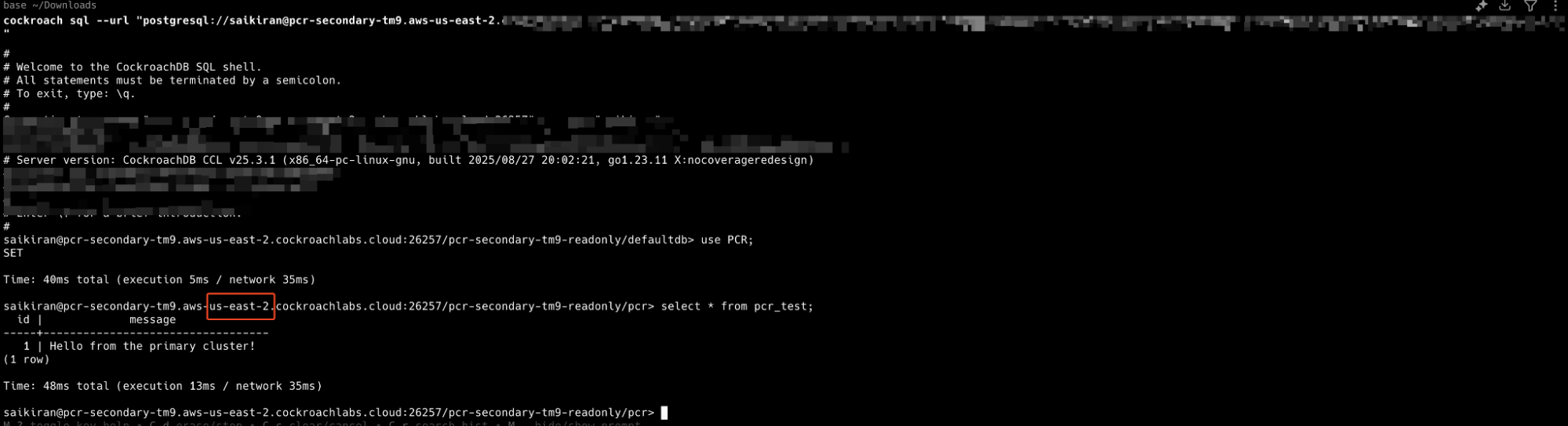
When you run this query on the pcr-secondary (us-east-2) cluster, you should see the exact same data you inserted on the primary. This simple test gives you tangible proof that your disaster recovery pipeline is active and your data is being successfully replicated.
Monitoring Your PCR Stream
Once your PCR stream is active, it's crucial to monitor its health and performance. CockroachDB Cloud makes this straightforward by integrating all necessary tools directly into the platform.
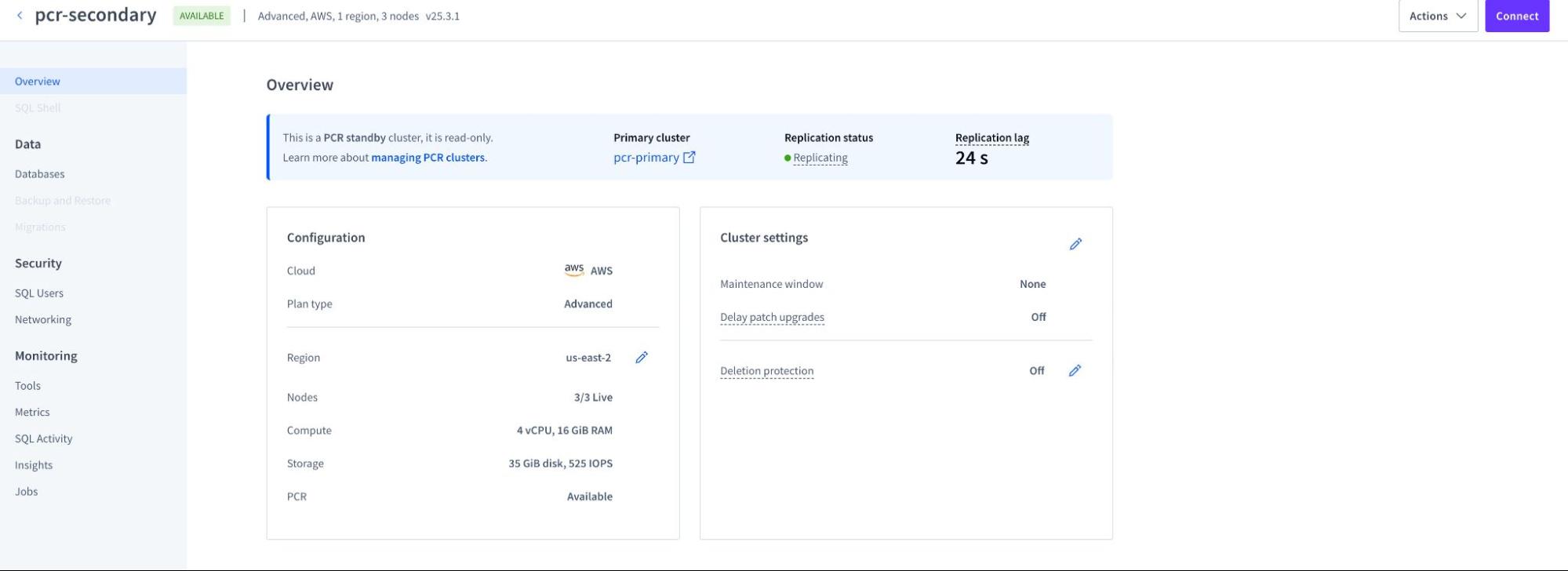
Cloud Console: The CockroachDB Cloud Console provides a dedicated "Physical Cluster Replication" dashboard. This UI gives you a real-time view of key metrics without needing to configure external tools. You can easily track:
Primary Cluster: The "primary cluster of the PCR stream" refers to the source CockroachDB cluster from which data is being replicated in a Physical Cluster Replication (PCR) setup.
Replication Status: Status of the replication
Replication Lag: The time delay between the primary and standby clusters.
SQL Shell:

Integrated Metrics: For teams that rely on centralized observability platforms, CockroachDB Cloud seamlessly integrates with services like Datadog and Prometheus. This allows you to export critical PCR health metrics into your existing dashboards. For continual, automated monitoring, it is essential to track specific Prometheus metrics to build a comprehensive view of your replication stream's health:
physical_replication.logical_bytes: Tracks the rate of data ingestion on the standby cluster, giving you insight into replication throughput.physical_replication.sst_bytes: Monitors the compressed data being written to the storage layer, which is useful for understanding the physical I/O on the standby.physical_replication.replicated_time_seconds: This is the most critical metric, representing the exact timestamp to which your standby cluster is consistent. By comparing this to the current time, you can calculate the precise replication lag.
Setting up alerts on these metrics, particularly on the replication lag derived from replicated_time_seconds, is a crucial step in creating a proactive DR posture.
What's Next: Failover and Failback
In this blog post, we've laid the groundwork for building a robust disaster recovery plan with CockroachDB's Physical Cluster Replication on the Cloud platform. We've explored the importance of a DR strategy, compared different recovery approaches, and walked through the simplified process of setting up and monitoring PCR.
With this foundation, you’re now equipped to start designing and validating a DR strategy tailored to your environment.
Sai Kiran Kshatriya is a Senior Sales Engineer at Cockroach Labs, where he helps customers design and operate resilient, globally distributed databases using CockroachDB.