



This post is part of the CockroachDB is Agent Ready launch series. See also: ccloud CLI|Agent Skills
AI-assisted development is rapidly moving from experimentation to expectation. Modern developers increasingly rely on coding agents and AI assistants such as Claude, Cursor, and Windsurf to explore systems, debug issues, and reason about data. At the center of this shift is the Model Context Protocol (MCP) – an emerging standard that allows AI agents to safely and predictably interact with external systems.
Today, we’re announcing the delivery of a Managed MCP Server, deeply integrated into CockroachDB Cloud. This MCP server makes it simpler for AI-native workflows to integrate directly with CockroachDB Cloud and participate in the expanding ecosystem that’s based on MCP.
This post walks through the motivation, architecture, and design decisions behind the managed MCP server, and explains how we balanced ease of use, security, and observability – all while keeping operational risk low.
Why a Managed MCP Server?
A managed MCP server delivers immediate, tangible value to CockroachDB customers by removing friction and enabling AI-native workflows out of the box. Specifically, it offers the following benefits:
Faster onboarding and time to value
With a managed MCP endpoint, developers do not need to deploy, configure, or operate any additional infrastructure. A simple configuration snippet generated directly from the Cloud Console allows AI agents to securely and simply connect to CockroachDB within minutes. This is especially valuable during evaluation, prototyping, and early development stages, where setup complexity can become a blocker.
Safe and secure production-grade defaults
The managed MCP server is designed to be secure by default. Read-only mode is enabled by default with write opt-in via consent, ensuring that AI agents can explore schemas, inspect query plans, and run analytical queries without the risk of unintended data modification. Guardrails are enforced at multiple layers, independent of the underlying SQL role, giving customers confidence when connecting their AI tools to real clusters.
Seamless integration with CockroachDB Cloud
Because the MCP server is operated and secured by Cockroach Labs, it integrates natively with existing Cloud authentication, RBAC, and SQL proxy mechanisms. Customers benefit from consistent security posture, predictable performance, and enterprise-grade observability without having to stitch together custom solutions.
Continuous improvement with no operational overhead
As MCP clients evolve and new tools or capabilities are added, customers automatically benefit from enhancements to the managed MCP server. There is no need to track protocol changes, upgrade dependencies, or redeploy services – the integration improves over time while remaining fully managed.
What We Built
At a high level, the managed MCP server provides:
A Cloud-hosted MCP endpoint accessible over HTTPS
Authentication via service account API keys, with Cloud RBAC enforcement
Explicit consent on Read and/or Write operations to be performed on DB
No new data-plane access paths – all SQL flows through existing internal service proxies
Out-of-the-box compatibility with Claude Code, with support for other MCP clients
Structured telemetry for observability and analytics
The endpoint is available at:
https://cockroachlabs.cloud/mcp
Architecture Overview
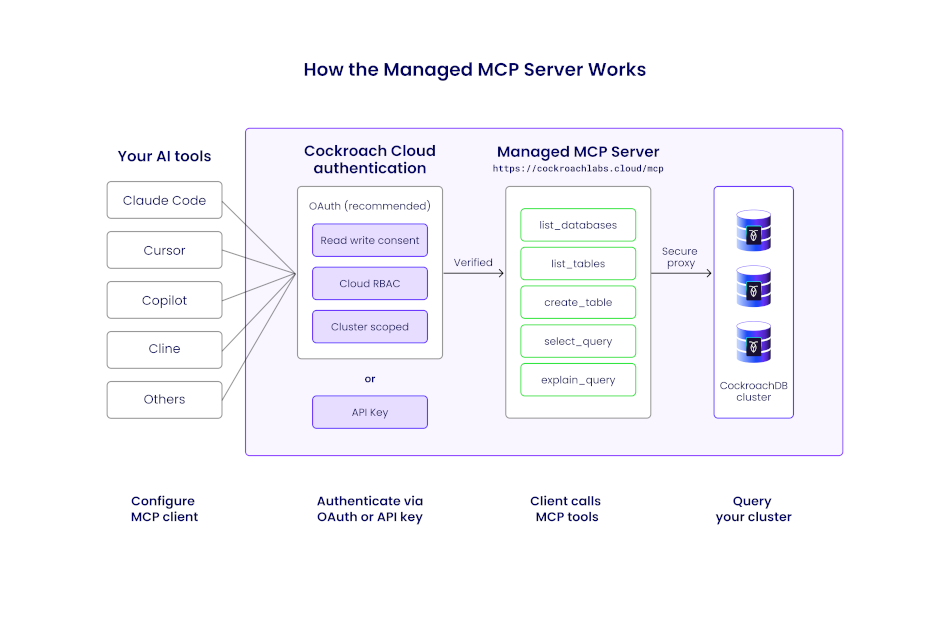
Managed MCP request flow illustrates how an AI agent interacts with CockroachDB Cloud through the managed MCP endpoint, without introducing a new data-plane access path.
Request flow
Conceptually, each MCP request follows this path:
MCP client (for example, Claude Code) sends a JSON-RPC request over HTTPS
Request passes through a load balancer
The internal mcp-service routes
/mcptraffic to the MCP handlerThe middleware pipeline enforces auth, rate limits, and logging
A tool handler performs authorization and executes the requested operation
Results are returned as an MCP-compliant JSON-RPC response
This mirrors how CockroachDB Cloud public APIs are exposed today, minimizing operational surprises.
Transport and Protocol Choices
We use the official modelcontextprotocol/go-sdk, ensuring spec alignment and consistency with future self-hosted implementations.
HTTP transport is supported and recommended
SSE transport is intentionally excluded (deprecated in MCP)
Security First: Authentication and Authorization
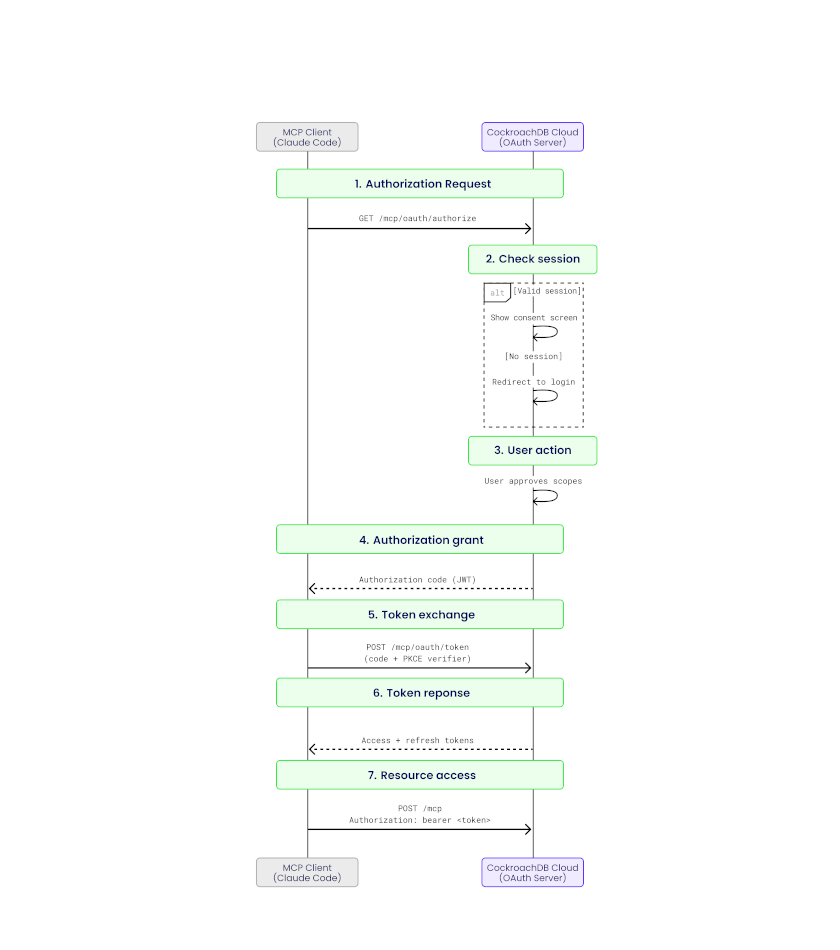
Authentication and authorization layering shows how multiple security controls compose to protect clusters from unintended access.
Security was a non-negotiable requirement, especially when AI agents are involved.
Authentication options
The managed MCP server supports two authentication mechanisms:
OAuth 2.1 (Authorization Code Flow with PKCE) Designed for interactive user workflows, with scoped permissions:
mcp:readfor safe, read-only accessmcp:writefor controlled mutations
Service account API keys Intended for fully autonomous environments. API keys can be granted Cloud RBAC roles scoped to the specific cluster being accessed.
Authorization and least privilege
Every tool invocation performs a Cloud RBAC check before execution. Requests are rejected if permissions exceed the expected scope.
Read and Write Consent
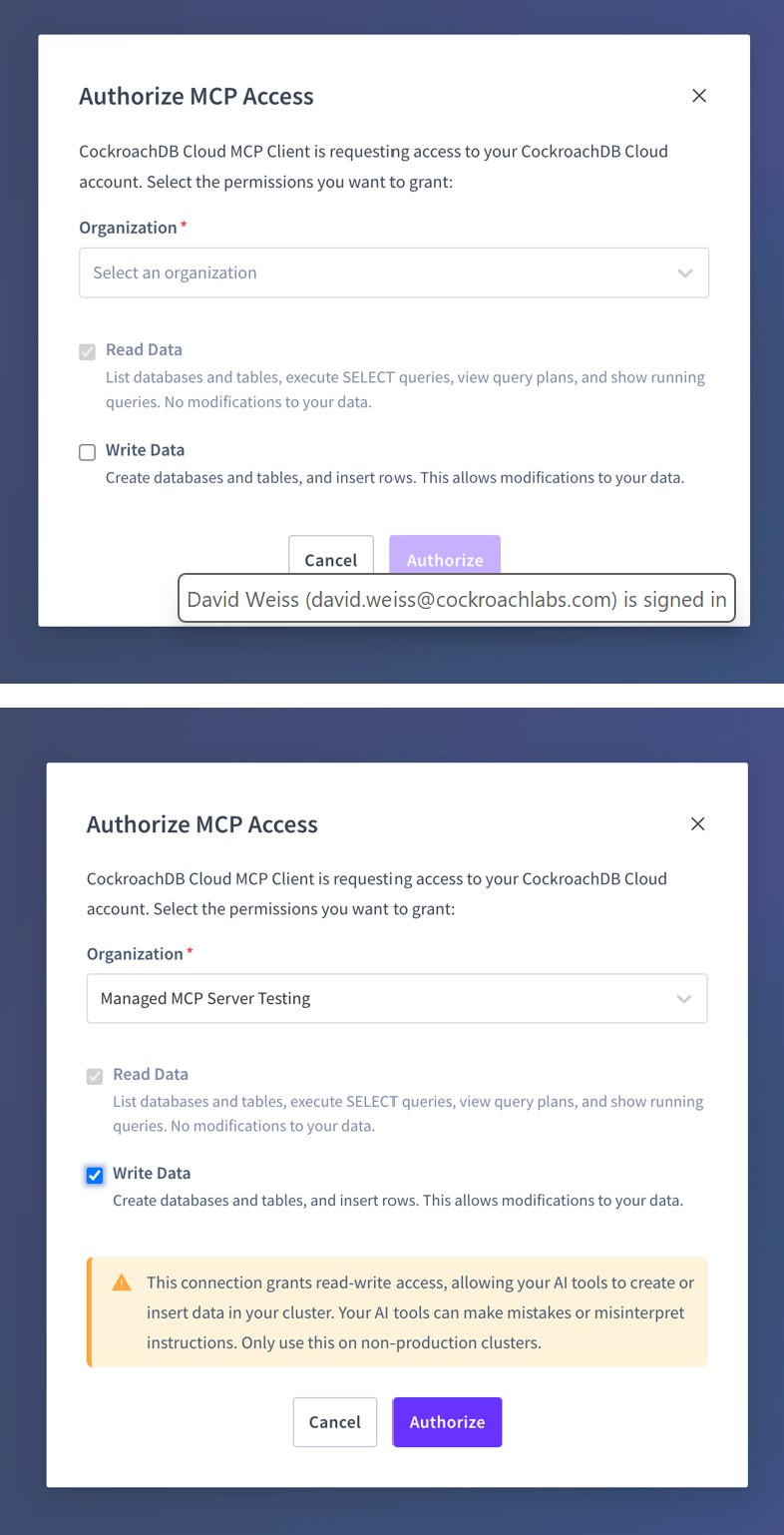
The read and write permissions can be selected and granted through the OAuth consent screen.
Read-only consent:
Only safe, introspective tools are permitted (for example,
list_databases,select_query,get_table_schema, etc...)Write operations are explicitly blocked
System tables are deny-listed to prevent sensitive access
Write consent:
Enables additional tools (such as
create_database,create_table,insert_rows)Destructive SQL operations (for example,
DROPorTRUNCATE)remain unsupported
This layered permission model ensures AI-driven exploration is safe by default, while allowing controlled write capabilities when explicitly granted.
Tool Design
Each MCP tool is implemented as a stateless handler that:
Accepts typed input decoded from JSON-RPC
Authorizes access at the cluster level
Enforces read-only or write-enabled constraints
Executes SQL or metadata queries through shared console-service helpers
Applies row limits and pagination to control result sizes
For example, a simple list_databases tool maps directly to a SHOW DATABASES query and returns a structured response suitable for AI consumption.
Observability and Analytics
From day one, the MCP server integrates deeply with CockroachDB Cloud’s observability stack.
Logging
All requests emit structured logs tagged with mcp, including:
Tool name
Cluster and organization context
Redacted SQL shape
Latency and response size
MCP-specific error codes
Tracing
End-to-end traces flow into our Observability pipeline, with spans covering middleware steps, API calls, and database queries.
Usage analytics
Tool usage events are sent to our analytics pipeline, enabling analysis of adoption patterns and real-world workflows.
Why This Matters to Developers
For developers adopting AI-assisted workflows, the managed MCP server removes a major source of friction between intent and insight.
First, it dramatically lowers the barrier to entry. Instead of provisioning infrastructure, configuring credentials, and maintaining a custom MCP deployment, developers can connect an AI agent to CockroachDB Cloud in minutes using a console-generated configuration snippet. This makes CockroachDB immediately usable in modern evaluation, prototyping, and onboarding workflows where setup time directly impacts adoption.
Second, it provides safe-by-default access to real production-like data. Read-only mode ensures that AI agents can explore schemas, reason about query plans, and answer data questions without risking accidental mutations. Developers get the benefits of intelligent assistance while retaining confidence that guardrails are always enforced.
Third, the MCP server enables more context-aware AI interactions. Instead of pasting schemas or query outputs into prompts, agents can directly interrogate the database, paginate through results, and adapt their reasoning based on live responses. This leads to better explanations, more accurate queries, and faster iteration cycles.
Finally, the managed approach means developers benefit from continuous improvement without operational burden. As MCP evolves, new tools are added, or compatibility expands across AI clients, those improvements arrive automatically - no upgrades or migrations required.
In short, the managed MCP server turns CockroachDB Cloud into a first-class participant in AI-native development workflows, allowing developers to focus on building systems rather than wiring them together.
Get Started
The CockroachDB MCP Server delivers secure, enterprise-ready access for your AI tools. It leverages the MCP standard and allows developers, administrators, and operators to leverage natural language tools to explore their data and the database, simplifying operations and application development.
To get started:
Log into CockroachDB Cloud Console
Navigate to your cluster, click on the “connect” modal and select the MCP integration option
Copy the generated configuration snippet
Paste the snippet into your MCP client's configuration file (Claude Code, Cursor, or VS Code)
Start asking your AI assistant questions about your database
For detailed setup instructions, see our quickstart guide.
Closing Thoughts
By launching a managed MCP server, we’ve made CockroachDB Cloud immediately accessible to AI agents – safely, observably, and with minimal friction. More importantly, we’ve created a feedback loop that lets us learn how developers actually use AI to reason about distributed SQL systems.
As AI-native development workflows continue to evolve, MCP provides a powerful bridge between agents and databases. We’re excited to build on this foundation and help shape what AI-first data access looks like.
If you’re experimenting with AI agents today, we’d love to hear how MCP fits into your workflow – and what capabilities you’d like to see next.
Try CockroachDB Today
Spin up your first CockroachDB Cloud cluster in minutes. Start with $400 in free credits. Or get a free 30-day trial of CockroachDB Enterprise on self-hosted environments.
Abhishek Munnolimath is a Senior Engineering Manager at Cockroach Labs, leading Platform Engineering efforts from India and collaborating with global functional leaders to build the foundational systems that power CockroachDB at scale. He drives cross-functional initiatives spanning the monetization platform, observability platform, and engineering productivity & testing platform - ensuring engineering teams worldwide can ship with speed and confidence. Abhishek is passionate about building resilient, scalable systems that customers trust and depend on every day.
Joel Rego is a Product Manager at Cockroach Labs. He is passionate about product thinking, databases, philosophy and geopolitics.
Rahul Srivastava is a Member of Technical Staff at Cockroach Labs on the Platform Engineering team. He works across marketplace integrations, billing infrastructure, and the MCP Server, delivering seamless user experiences backed by resilient and scalable systems.