

cockroach demo starts a temporary, in-memory CockroachDB cluster of one or more nodes, with or without a preloaded dataset, and opens an interactive SQL shell to the cluster.
- All SQL shell commands, client-side options, help, and shortcuts supported by the command are also supported by
cockroach demo. - The in-memory cluster persists only as long as the SQL shell is open. As soon as the shell is exited, the cluster and all its data are permanently destroyed. This command is therefore recommended only as an easy way to experiment with the CockroachDB SQL dialect.
- By default,
cockroach demostarts in secure mode using TLS certificates to encrypt network communication. It also serves a local DB Console that does not use TLS encryption. - Each instance of
cockroach demoloads a temporary Enterprise license that expires after 24 hours. To prevent the loading of a temporary license, set the--disable-demo-licenseflag. cockroach demoopens the SQL shell with a new nameddemo. Thedemouser is assigned a random password and granted the .
cockroach demo is designed for testing purposes only. It is not suitable for production deployments. To see a list of recommendations for production deployments, see the .Synopsis
View help forcockroach demo:
movr dataset pre-loaded:
movr workload against a demo cluster:
Datasets
Flags
General
Thedemo command supports the following general-use flags.
Logging
By default, thedemo command does not log messages.
If you need to troubleshoot this command’s behavior, you can .
SQL shell
Welcome text
When the SQL shell connects to the demo cluster at startup, it prints a welcome text with some tips and cluster details. Most of these details resemble the that is printed when connectingcockroach sql to a permanent cluster. cockroach demo also includes some connection parameters for connecting to the DB Console or for connecting another SQL client to the demo cluster.
Connection parameters
The SQL shell welcome text includes connection parameters for accessing the DB Console and for connecting other SQL clients to the demo cluster:You do not need to create or specify node and client certificates in
sql or sql/unix connection URLs. Instead, you can securely connect to the demo cluster with the random password generated for the demo user.\demo ls shell command to list the connection parameters for all nodes:
Commands
General
The following commands can be used within the interactive SQL shell:Patterns
Commands use the SQL for string pattern matching, not POSIX regular expressions. For example to list all schemas that begin with the letter “p” you’d use the following pattern:Demo-specific
cockroach demo offers the following additional shell commands. Note that these commands are experimental and their interface and output are subject to change.
Client-side options
- To view option descriptions and how they are currently set, use
\setwithout any options. - To enable or disable an option, use
\set <option> <value>or\unset <option> <value>. You can also use the form<option=<value. - If an option accepts a boolean value:
\set <option>without<valueis equivalent to\set <option> true, and\unset <option>without<valueis equivalent to\set <option> false.on,yes, and1are aliases fortrue, andoff,no, and0are aliases forfalse.
Customizing the prompt
The\set prompt1 option allows you to customize the interactive prompt in the SQL shell. Use the following prompt variables to set a custom prompt.
For example, to change the prompt to just the user, host, and database:
Help
Within the SQL shell, you can get interactive help about statements and functions:Examples
Shortcuts
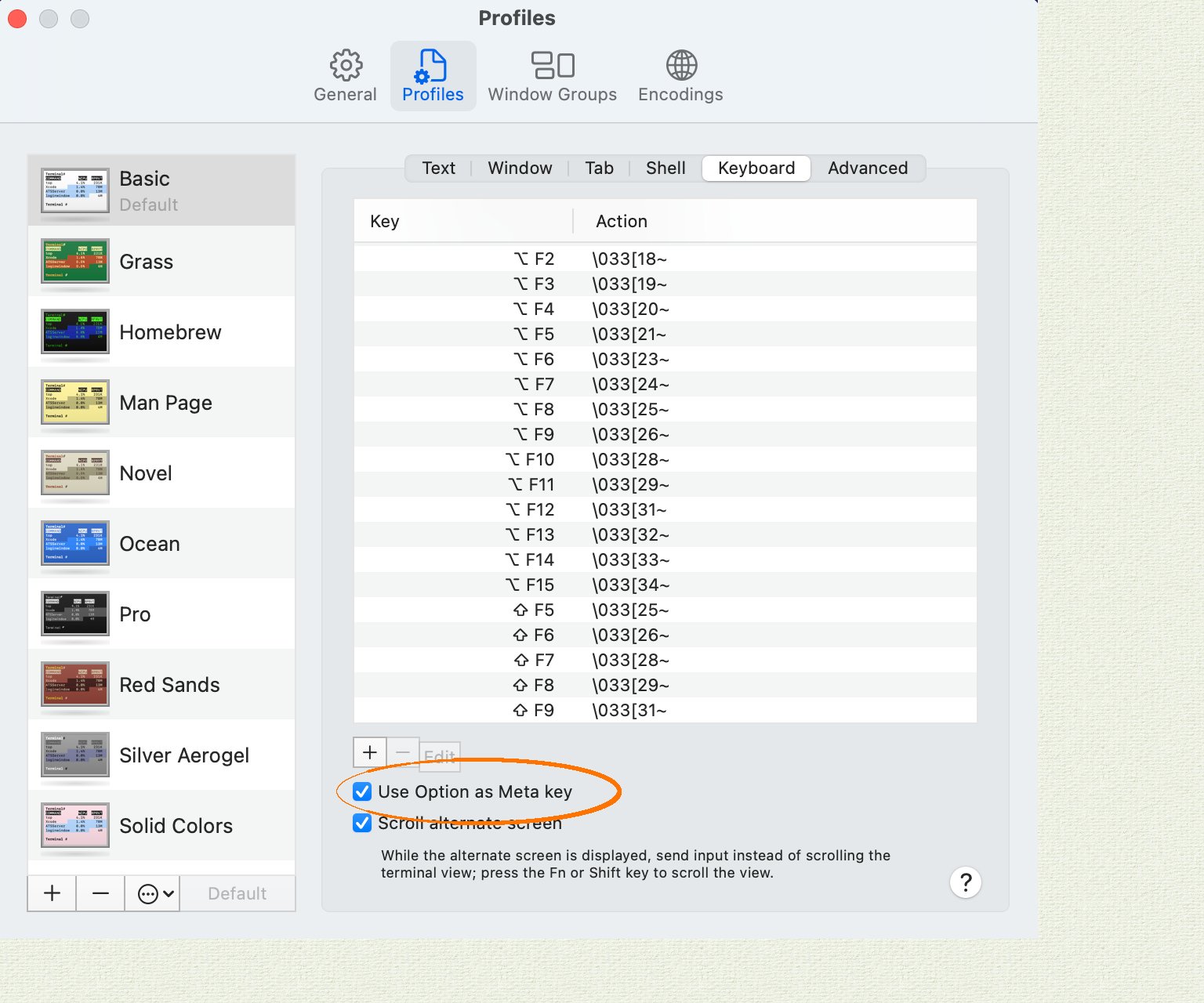
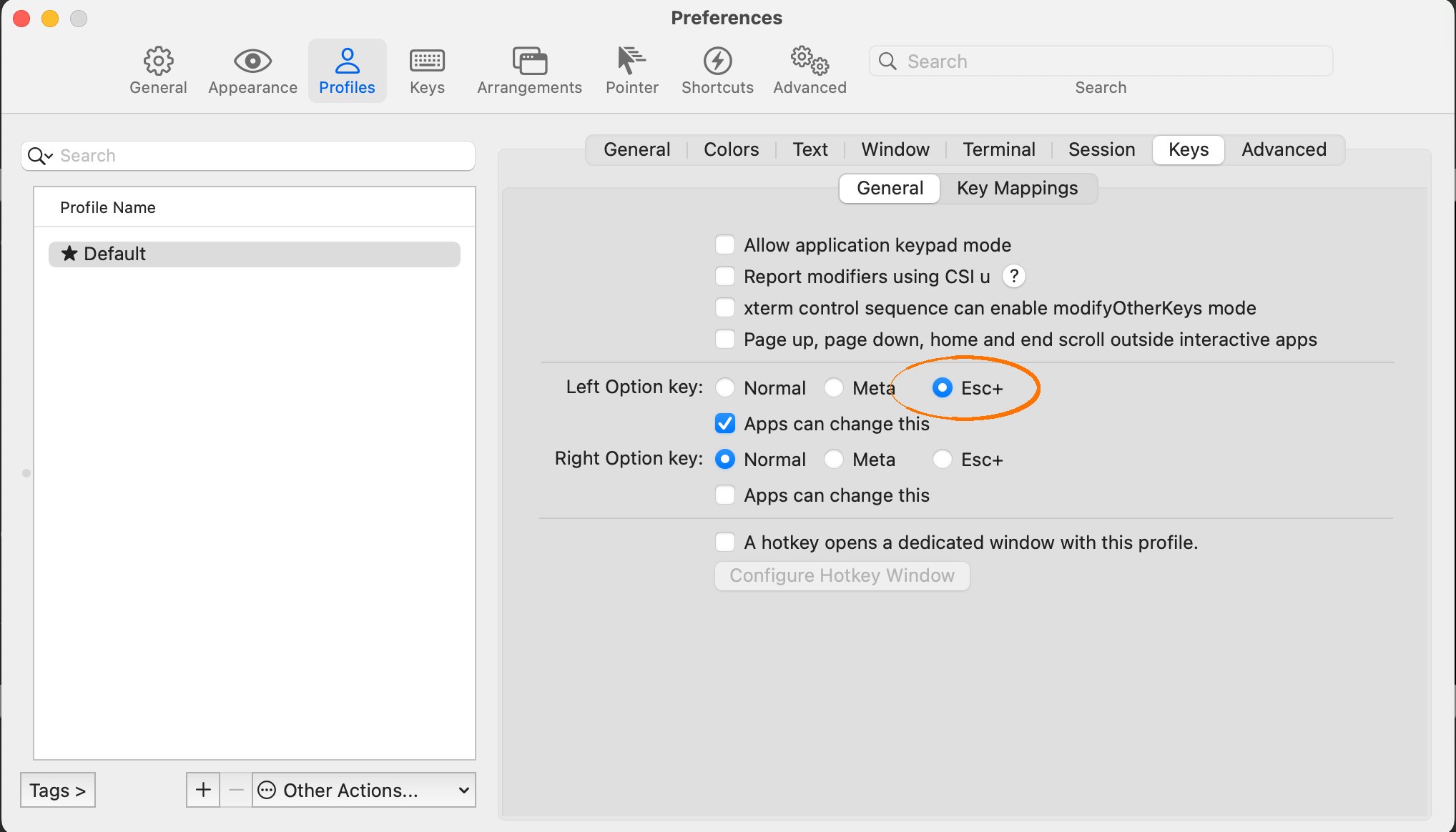
Note: macOS users may need to manually enable Alt-based shortcuts in their terminal configuration. See the section macOS terminal configuration below for details.
When searching for history entries, the following shortcuts are active:
Tab completion
The SQL client offers context-sensitive tab completion when entering commands. Use the Tab key on your keyboard when entering a command to initiate the command completion interface. You can then navigate to database objects, keywords, and functions using the arrow keys. Press the Tab key again to select the object, function, or keyword from the command completion interface and return to the console.macOS terminal configuration
In Apple Terminal:- Navigate to “Preferences”, then “Profiles”, then “Keyboard”.
- Enable the checkbox “Use Option as Meta Key”.
- Navigate to “Preferences”, then “Profiles”, then “Keys”.
- Select the radio button “Esc+” for the behavior of the Left Option Key.
Diagnostics reporting
By default,cockroach demo shares anonymous usage details with Cockroach Labs. To opt out, set the to false. You can also opt out by setting the environment variable to false before running cockroach demo.
Examples
In these examples, we demonstrate how to start a shell withcockroach demo. For more SQL shell features, see the .
Start a single-node demo cluster
cockroach demo loads the movr dataset in to the demo cluster:
Start a multi-node demo cluster
Load a sample dataset into a demo cluster
By default,cockroach demo loads the movr dataset in to the demo cluster. To pre-load any of the other available datasets using cockroach demo <dataset>. For example, to load the ycsb dataset:
Run load against a demo cluster
movr database preloaded and then inserts rows into each table in the movr database. You can monitor the workload progress on the .
When running a multi-node demo cluster, load is balanced across all nodes.
Execute SQL from the command-line against a demo cluster
Connect an additional SQL client to the demo cluster
In addition to the interactive SQL shell that opens when you runcockroach demo, you can use the connection parameters in the welcome text to connect additional SQL clients to the cluster.
-
Use
\demo lsto list the connection parameters for each node in the demo cluster: -
Open a new terminal and run with the
--urlflag set to thesqlconnection URL of the node to which you want to connect:You can also use this URL to connect an application to the demo cluster as thedemouser.
Start a multi-region demo cluster
movr database preloaded and region and zone localities set at the cluster level.
The
--global flag is an experimental feature of cockroach demo. The interface and output are subject to change.Add, shut down, and restart nodes in a multi-node demo cluster
In a multi-node demo cluster, you can use\demo shell commands to add, shut down, restart, decommission, and recommission individual nodes.
This feature is in and subject to change. To share feedback and/or issues, contact Support.
cockroach demo does not support the \demo add and \demo shutdown commands in demo clusters started with the --global flag.Try your own scenario
In addition to using one of the pre-loaded dataset, you can create your own database (e.g., ), or use the emptydefaultdb database (e.g., ) to test our your own scenario involving any CockroachDB SQL features you are interested in.