

cockroach-sql command is a client for executing SQL statements from an interactive shell or directly from the command line. To use this client, run cockroach-sql as described below.
cockroach-sql is functionally equivalent to the .cockroach-sql when used non-interactively is part of a stable interface, and can be used programmatically, with the exception of informational output lines that begin with the hash symbol (#). Informational output can change from release to release, and should not be used programmatically.
Install cockroach-sql
- Mac
- Linux
- Windows
- Visit and download the SQL Shell binary for CockroachDB.
-
Follow the instructions to on your local system. The resulting
cockroachbinary supports onlycockroach sqlsubcommands.
Before you begin
- The logging in must be
LOGINorSQLLOGIN, which are granted by default. If the user has been set to use theNOLOGINrole or theNOSQLLOGIN(or the legacyNOSQLLOGINrole option), the user cannot log in using the SQL CLI with any authentication method. - macOS users only: By default, macOS-based terminals do not enable handling of the Alt key modifier. This prevents access to many keyboard shortcuts in the unix shell and
cockroach sql. See the section macOS terminal configuration below for details.
Synopsis
Start the interactive SQL shell:Flags
Thesql command supports the following types of flags:
General
- To start an interactive SQL shell, run
cockroach-sqlwith all appropriate connection flags or use just the--urlflag, which includes . - To execute SQL statements from the command line, use the
--executeflag.
Client connection
See for more details.
Logging
By default, this command logs messages tostderr. This includes events with WARNING and higher.
If you need to troubleshoot this command’s behavior, you can .
Session and output types
cockroach-sql exhibits different behaviors depending on whether or not the session is interactive and/or whether or not the session outputs on a terminal.
- A session is interactive when
cockroach-sqlis invoked without the-eor-fflag, and the input is a terminal. In such cases:- The
errexitoption defaults tofalse. - The
check_syntaxoption defaults totrueif supported by the CockroachDB server (this is checked when the shell starts up). - Ctrl+C at the prompt will only terminate the shell if no other input was entered on the same line already.
- The shell will attempt to set the
safe_updatestotrueon the server. - The shell continues to read input after the last command entered.
- The
- A session outputs on a terminal when output is not redirected to a file. In such cases:
- The
--formatflag and its correspondingdisplay_formatoption default totable. These default totsvotherwise. - The
show_timesoption defaults totrue.
- The
cockroach-sql also activates the interactive prompt with a line editor that can be used to modify the current line of input. Also, command history becomes active.
SQL shell
Welcome message
When the SQL shell connects (or reconnects) to a CockroachDB node, it prints a welcome text with some tips and CockroachDB version and cluster details:- When the client and server versions of CockroachDB are the same, the shell prints the
Server versionfollowed by(same version as client). - When the client and server versions are different, the shell prints both the
Client versionandServer version. In this case, you may want to of earlier client or server versions. - Since every CockroachDB cluster has a unique ID, you can use the
Cluster IDfield to verify that your client is always connecting to the correct cluster.
Commands
The following commands can be used within the interactive SQL shell:Patterns
Commands use the SQL for string pattern matching, not POSIX regular expressions. For example to list all schemas that begin with the letter “p” you’d use the following pattern:Client-side options
- To view option descriptions and how they are currently set, use
\setwithout any options. - To enable or disable an option, use
\set <option> <value>or\unset <option> <value>. You can also use the form<option=<value. - If an option accepts a boolean value:
\set <option>without<valueis equivalent to\set <option> true, and\unset <option>without<valueis equivalent to\set <option> false.on,yes, and1are aliases fortrue, andoff,no, and0are aliases forfalse.
Customizing the prompt
The\set prompt1 option allows you to customize the interactive prompt in the SQL shell. Use the following prompt variables to set a custom prompt.
For example, to change the prompt to just the user, host, and database:
Help
Within the SQL shell, you can get interactive help about statements and functions:Examples
Shortcuts
Note: macOS users may need to manually enable Alt-based shortcuts in their terminal configuration. See the section macOS terminal configuration below for details.
When searching for history entries, the following shortcuts are active:
Tab completion
The SQL client offers context-sensitive tab completion when entering commands. Use the Tab key on your keyboard when entering a command to initiate the command completion interface. You can then navigate to database objects, keywords, and functions using the arrow keys. Press the Tab key again to select the object, function, or keyword from the command completion interface and return to the console.macOS terminal configuration
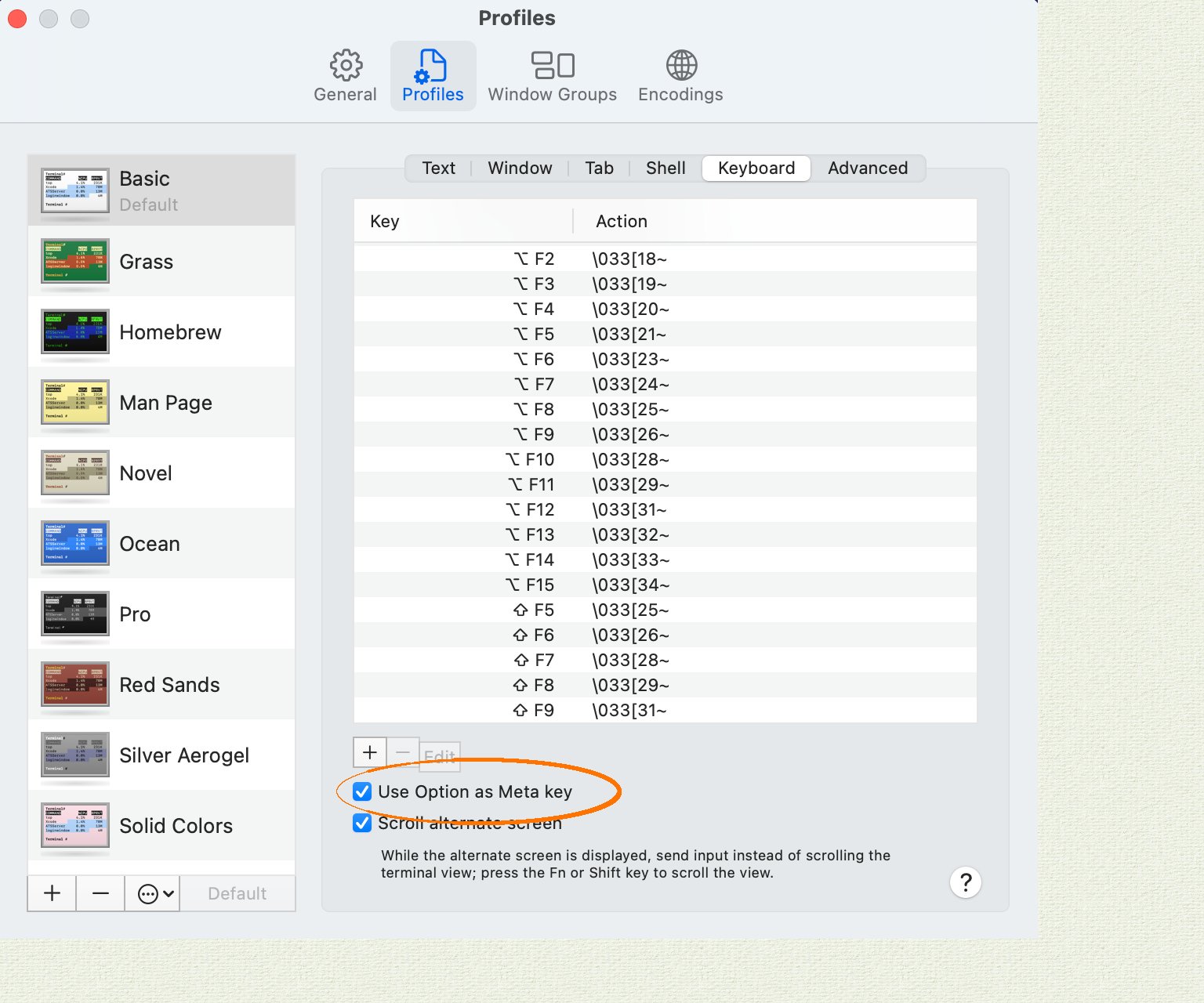
In Apple Terminal:- Navigate to “Preferences”, then “Profiles”, then “Keyboard”.
- Enable the checkbox “Use Option as Meta Key”.
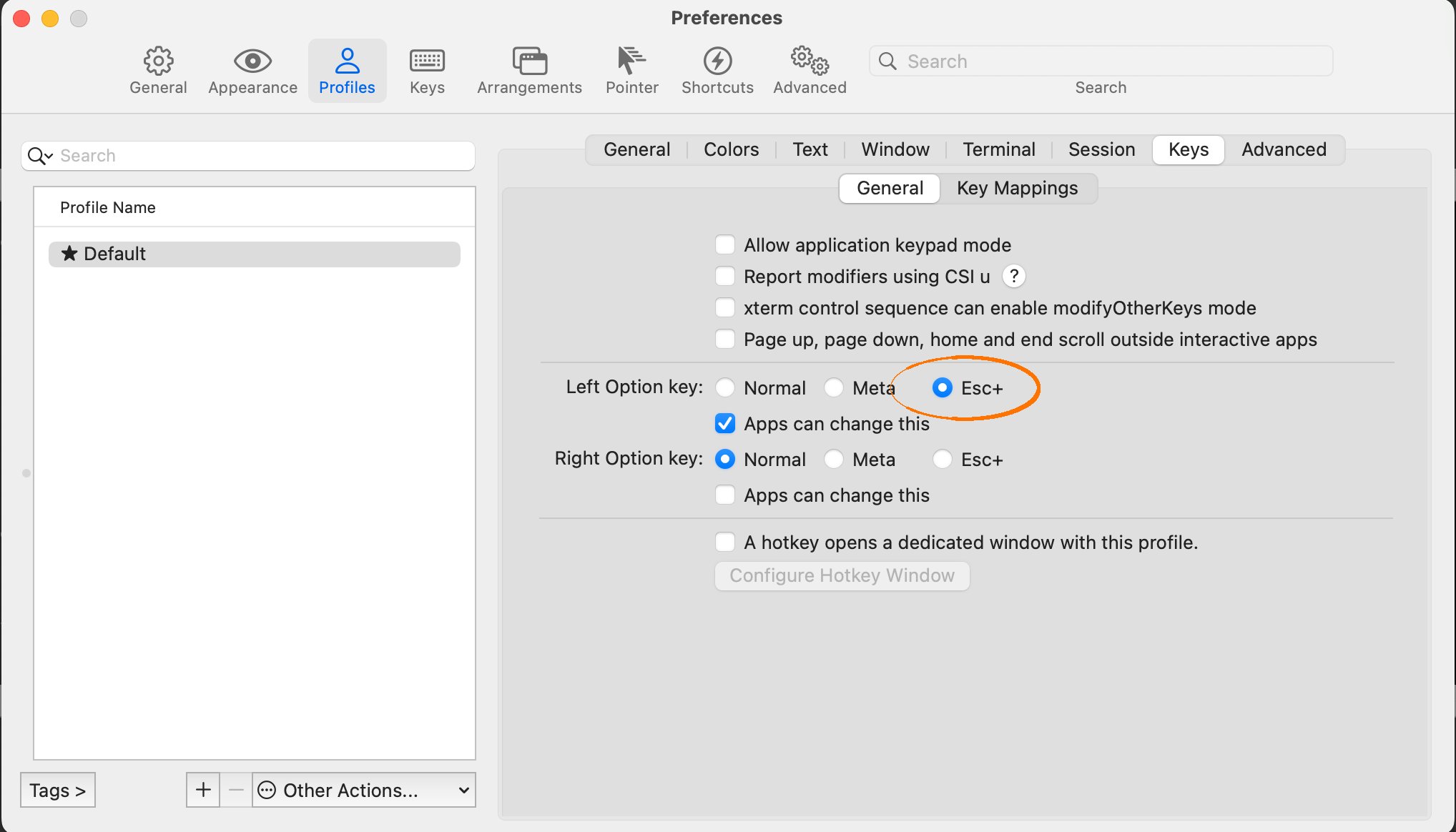
- Navigate to “Preferences”, then “Profiles”, then “Keys”.
- Select the radio button “Esc+” for the behavior of the Left Option Key.
Error messages and SQLSTATE codes
When CockroachDB encounters a SQL error, it returns the following information to the client (whether cockroach-sql or another client application):
- An error message, prefixed with the “Severity” field of the PostgreSQL wire protocol. For example,
ERROR: insert on table "shipments" violates foreign key constraint "fk_customers". - A 5-digit
SQLSTATEerror code as defined by the SQL standard. For example,SQLSTATE: 23503.
SQLSTATE code as described above.
SQLSTATE code in particular can be helpful in the following ways:
- It is a standard SQL error code that you can look up in documentation and search for on the web. For any given error state, CockroachDB tries to produce the same
SQLSTATEcode as PostgreSQL. - If you are developing automation that uses the CockroachDB SQL shell, it is more reliable to check for
SQLSTATEvalues than for error message strings, which are likely to change.
Examples
Start a SQL shell
In these examples, we connect a SQL shell to a secure cluster.Execute SQL statement within the SQL shell
This example assumes that we have already started the SQL shell (see examples above).Execute SQL statements from the command line
In these examples, we use the--execute flag to execute statements from the command line:
echo command to execute statements from the command line:
Control how table rows are printed
In these examples, we show tables and special characters printed in various formats. When the standard output is a terminal,--format defaults to table and tables are printed with ASCII art and special characters are not escaped for easy human consumption:
--format to another format (e.g., tsv or html):
--format defaults to tsv:
--format to another format (e.g., table):
Show borders around the statement output within the SQL shell
To display outside and inside borders in the statement output, set theborder SQL shell option to 3.
Make the output of SHOW statements selectable
To make it possible to select from the output of SHOW statements, set --format to raw:
--format is not set to raw, you can use the display_format SQL shell option to change the output format within the interactive session:
Execute SQL statements from a file
In this example, we show and then execute the contents of a file containing SQL statements.Run external commands from the SQL shell
In this example, we use\! to look at the rows in a CSV file before creating a table and then using \| to insert those rows into the table.
This example works only if the values in the CSV file are numbers. For values in other formats, use an online CSV-to-SQL converter or make your own import program.
\| to programmatically insert values.
Allow potentially unsafe SQL statements
The--safe-updates flag defaults to true. This prevents SQL statements that may have broad, undesired side effects. For example, by default, we cannot use DELETE without a WHERE clause to delete all rows from a table:
--safe-updates=false:
Reveal the SQL statements sent implicitly by the command-line utility
In this example, we use the--execute flag to execute statements from the command line and the --echo-sql flag to reveal SQL statements sent implicitly:
echo shell option to reveal SQL statements sent implicitly:
Repeat a SQL statement
Repeating SQL queries on a table can be useful for monitoring purposes. With the--watch flag, you can repeat the statements specified with a --execute or -e flag periodically, until a SQL error occurs or the process is terminated.
For example, if you want to monitor the number of queries running on the current node, you can use cockroach-sql with the --watch flag to query the node’s crdb_internal.node_statement_statistics table for the query count:
Connect to a cluster listening for Unix domain socket connections
To connect to a cluster that is running on the same machine as your client and is listening for Unix domain socket connections, with the--url connection parameter.
For example, suppose you start a single-node cluster with the following command: