

Advanced cluster architecture
The following diagram shows the internal architecture and network flow of a CockroachDB Advanced cluster: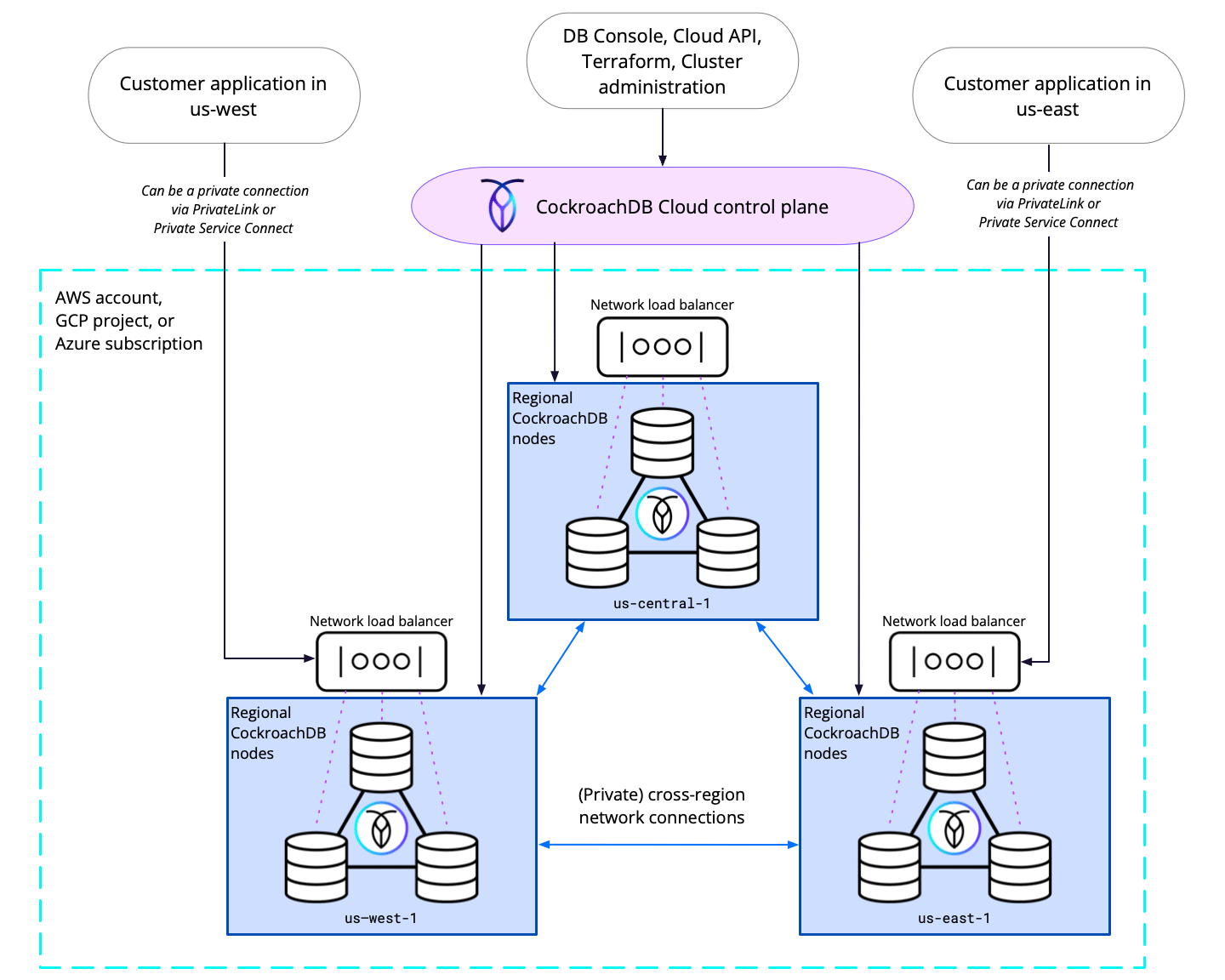
- Control operations manage the CockroachDB cluster as a whole. These requests are handled by the CockroachDB Cloud control plane which communicates directly with cluster nodes as needed. These connections include access to the Cloud Console, DB Console, , , and other cluster management tools.
- Data operations involve connections between data applications and your underlying CockroachDB nodes, including SQL queries and responses. Each region has a network load balancer (NLB) that handles and distributes requests across CockroachDB nodes within the region. Advanced clusters can utilize across the cloud to limit the amount of network traffic that is sent over the public Internet.
Cluster topology
Single-region clusters
For single-region production deployments, Cockroach Labs recommends a minimum of 3 nodes. The number of nodes you choose also affects your storage capacity and performance. See the Example for more information. Some of a CockroachDB Advanced cluster’s provisioned memory capacity is used for system overhead factors such as filesystem cache and sidecars, so the full amount of memory may not be available to the cluster’s workloads. CockroachDB Advanced clusters use three Availability Zones (AZs). For balanced data distribution and best performance, we recommend using a number of nodes that is a multiple of 3 (for example, 3, 6, or 9 nodes per region). You cannot scale a multi-node cluster down to a single-node cluster. If you need to scale down to a single-node cluster, your cluster and it into a new single-node cluster.Multi-region clusters
Multi-region CockroachDB Advanced clusters must contain at least three regions to ensure that data replicated across regions can survive the loss of one region. For example, this applies to internal system data that is important for overall cluster operations as well as tables with the table locality or the table locality and . Each region of a multi-region cluster must contain at least 3 nodes to ensure that data located entirely in a region can survive the loss of one node in that region. For example, this applies to tables with the table locality. For best performance and stability, we recommend you use the same number of nodes in each region of your cluster. You can configure a maximum of 9 regions per cluster through the Console. If you need to add more regions, contact your Cockroach Labs account team.Cluster sizing and scaling
A cluster’s number of nodes and node capacity together determine the node’s total compute and storage capacity. When considering your cluster’s scale, we recommend that you start by planning the compute requirements per node. If a workload requires more than 16 vCPUs per node, consider adding more nodes. For example, if a 3-node cluster with 8 vCPUs per node is not adequate for your workload, consider scaling up to 16 vCPUs before adding a fourth node. For most production applications, we recommend at minimum 8 vCPUs per node.Cockroach Labs does not provide support for clusters with only 2 vCPUs per node.
Storage capacity
When selecting your storage capacity, consider the following factors:
For more details about disk performance, refer to:
- AWS: Amazon EBS volume types
- Azure: Virtual machine and disk performance
- GCP: Configure disks to meet performance requirements
Example
Let’s say you want to create a cluster to connect with an application that is running on the Google Cloud Platform in theus-east1 region, and that the application requires 2000 transactions per second.
Suppose the raw data amount you expect to store without replication is 500 GiB. At 40% compression, you can expect a savings of 200 GiB, making the amount of data you need to store is 300 GiB.
Assume a storage buffer of 50% to account for overhead and data growth. The net raw data amount you need to store is now 450 GiB.
With the default replication factor of 3, the total amount of data stored is (3 * 450 GiB) = 1350 GiB.
To determine the number of nodes and the hardware configuration to store 1350 GiB of data, refer to the table in . One way to reach a 1350 GiB storage capacity is 3 nodes with 480 GiB per node, which gives you a capacity of (3*480 GiB) = 1440 GiB.
To meet your performance requirement of 2000 TPS, consider a configuration of 3 nodes with 4 vCPUs per node. This configuration has (3*4 vCPUs) = 12 vCPUs. Each vCPU can handle around 1000 TPS, so this configuration provides 12000 TPS, which exceeds your performance requirements.
Your final configuration is as follows: