

- Databases
- Tables
- Rows
- Indexes
- All data in the cluster, including internal system data ( via the default replication zone )
- How many copies of each range to spread through the cluster.
- Which constraints are applied to which data, e.g., “table X’s data can only be stored in the German availability zones”.
- The maximum size of ranges (how big ranges get before they are split).
- How long old data is kept before being garbage collected.
- Where you would like the leaseholders for certain ranges to be located, e.g., “for ranges that are already constrained to have at least one replica in
region=us-west, also try to put their leaseholders inregion=us-west”.
ALTER... CONFIGURE ZONE statement to manage them. CONFIGURE ZONE is a subcommand of the , , , , and statements.
For instructions showing how to troubleshoot replication zones that may be misconfigured, see .
To configure replication zones, a user must be a member of the or have been granted or privileges. To configure
system objects, the user must be a member of the admin role.Overview
Every in the cluster is part of a replication zone. Each range’s zone configuration is taken into account as ranges are rebalanced across the cluster to ensure that any constraints are honored. When a cluster starts, there are two categories of replication zone:- Pre-configured replication zones that apply to internal system data.
- A single default replication zone that applies to the rest of the cluster.
Replication zone levels
There are five replication zone levels for in a cluster, listed from least to most granular:For system data
In addition, CockroachDB stores internal in what are called system ranges. There are two replication zone levels for this internal system data, listed from least to most granular:Level priorities
When replicating data, whether table or system, CockroachDB always uses the most granular replication zone available. For example, for a piece of user data:- If there’s a replication zone for the row (a.k.a. ), CockroachDB uses it.
- If there’s no applicable row replication zone and the row is from an index, CockroachDB uses the index replication zone.
- If the row isn’t from a index or there is no applicable index replication zone, CockroachDB uses the table replication zone.
- If there’s no applicable table replication zone, CockroachDB uses the database replication zone.
- If there’s no applicable database replication zone, CockroachDB uses the
defaultcluster-wide replication zone.
How zone config inheritance works
As discussed previously, CockroachDB always uses the most granular replication zone available for each schema object (database, table, etc.). More-specific settings applied to schema objects at lower levels of the inheritance tree will always override the settings of objects above them in the tree. All configurations will therefore be modified versions of the , which acts as the root of the tree. This means that in practice, any changes to a specific schema object’s zone configurations are by definition user-initiated, either via or manual changes. Because each zone config inherits all of its initial values from its parent object, it only stores the values that differ from its parent. Any fields that are unset will be looked up in the parent object’s zone configuration. This continues recursively up the inheritance hierarchy all the way to thedefault zone config. In practice, most values are cached for performance.
For more information, see the following subsections:
- The zone config inheritance hierarchy
- Zone config inheritance - example SQL session
- Why manual zone config management is not recommended
The zone config inheritance hierarchy
The hierarchy of inheritance for zone configs can be visualized using the following outline-style diagram, in which each level of indentation denotes an inheritance relationship. The only exception to this simple inheritance relationship is that due to a known limitation, sub-partitions do not inherit their values from their parent partitions. Instead, sub-partitions inherit their values from the parent table.default range).
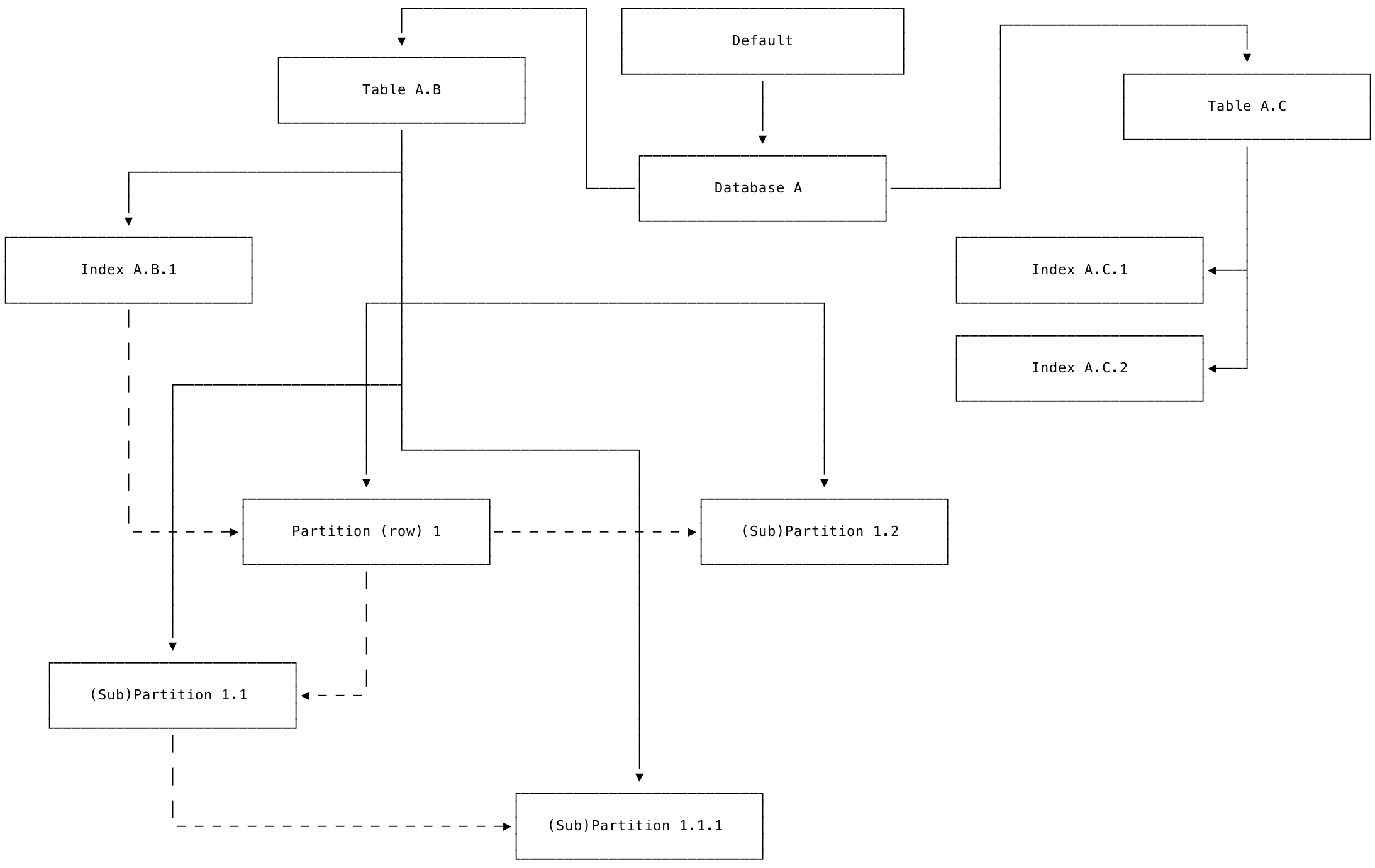
The following diagram presents the same set of schema objects as the previous outline-style diagram, but using boxes and lines joined with arrows that represent the “top-down” view.
Each box represents a schema object in the zone configuration inheritance hierarchy. Each solid line ends in an arrow that points from a parent object to its child object, which will inherit the parent’s values unless those values are changed at the child level. The dotted lines between partitions and sub-partitions represent the known limitation mentioned previously that sub-partitions do not inherit their values from their parent partitions. Instead, sub-partitions inherit their values from the parent table.
Zone config inheritance - example SQL session
You can verify the inheritance behavior described previously in a SQL session. Start a . Create a sample database and table:num_replicas:
test.kv inherits the value of num_replicas from its parent database. You should see output like the following:
num_replicas field on the table to a different value than its parent database:
num_replicas set by the parent test database. From this point forward, until you discard the changed settings at the table level, the table will no longer inherit those changed values from its parent database.
In other words, the value of this field on the table’s zone config has diverged from its parent database, and all state on this field must be managed manually going forward. This divergence in state between parent and child objects, and the necessity to manage it manually once it diverges, is the reason why manual zone config management is not recommended.
Next, check the zone config for the table test.kv, and verify that its value of num_replicas has diverged:
num_replicas for the test database again. Once again, choose a different value than its child table test.kv (which has num_replicas = 5).
num_replicas field on the kv table is no longer inherited from its parent database test.
num_replicas in kv to match the value of its parent test, further changes to test will still not be propagated downward to test.kv. Confirm this by running the following statements:
num_replicas field in the kv table’s zone config.
However, you can confirm that other fields on test.kv which have not been modified from their default values still inherit from the parent database test as expected by changing the value of gc.ttlseconds on the test database.
Change the value of gc.ttlseconds on the test database:
gc.ttlseconds from the test database is inherited by the test.kv table as expected:
test.kv table to a state where it goes back to inheriting all of its values from its parent database test, use the statement:
Why manual zone config management is not recommended
Reasons to avoid modifying zone configurations manually using include:- It is difficult to do proper auditing and change management of manually altered zone configurations.
- It is easy to introduce logic errors (a.k.a., bugs) and end up in a state where your replication is not behaving as it is “supposed to”.
- Manual zone config modifications must be entirely maintained by the user with no help from the system. Such manual changes must be fully overwritten on each configuration change in order to take effect; this introduces another avenue for error.
- If you set some field F at the database level, the updated value of that field will propagate down the inheritance tree to all of the database’s child tables.
- However, if you then edit that same field F on a child table, the table will no longer inherit its value of F from its parent database. Instead, the field F across these two schema objects is now in a diverged state. This means that any changes to the value of F at the database level no longer propagate downward to the child table, which has its own value of F.
- In other words, once you touch any schema object O to manually edit some field F, a “dirty bit” is set on O.F, and CockroachDB will no longer modify O.F without user intervention. Instead, you are now responsible for managing the state of O.F via direct calls to anytime something needs to change in your configuration.
Manage replication zones
Use theALTER... CONFIGURE ZONE statement to add, modify, reset, and remove replication zones.
Replication zone variables
Use theALTER... CONFIGURE ZONE to set a replication zone:
If a value is not set, new zone configurations will inherit their values from their parent zone (e.g., a partition zone inherits from the table zone), which is not necessarily
default.If a variable is set to COPY FROM PARENT (e.g., range_max_bytes = COPY FROM PARENT), the variable will copy its value from its parent . The COPY FROM PARENT value is a convenient shortcut to use so you do not have to look up the parent’s current value. For example, the range_max_bytes and range_min_bytes variables must be set together, so when editing one value, you can use COPY FROM PARENT for the other. Note that if the variable in the parent replication zone is changed after the child replication zone is copied, the change will not be reflected in the child zone.Replication constraints
The location of replicas, both when they are first added and when they are rebalanced to maintain cluster equilibrium, is based on the interplay between descriptive attributes assigned to nodes and constraints set in zone configurations.Descriptive attributes assigned to nodes
When starting a node with the command, you can assign the following types of descriptive attributes:Types of constraints
The node-level and store-level descriptive attributes mentioned above can be used as the following types of constraints in replication zones to influence the location of replicas. However, note the following general guidance:- When locality is the only consideration for replication, it’s recommended to set locality on nodes without specifying any constraints in zone configurations. In the absence of constraints, CockroachDB attempts to spread replicas evenly across the cluster based on locality.
- Required and prohibited constraints are useful in special situations where, for example, data must or must not be stored in a specific country or on a specific type of machine.
- Avoid conflicting constraints. CockroachDB returns an error if you:
- Redefine a required constraint key within the same
constraintsdefinition on all replicas. For example,constraints = '[+region=west, +region=east]'will result in an error. - Define a required and prohibited definition for the same key-value pair. For example,
constraints = '[-region=west, +region=west]'will result in an error.
- Redefine a required constraint key within the same
Scope of constraints
Constraints can be specified such that they apply to all replicas in a zone or such that different constraints apply to different replicas, meaning you can effectively pick the exact location of each replica.Node/replica recommendations
See recommendations for production deployments.Troubleshooting zone constraint violations
For instructions showing how to troubleshoot replication zones that may be misconfigured, see .View replication zones
Use theSHOW ZONE CONFIGURATIONS statement to view details about existing replication zones.
You can also use the statement to view the zone constraints on existing table partitions, or to view zone configurations for a table.
Basic examples
Setup
The following examples use MovR, a fictional vehicle-sharing application, to demonstrate CockroachDB SQL statements. For more information about the MovR example application and dataset, see . To follow along, run with the--geo-partitioned-replicas flag. This command opens an interactive SQL shell to a temporary, 9-node in-memory cluster with the movr database.
View all replication zones
View the default replication zone
Edit the default replication zone
To edit the default replication zone, use theALTER RANGE... CONFIGURE ZONE statement to define the values you want to change (other values will remain the same):
Create a replication zone for a system range
In addition to the databases and tables that are visible via the SQL interface, CockroachDB stores internal data in what are called system ranges. CockroachDB comes with pre-configured replication zones for some of these ranges:Use caution when editing replication zones for system ranges, as they could cause some (or all) parts of your cluster to stop working.
Create a replication zone for a database
To control replication for a specific database, use theALTER DATABASE... CONFIGURE ZONE statement to define the relevant values (other values will be inherited from the parent zone):
Create a replication zone for a table
To control replication for a specific table, use theALTER TABLE... CONFIGURE ZONE statement to define the relevant values (other values will be inherited from the parent zone):
Create a replication zone for a secondary index
The on a table will automatically use the replication zone for the table. You can also add distinct replication zones for secondary indexes. To control replication for a specific secondary index, use theALTER INDEX... CONFIGURE ZONE statement to define the relevant values (other values will be inherited from the parent zone).
Create a replication zone for a partition
Once , to control replication for a partition, useALTER PARTITION <partition> OF INDEX <table@index> CONFIGURE ZONE:
@* syntax to save several steps:
SHOW ZONE CONFIGURATION FROM PARTITION <partition> OF INDEX <table@index>:
Reset a replication zone
Remove a replication zone
When you discard a zone configuration, the objects it was applied to will then inherit a configuration from an object “the next level up”; e.g., if the object whose configuration is being discarded is a table, it will use its parent database’s configuration.You cannot
DISCARD any zone configurations on multi-region tables, indexes, or partitions if the multi-region abstractions created the zone configuration.Constrain leaseholders to specific availability zones
In addition to , you may also specify preferences for where the range’s leaseholders should be placed. This can result in increased performance in some scenarios. The statement below requires that the cluster try to place the ranges’ leaseholders in zoneus-east1; if that is not possible, it will try to place them in zone us-west1.
For more information about how the lease_preferences field works, see its description in the section.
Scenario-based examples
Even replication across availability zones
Scenario:- You have 6 nodes across 3 availability zones, 2 nodes in each availability zone.
- You want data replicated 3 times, with replicas balanced evenly across all three availability zones.
-
Start each node with its availability zone location specified in the flag:
Availability zone 1:
Availability zone 2:Availability zone 3:
-
Initialize the cluster:
Per-replica constraints to specific availability zones
Scenario:- You have 5 nodes across 5 availability zones in 3 regions, 1 node in each availability zone.
- You want data replicated 3 times, with a quorum of replicas for a database holding West Coast data centered on the West Coast and a database for nation-wide data replicated across the entire country.
-
Start each node with its region and availability zone location specified in the flag:
Start the five nodes:
Initialize the cluster:
-
On any node, open the :
-
Create the database for the West Coast application:
-
Configure a replication zone for the database:
-
View the replication zone:
Two of the database’s three replicas will be put in
region=us-west1and its remaining replica will be put inregion=us-central1. This gives the application the resilience to survive the total failure of any one availability zone while providing low-latency reads and writes on the West Coast because a quorum of replicas are located there. - No configuration is needed for the nation-wide database. The cluster is configured to replicate data 3 times and spread them as widely as possible by default. Because the first key-value pair specified in each node’s locality is considered the most significant part of each node’s locality, spreading data as widely as possible means putting one replica in each of the three different regions.
Multiple applications writing to different databases
Scenario:- You have 2 independent applications connected to the same CockroachDB cluster, each application using a distinct database.
- You have 6 nodes across 2 availability zones, 3 nodes in each availability zone.
- You want the data for application 1 to be replicated 5 times, with replicas evenly balanced across both availability zones.
- You want the data for application 2 to be replicated 3 times, with all replicas in a single availability zone.
-
Start each node with its availability zone location specified in the flag:
Availability zone 1:
Availability zone 2:Initialize the cluster:
-
On any node, open the :
-
Create the database for application 1:
-
Configure a replication zone for the database used by application 1:
-
View the replication zone:
Nothing else is necessary for application 1’s data. Since all nodes specify their availability zone locality, the cluster will aim to balance the data in the database used by application 1 between availability zones 1 and 2.
-
Still in the SQL client, create a database for application 2:
-
Configure a replication zone for the database used by application 2:
-
View the replication zone:
The required constraint will force application 2’s data to be replicated only within the
us-2availability zone.
Stricter replication for a table and its secondary indexes
Scenario:- You have 7 nodes, 5 with SSD drives and 2 with HDD drives.
- You want data replicated 3 times by default.
- Speed and availability are important for a specific table and its indexes, which are queried very frequently, however, so you want the data in the table and secondary indexes to be replicated 5 times, preferably on nodes with SSD drives.
-
Start each node with
ssdorhddspecified as store attributes: 5 nodes with SSD storage:2 nodes with HDD storage:Initialize the cluster: -
On any node, open the :
-
Create a database and table:
-
Configure a replication zone for the table that must be replicated more strictly:
-
View the replication zone:
The secondary indexes on the table will use the table’s replication zone, so all data for the table will be replicated 5 times, and the required constraint will place the data on nodes with
ssddrives.
Tweaking the replication of system ranges
Scenario:- You have nodes spread across 7 availability zones.
- You want data replicated 5 times by default.
- For better performance, you want a copy of the meta ranges in all of the availability zones.
- To save disk space, you only want the internal timeseries data replicated 3 times by default.
-
Start each node with a different attribute:
Initialize the cluster:
-
On any node, open the :
-
Configure the default replication zone:
-
View the replication zone:
All data in the cluster will be replicated 5 times, including both SQL data and the internal system data.
-
Configure the
metareplication zone:Themetaaddressing ranges will be replicated such that one copy is in all 7 availability zones, while all other data will be replicated 5 times. -
Configure the
timeseriesreplication zone:The timeseries data will only be replicated 3 times without affecting the configuration of all other data.