> ## Documentation Index
> Fetch the complete documentation index at: https://cockroachlabs.mintlify.site/llms.txt
> Use this file to discover all available pages before exploring further.
# Node Shutdown
export const InternalLink = ({version, path = "", children, ...props}) => {
let detectedVersion = version || "stable";
if (typeof window !== 'undefined' && !version) {
const match = window.location.pathname.match(/\/docs\/([^/]+)/);
if (match) {
detectedVersion = match[1];
}
}
const normalizedPath = path.startsWith("/") ? path.slice(1) : path;
return
{children}
;
};
A node **shutdown** terminates the `cockroach` process on the node.
There are two ways to handle node shutdown:
* **Drain a node** to temporarily stop it when you plan restart it later, such as during cluster maintenance. When you drain a node:
* Clients are disconnected, and subsequent connection requests are sent to other nodes.
* The node's data store is preserved and will be reused as long as the node restarts in a short time. Otherwise, the node's data is moved to other nodes.
After the node is drained, you can manually terminate the `cockroach` process to perform maintenance, then restart the process for the node to rejoin the cluster. The `--shutdown` flag of `cockroach node drain` automatically terminates the `cockroach` process after draining completes. A node is also automatically drained when upgrading its major version. Draining a node is lightweight because it generates little node-to-node traffic across the cluster.
* **Decommission a node** to permanently remove it from the cluster, such as when scaling down the cluster or to replace the node due to hardware failure. During decommission:
* The node is drained automatically if you have not manually drained it.
* The node's data is moved off the node to other nodes. This replica rebalancing generates a large amount of node-to-node network traffic, so decommissioning a node is considered a heavyweight operation.
This page describes:
* The details of the [node shutdown sequence](#node-shutdown-sequence) from the point of view of the `cockroach` process on a CockroachDB node.
* How to [prepare for graceful shutdown](#prepare-for-graceful-shutdown) on CockroachDB self-hosted clusters by coordinating load balancer, client application server, process manager, and cluster settings.
* How to [perform node shutdown](#perform-node-shutdown) on CockroachDB self-hosted deployments by manually draining or decommissioning a node.
* How to handle node shutdown when CockroachDB is deployed using [Kubernetes](#decommissioning-and-draining-on-kubernetes) or in a [CockroachDB Advanced cluster](#decommissioning-and-draining-on-cockroachdb-advanced).
This guidance applies to primarily to manual deployments. For more details about graceful termination when CockroachDB is deployed using Kubernetes, refer to [Decommissioning and draining on Kubernetes](#decommissioning-and-draining-on-kubernetes). For more details about graceful termination in a CockroachDB Advanced cluster, refer to [Decommissioning and draining on CockroachDB Advanced](#decommissioning-and-draining-on-cockroachdb-advanced).
## Node shutdown sequence
When a node is temporarily stopped, the following stages occur in sequence:
#### Draining
An operator [initiates the draining process](#drain-the-node-and-terminate-the-node-process) on the node. Draining a node disconnects clients after active queries are completed, and transfers any range leases and Raft leaderships to other nodes, but does not move replicas or data off of the node.
When draining is complete, the node must be shut down prior to any maintenance. After a 60-second wait at minimum, you can send a `SIGTERM` signal to the `cockroach` process to shut it down. The `--shutdown` flag of `cockroach node drain` automatically terminates the `cockroach` process after draining completes.
After you perform the required maintenance, you can restart the `cockroach` process on the node for it to rejoin the cluster.
Do not terminate the `cockroach` process before all of the phases of draining are complete. Otherwise, you may experience latency spikes until the leases that were on that node have transitioned to other nodes. It is safe to terminate the `cockroach` process only after a node has completed the drain process. This is especially important in a containerized system, to allow all TCP connections to terminate gracefully. If necessary, adjust the [`server.shutdown.initial_wait`](#server-shutdown-initial_wait) and the termination grace period cluster settings and adjust your process manager or other deployment tooling to allow adequate time for the node to finish draining before it is terminated or restarted.
Node drain consists of the following consecutive phases:
1. **Unready phase:** The node's `/health?ready=1` endpoint returns an HTTP `503 Service Unavailable` response code, which causes load balancers and connection managers to reroute traffic to other nodes. This phase completes when the [fixed duration set by `server.shutdown.initial_wait`](#server-shutdown-initial_wait) is reached.
2. **SQL wait phase:** New SQL client connections are no longer permitted, and any remaining SQL client connections are allowed to close or time out. This phase completes either when all SQL client connections are closed or the [maximum duration set by `server.shutdown.connections.timeout`](#server-shutdown-connections-timeout) is reached.
3. **SQL drain phase:** All active transactions and statements for which the node is a gateway are allowed to complete, and CockroachDB closes the SQL client connections immediately afterward. After this phase completes, CockroachDB closes all remaining SQL client connections to the node. This phase completes either when all transactions have been processed or the [maximum duration set by `server.shutdown.transactions.timeout`](#server-shutdown-transactions-timeout) is reached.
4. **DistSQL drain phase**: All distributed statements initiated on other gateway nodes are allowed to complete, and DistSQL requests from other nodes are no longer accepted. This phase completes either when all transactions have been processed or the [maximum duration set by `server.shutdown.transactions.timeout`](#server-shutdown-transactions-timeout) is reached.
5. **Lease transfer phase:** The node's `is_draining` field is set to `true`, which removes the node as a candidate for replica rebalancing, lease transfers, and query planning. Any range leases or Raft leaderships must be transferred to other nodes. This phase completes when all range leases and Raft leaderships have been transferred.
When [draining manually](#drain-a-node-manually), if the above steps have not completed after [`server.shutdown.initial_wait`](#server-shutdown-initial_wait), node draining will stop and must be restarted manually to continue. For more information, see [Drain timeout](#drain-timeout).
At this point, it is safe to terminate the `cockroach` process manually or using your process manager or other deployment tooling (such as Kubernetes, Nomad, or Docker).
#### Process termination
After draining is complete:
* If the node was drained automatically because the `cockroach` process received a `SIGTERM` signal, the `cockroach` process is automatically terminated when draining is complete.
* If the node was drained manually because an operator issued a `cockroach node drain` command:
* If you pass the `--shutdown` flag to `cockroach node drain`, the `cockroach` process terminates automatically after draining completes.
* If the node's major version is being updated, the `cockroach` process terminates automatically after draining completes.
* Otherwise, the `cockroach` process must be terminated manually. A minimum of 60 seconds after draining is complete, send it a `SIGTERM` signal to terminate it. Refer to [Terminate the node process](#drain-the-node-and-terminate-the-node-process).
A node **process termination** stops the `cockroach` process on the node. The node will stop updating its liveness record.
If the node then stays offline for the duration set by [`server.time_until_store_dead`](#server-time_until_store_dead) (5 minutes by default), the cluster considers the node "dead" and starts to rebalance its range replicas onto other nodes.
If the node is brought back online, its remaining range replicas will determine whether or not they are still valid members of replica groups. If a range replica is still valid and any data in its range has changed, it will receive updates from another replica in the group. If a range replica is no longer valid, it will be removed from the node.
CockroachDB's node shutdown behavior does not match any of the [PostgreSQL server shutdown modes](https://www.postgresql.org/docs/current/server-shutdown.html).
## Prepare for graceful shutdown
Each of the [node shutdown steps](#node-shutdown-sequence) is performed in order, with each step commencing once the previous step has completed. However, because some steps can be interrupted, it's best to ensure that all steps complete gracefully.
Before you [perform node shutdown](#perform-node-shutdown), review the following prerequisites to graceful shutdown:
* Configure your [load balancer](#load-balancing) to monitor node health.
* Review and adjust [cluster settings](#cluster-settings) and [drain timeout](#drain-timeout) as needed for your deployment.
* Configure the [termination grace period](#termination-grace-period) and if necessary, adjust the configuration of your process manager, orchestration system, or deployment tooling accordingly.
### Load balancing
Your load balancer should use the `/health?ready=1` endpoint to actively monitor node health and direct SQL client connections away from nodes that are not ready to receive requests.
To handle node shutdown effectively, the load balancer must be given enough time by the [`server.shutdown.initial_wait` duration](#server-shutdown-initial_wait).
### Cluster settings
#### `server.shutdown.initial_wait`
Alias: `server.shutdown.drain_wait`
`server.shutdown.initial_wait` sets a **fixed** duration for the ["unready phase"](#draining) of node drain. Because a load balancer reroutes connections to non-draining nodes within this duration (`0s` by default), this setting should be coordinated with the load balancer settings.
Increase `server.shutdown.initial_wait` so that your load balancer is able to make adjustments before this phase times out. Because the drain process waits unconditionally for the `server.shutdown.initial_wait` duration, do not set this value too high.
For example, HAProxy uses the default settings `inter 2000 fall 3` when checking server health. This means that HAProxy considers a node to be down (and temporarily removes the server from the pool) after 3 unsuccessful health checks being run at intervals of 2000 milliseconds. To ensure HAProxy can run 3 consecutive checks before timeout, set `server.shutdown.initial_wait` to `8s` or greater:
```sql theme={"theme":{"light":"catppuccin-mocha","dark":"catppuccin-mocha"}}
SET CLUSTER SETTING server.shutdown.initial_wait = '8s';
```
#### `server.shutdown.connections.timeout`
Alias: `server.shutdown.connection_wait`
`server.shutdown.connections.timeout` sets the **maximum** duration for the ["connection phase"](#draining) of node drain. SQL client connections are allowed to close or time out within this duration (`0s` by default). This setting presents an option to gracefully close the connections before CockroachDB forcibly closes those that remain after the ["SQL drain phase"](#draining).
Change this setting **only** if you cannot tolerate connection errors during node drain and cannot configure the maximum lifetime of SQL client connections, which is usually configurable via a connection pool. Depending on your requirements:
* Lower the maximum lifetime of a SQL client connection in the pool. This will cause more frequent reconnections. Set `server.shutdown.connections.timeout` above this value.
* If you cannot tolerate more frequent reconnections, do not change the SQL client connection lifetime. Instead, use a longer `server.shutdown.connections.timeout`. This will cause a longer draining process.
#### `server.shutdown.transactions.timeout`
Alias: `server.shutdown.query_wait`
`server.shutdown.transactions.timeout` sets the **maximum** duration for the ["SQL drain phase"](#draining) and the **maximum** duration for the ["DistSQL drain phase"](#draining) of node drain. Active local and distributed queries must complete, in turn, within this duration (`10s` by default).
Ensure that `server.shutdown.transactions.timeout` is greater than:
* The longest possible transaction in the workload that is expected to complete successfully.
* The `sql.defaults.idle_in_transaction_session_timeout` cluster setting, which controls the duration a session is permitted to idle in a transaction before the session is terminated (`0s` by default).
* The `sql.defaults.statement_timeout` cluster setting, which controls the duration a query is permitted to run before it is canceled (`0s` by default).
`server.shutdown.transactions.timeout` defines the upper bound of the duration, meaning that node drain proceeds to the next phase as soon as the last open transaction completes.
If there are still open transactions on the draining node when the server closes its connections, you will encounter errors. You may need to adjust your application server's connection pool settings.
Use `ALTER ROLE ALL SET {sessionvar} = {val}` instead of the `sql.defaults.*` cluster settings. This allows you to set a default value for all users for any session variable that applies during login, making the `sql.defaults.*` cluster settings redundant.
#### `server.shutdown.lease_transfer_iteration.timeout`
Alias: `server.shutdown.lease_transfer_wait`
In the ["lease transfer phase"](#draining) of node drain, the server attempts to transfer all range leases and Raft leaderships from the draining node. `server.shutdown.lease_transfer_iteration.timeout` sets the maximum duration of each iteration of this attempt (`5s` by default). Because this phase does not exit until all transfers are completed, changing this value affects only the frequency at which drain progress messages are printed.
In most cases, the default value is suitable. Do **not** set `server.shutdown.lease_transfer_iteration.timeout` to a value lower than `5s`. In this case, leases can fail to transfer and node drain will not be able to complete.
The sum of [`server.shutdown.initial_wait`](#server-shutdown-connections-timeout), [`server.shutdown.connections.timeout`](#server-shutdown-connections-timeout), [`server.shutdown.transactions.timeout`](#server-shutdown-transactions-timeout) times two, and [`server.shutdown.lease_transfer_iteration.timeout`](#server-shutdown-lease_transfer_iteration-timeout) should not be greater than the configured [drain timeout](#drain-timeout).
#### `kv.allocator.recovery_store_selector`
When a node is dead or decommissioning and all of its range replicas are being up-replicated onto other nodes, this setting controls the algorithm used to select the new node for each range replica. Regardless of the algorithm, a node must satisfy all available constraints for replica placement and survivability to be eligible.
Possible values are `good` (the default) and `best`. When set to `good`, a random node is selected from the list of all eligible nodes. When set to `best`, a node with a low range count is preferred.
#### `server.time_until_store_dead`
`server.time_until_store_dead` sets the duration after which a node is considered "dead" and its data is rebalanced to other nodes (`5m0s` by default). In the node shutdown sequence, this follows [process termination](#node-shutdown-sequence).
Before temporarily stopping nodes for planned maintenance (e.g., upgrading system software), if you expect any nodes to be offline for longer than 5 minutes, you can prevent the cluster from unnecessarily moving data off the nodes by increasing `server.time_until_store_dead` to match the estimated maintenance window:
During this window, the cluster has reduced ability to tolerate another node failure. Be aware that increasing this value therefore reduces fault tolerance.
```sql theme={"theme":{"light":"catppuccin-mocha","dark":"catppuccin-mocha"}}
SET CLUSTER SETTING server.time_until_store_dead = '15m0s';
```
After completing the maintenance work and restarting the nodes, you would then change the setting back to its default:
```sql theme={"theme":{"light":"catppuccin-mocha","dark":"catppuccin-mocha"}}
RESET CLUSTER SETTING server.time_until_store_dead;
```
### Drain timeout
When [draining manually](#drain-a-node-manually) with `cockroach node drain`, all [drain phases](#draining) must be completed within the duration of `--drain-wait` (`10m` by default) or the drain will stop. This can be observed with an `ERROR: drain timeout` message in the terminal output. To continue the drain, re-initiate the command.
A very long drain may indicate an anomaly, and you should manually inspect the server to determine what blocks the drain.
CockroachDB automatically increases the verbosity of logging when it detects a stall in the range lease transfer stage of `node drain`. Messages logged during such a stall include the time an attempt occurred, the total duration stalled waiting for the transfer attempt to complete, and the lease that is being transferred.
`--drain-wait` sets the timeout for [all draining phases](#draining) and is **not** related to the `server.shutdown.initial_wait` cluster setting, which configures the "unready phase" of draining. The value of `--drain-wait` should be greater than the sum of [`server.shutdown.initial_wait`](#server-shutdown-connections-timeout), [`server.shutdown.connections.timeout`](#server-shutdown-connections-timeout), [`server.shutdown.transactions.timeout`](#server-shutdown-transactions-timeout) times two, and [`server.shutdown.lease_transfer_iteration.timeout`](#server-shutdown-lease_transfer_iteration-timeout).
### Termination grace period
On production deployments, a process manager or orchestration system can disrupt graceful node shutdown if its termination grace period is too short.
Do not terminate the `cockroach` process before all of the phases of draining are complete. Otherwise, you may experience latency spikes until the leases that were on that node have transitioned to other nodes. It is safe to terminate the `cockroach` process only after a node has completed the drain process. This is especially important in a containerized system, to allow all TCP connections to terminate gracefully.
If the `cockroach` process has not terminated at the end of the grace period, a `SIGKILL` signal is sent to perform a "hard" shutdown that bypasses CockroachDB's [node shutdown logic](#node-shutdown-sequence) and forcibly terminates the process.
* When using [`systemd`](https://www.freedesktop.org/wiki/Software/systemd/) to run CockroachDB as a service, set the termination grace period with [`TimeoutStopSec`](https://www.freedesktop.org/software/systemd/man/systemd.service.html#TimeoutStopSec=) setting in the service file.
* When using Kubernetes to orchestrate CockroachDB, refer to [Decommissioning and draining on Kubernetes](#decommissioning-and-draining-on-kubernetes).
To determine an appropriate termination grace period:
* [Run `cockroach node drain` with `--drain-wait`](#drain-a-node-manually) and observe the amount of time it takes node drain to successfully complete.
* In general, we recommend setting the termination grace period to the sum of all `server.shutdown.*` settings. If a node requires more time than this to drain successfully, this may indicate a technical issue such as inadequate cluster sizing.
* Increasing the termination grace period does not increase the duration of a node shutdown. However, the termination grace period should not be excessively long, as this can mask an underlying hardware or software issue that is causing node shutdown to become "stuck".
## Perform node shutdown
After [preparing for graceful shutdown](#prepare-for-graceful-shutdown), do the following to temporarily stop a node. This both drains the node and terminates the `cockroach` process.
This guidance applies to manual deployments. In a Kubernetes deployment or a CockroachDB Advanced cluster, terminating the `cockroach` process is handled through Kubernetes. Refer to [Decommissioning and draining on Kubernetes](#decommissioning-and-draining-on-kubernetes) and [Decommissioning and draining on CockroachDB Advanced](#decommissioning-and-draining-on-cockroachdb-advanced).
### Drain the node and terminate the node process
If you passed the `--shutdown` flag to `cockroach node drain`, the `cockroach` process terminates automatically after draining completes. Otherwise, terminate the `cockroach` process.
Perform maintenance on the node as required, then restart the `cockroach` process for the node to rejoin the cluster.
To drain the node without process termination, see [Drain a node manually](#drain-a-node-manually).
Cockroach Labs does not recommend terminating the `cockroach` process by sending a `SIGKILL` signal, because it bypasses CockroachDB's [node shutdown logic](#node-shutdown-sequence) and degrades the cluster's health. From the point of view of other cluster nodes, the node will be suddenly unavailable.
* If a decommissioning node is forcibly terminated before decommission completes, ranges will be under-replicated and the cluster is at risk of loss of quorum if an additional node experiences an outage in the window before up-replication completes.
* If a draining or decommissioning node is forcibly terminated before the operation completes, it can corrupt log files and, in certain edge cases, can result in temporary data unavailability, latency spikes, uncertainty errors, ambiguous commit errors, or query timeouts.
* On production deployments, use the process manager, orchestration system, or other deployment tooling to send `SIGTERM` to the process. For example, with [`systemd`](https://www.freedesktop.org/wiki/Software/systemd/), run `systemctl stop {systemd config filename}`.
* If you run CockroachDB in the foreground for local testing, you can use `ctrl-c` in the terminal to terminate the process.
## Monitor shutdown progress
After you initiate a node shutdown or restart, the node's progress is regularly logged to the default logging destination until the operation is complete. The following sections provide additional ways to monitor the operation's progress.
### `OPS`
During node shutdown, progress messages are generated in the `OPS` logging channel. The frequency of these messages is configured with [`server.shutdown.lease_transfer_iteration.timeout`](#server-shutdown-lease_transfer_iteration-timeout). By default, the `OPS` logs output to a `cockroach.log` file.
Node drain progress is reported in unstructured log messages:
```shell theme={"theme":{"light":"catppuccin-mocha","dark":"catppuccin-mocha"}}
grep 'drain' node1/logs/cockroach.log
```
```
I220202 20:51:21.654349 2867 1@server/drain.go:210 ⋮ [n1,server drain process] 299 drain remaining: 15
I220202 20:51:21.654425 2867 1@server/drain.go:212 ⋮ [n1,server drain process] 300 drain details: descriptor leases: 7, liveness record: 1, range lease iterations: 7
I220202 20:51:23.052931 2867 1@server/drain.go:210 ⋮ [n1,server drain process] 309 drain remaining: 1
I220202 20:51:23.053217 2867 1@server/drain.go:212 ⋮ [n1,server drain process] 310 drain details: range lease iterations: 1
W220202 20:51:23.772264 681 sql/stmtdiagnostics/statement_diagnostics.go:162 ⋮ [n1] 313 error polling for statement diagnostics requests: ‹stmt-diag-poll›: cannot acquire lease when draining
E220202 20:51:23.800288 685 jobs/registry.go:715 ⋮ [n1] 314 error expiring job sessions: ‹expire-sessions›: cannot acquire lease when draining
E220202 20:51:23.819957 685 jobs/registry.go:723 ⋮ [n1] 315 failed to serve pause and cancel requests: could not query jobs table: ‹cancel/pause-requested›: cannot acquire lease when draining
I220202 20:51:24.672435 2867 1@server/drain.go:210 ⋮ [n1,server drain process] 320 drain remaining: 0
I220202 20:51:24.984089 1 1@cli/start.go:868 ⋮ [n1] 332 server drained and shutdown completed
```
### `cockroach node status`
Draining status is reflected in the `cockroach node status --decommission` output:
```shell theme={"theme":{"light":"catppuccin-mocha","dark":"catppuccin-mocha"}}
cockroach node status --decommission --certs-dir=certs --host={address of any live node}
```
```
id | address | sql_address | build | started_at | updated_at | locality | is_available | is_live | gossiped_replicas | is_decommissioning | membership | is_draining
-----+-----------------+-----------------+-----------------+----------------------------+----------------------------+----------+--------------+---------+-------------------+--------------------+----------------+--------------
1 | localhost:26257 | localhost:26257 | v22.2.0-alpha.1 | 2022-09-01 02:11:55.07734 | 2022-09-01 02:17:28.202777 | | true | true | 73 | false | active | true
2 | localhost:26258 | localhost:26258 | v22.2.0-alpha.1 | 2022-09-01 02:11:56.203535 | 2022-09-01 02:17:29.465841 | | true | true | 73 | false | active | false
3 | localhost:26259 | localhost:26259 | v22.2.0-alpha.1 | 2022-09-01 02:11:56.406667 | 2022-09-01 02:17:29.588486 | | true | true | 73 | false | active | false
(3 rows)
```
`is_draining == true` indicates that the node is either undergoing or has completed the draining process.
### `stderr`
When CockroachDB receives a signal to [drain and terminate the node process](#drain-the-node-and-terminate-the-node-process), this message is printed to `stderr`:
```
initiating graceful shutdown of server
```
After the `cockroach` process has stopped, this message is printed to `stderr`:
```
server drained and shutdown completed
```
## Examples
These examples assume that you have already prepared for a [graceful node shutdown](#prepare-for-graceful-shutdown).
### Stop and restart a node
To drain and shut down a node that was started in the foreground with `cockroach start`:
1. Press `ctrl-c` in the terminal where the node is running.
```
initiating graceful shutdown of server
server drained and shutdown completed
```
2. Filter the logs for draining progress messages. By default, the `OPS` logs output to a `cockroach.log` file:
```shell theme={"theme":{"light":"catppuccin-mocha","dark":"catppuccin-mocha"}}
grep 'drain' node1/logs/cockroach.log
```
```
I220202 20:51:21.654349 2867 1@server/drain.go:210 ⋮ [n1,server drain process] 299 drain remaining: 15
I220202 20:51:21.654425 2867 1@server/drain.go:212 ⋮ [n1,server drain process] 300 drain details: descriptor leases: 7, liveness record: 1, range lease iterations: 7
I220202 20:51:23.052931 2867 1@server/drain.go:210 ⋮ [n1,server drain process] 309 drain remaining: 1
I220202 20:51:23.053217 2867 1@server/drain.go:212 ⋮ [n1,server drain process] 310 drain details: range lease iterations: 1
W220202 20:51:23.772264 681 sql/stmtdiagnostics/statement_diagnostics.go:162 ⋮ [n1] 313 error polling for statement diagnostics requests: ‹stmt-diag-poll›: cannot acquire lease when draining
E220202 20:51:23.800288 685 jobs/registry.go:715 ⋮ [n1] 314 error expiring job sessions: ‹expire-sessions›: cannot acquire lease when draining
E220202 20:51:23.819957 685 jobs/registry.go:723 ⋮ [n1] 315 failed to serve pause and cancel requests: could not query jobs table: ‹cancel/pause-requested›: cannot acquire lease when draining
I220202 20:51:24.672435 2867 1@server/drain.go:210 ⋮ [n1,server drain process] 320 drain remaining: 0
I220202 20:51:24.984089 1 1@cli/start.go:868 ⋮ [n1] 332 server drained and shutdown completed
```
The `server drained and shutdown completed` message indicates that the `cockroach` process has stopped.
3. Start the node to have it rejoin the cluster.
Re-run the `cockroach start` command that you used to start the node initially. For example:
```shell theme={"theme":{"light":"catppuccin-mocha","dark":"catppuccin-mocha"}}
cockroach start \
--certs-dir=certs \
--store=node1 \
--listen-addr=localhost:26257 \
--http-addr=localhost:8080 \
--join=localhost:26257,localhost:26258,localhost:26259 \
```
```
CockroachDB node starting at 2022-09-01 06:25:24.922474 +0000 UTC (took 5.1s)
build: CCL v22.2.0-alpha.1 @ 2022/08/30 23:02:58 (go1.19.1)
webui: https://localhost:8080
sql: postgresql://root@localhost:26257/defaultdb?sslcert=certs%2Fclient.root.crt&sslkey=certs%2Fclient.root.key&sslmode=verify-full&sslrootcert=certs%2Fca.crt
sql (JDBC): jdbc:postgresql://localhost:26257/defaultdb?sslcert=certs%2Fclient.root.crt&sslkey=certs%2Fclient.root.key&sslmode=verify-full&sslrootcert=certs%2Fca.crt&user=root
RPC client flags: cockroach --host=localhost:26257 --certs-dir=certs
logs: /Users/maxroach/node1/logs
temp dir: /Users/maxroach/node1/cockroach-temp2906330099
external I/O path: /Users/maxroach/node1/extern
store[0]: path=/Users/maxroach/node1
storage engine: pebble
clusterID: b2b33385-bc77-4670-a7c8-79d79967bdd0
status: restarted pre-existing node
nodeID: 1
```
### Drain a node manually
You can use `cockroach node drain` to drain a node separately from decommissioning the node or terminating the node process.
1. Run the `cockroach node drain` command, specifying the ID of the node to drain (and optionally a custom [drain timeout](#drain-timeout) to allow draining more time to complete). You can optionally pass the `--shutdown` flag to `cockroach node drain` to automatically terminate the `cockroach` process after draining completes.
```shell theme={"theme":{"light":"catppuccin-mocha","dark":"catppuccin-mocha"}}
cockroach node drain 1 --host={address of any live node} --drain-wait=15m --certs-dir=certs
```
You will see the draining status print to `stderr`:
```
node is draining... remaining: 50
node is draining... remaining: 0 (complete)
ok
```
2. Filter the logs for shutdown progress messages. By default, the `OPS` logs output to a `cockroach.log` file:
```shell theme={"theme":{"light":"catppuccin-mocha","dark":"catppuccin-mocha"}}
grep 'drain' node1/logs/cockroach.log
```
```
I220204 00:08:57.382090 1596 1@server/drain.go:110 ⋮ [n1] 77 drain request received with doDrain = true, shutdown = false
E220204 00:08:59.732020 590 jobs/registry.go:749 ⋮ [n1] 78 error processing claimed jobs: could not query for claimed jobs: ‹select-running/get-claimed-jobs›: cannot acquire lease when draining
I220204 00:09:00.711459 1596 kv/kvserver/store.go:1571 ⋮ [drain] 79 waiting for 1 replicas to transfer their lease away
I220204 00:09:01.103881 1596 1@server/drain.go:210 ⋮ [n1] 80 drain remaining: 50
I220204 00:09:01.103999 1596 1@server/drain.go:212 ⋮ [n1] 81 drain details: liveness record: 2, range lease iterations: 42, descriptor leases: 6
I220204 00:09:01.104128 1596 1@server/drain.go:134 ⋮ [n1] 82 drain request completed without server shutdown
I220204 00:09:01.307629 2150 1@server/drain.go:110 ⋮ [n1] 83 drain request received with doDrain = true, shutdown = false
I220204 00:09:02.459197 2150 1@server/drain.go:210 ⋮ [n1] 84 drain remaining: 0
I220204 00:09:02.459272 2150 1@server/drain.go:134 ⋮ [n1] 85 drain request completed without server shutdown
```
The `drain request completed without server shutdown` message indicates that the node was drained.
## Node shutdown sequence
When a node is permanently removed, the following stages occur in sequence:
#### Decommissioning
An operator [initiates the decommissioning process](#decommission-the-node) on the node.
The node's `is_decommissioning` field is set to `true` and its `membership` status is set to `decommissioning`, which causes its replicas to be rebalanced to other nodes. If the rebalancing stalls during decommissioning, replicas that have yet to move are printed to the SQL shell and written to the `OPS` logging channel. By default, the `OPS` channel logs output to a `cockroach.log` file.
The node's `/health?ready=1` endpoint returns an HTTP `503 Service Unavailable` response code with a JSON error response so that load balancers and connection managers stop directing new SQL client connections to the node while replicas are rebalanced.
After this stage, the node is automatically drained. However, to avoid possible disruptions in query performance, you can manually drain the node before decommissioning. For more information, see [Perform node shutdown](#perform-node-shutdown).
#### Draining
After all replicas on a decommissioning node are rebalanced, the node is automatically drained.
Node drain consists of the following consecutive phases:
1. **Unready phase:** The node's `/health?ready=1` endpoint returns an HTTP `503 Service Unavailable` response code, which causes load balancers and connection managers to reroute traffic to other nodes. This phase completes when the [fixed duration set by `server.shutdown.initial_wait`](#server-shutdown-initial_wait) is reached.
2. **SQL wait phase:** New SQL client connections are no longer permitted, and any remaining SQL client connections are allowed to close or time out. This phase completes either when all SQL client connections are closed or the [maximum duration set by `server.shutdown.connections.timeout`](#server-shutdown-connections-timeout) is reached.
3. **SQL drain phase:** All active transactions and statements for which the node is a gateway are allowed to complete, and CockroachDB closes the SQL client connections immediately afterward. After this phase completes, CockroachDB closes all remaining SQL client connections to the node. This phase completes either when all transactions have been processed or the [maximum duration set by `server.shutdown.transactions.timeout`](#server-shutdown-transactions-timeout) is reached.
4. **DistSQL drain phase**: All distributed statements initiated on other gateway nodes are allowed to complete, and DistSQL requests from other nodes are no longer accepted. This phase completes either when all transactions have been processed or the [maximum duration set by `server.shutdown.transactions.timeout`](#server-shutdown-transactions-timeout) is reached.
5. **Lease transfer phase:** The node's `is_draining` field is set to `true`, which removes the node as a candidate for replica rebalancing, lease transfers, and query planning. Any range leases or Raft leaderships must be transferred to other nodes. This phase completes when all range leases and Raft leaderships have been transferred.
Since all range replicas were already removed from the node during the [draining](#draining) stage, this step immediately resolves.
#### Status change
After the node is drained and decommissioned, the node membership status changes from `decommissioning` to `decommissioned`.
This node is now prevented from communicating with the rest of the cluster, and client connection attempts to the node will result in an error.
At this point, it is safe to terminate the `cockroach` process manually or using your process manager or other deployment tooling (such as Kubernetes, Nomad, or Docker).
#### Process termination
After draining and decommissioning are complete, an operator [terminates the node process](?filters=decommission).
A node **process termination** stops the `cockroach` process on the node. The node will stop updating its liveness record.
A node that stays offline for the duration set by the `server.time_until_store_dead` cluster setting (5 minutes by default) is usually considered "dead" by the cluster. However, a decommissioned node retains **decommissioned** status.
CockroachDB's node shutdown behavior does not match any of the [PostgreSQL server shutdown modes](https://www.postgresql.org/docs/current/server-shutdown.html).
## Prepare for graceful shutdown
Each of the [node shutdown steps](#node-shutdown-sequence) is performed in order, with each step commencing once the previous step has completed. However, because some steps can be interrupted, it's best to ensure that all steps complete gracefully.
Before you [perform node shutdown](#perform-node-shutdown), review the following prerequisites to graceful shutdown:
* Configure your [load balancer](#load-balancing) to monitor node health.
* Review and adjust [cluster settings](#cluster-settings) and [drain timeout](#drain-timeout) as needed for your deployment.
* Configure the [termination grace period](#termination-grace-period) and if necessary, adjust the configuration of your process manager, orchestration system, or deployment tooling accordingly.
* Ensure that the [size and replication factor](#size-and-replication-factor) of your cluster are sufficient to handle decommissioning.
### Load balancing
Your load balancer should use the `/health?ready=1` endpoint to actively monitor node health and direct SQL client connections away from nodes that are not ready to receive requests.
To handle node shutdown effectively, the load balancer must be given enough time by the [`server.shutdown.initial_wait` duration](#server-shutdown-initial_wait).
### Cluster settings
#### `server.shutdown.initial_wait`
Alias: `server.shutdown.drain_wait`
`server.shutdown.initial_wait` sets a **fixed** duration for the ["unready phase"](#draining) of node drain. Because a load balancer reroutes connections to non-draining nodes within this duration (`0s` by default), this setting should be coordinated with the load balancer settings.
Increase `server.shutdown.initial_wait` so that your load balancer is able to make adjustments before this phase times out. Because the drain process waits unconditionally for the `server.shutdown.initial_wait` duration, do not set this value too high.
For example, HAProxy uses the default settings `inter 2000 fall 3` when checking server health. This means that HAProxy considers a node to be down (and temporarily removes the server from the pool) after 3 unsuccessful health checks being run at intervals of 2000 milliseconds. To ensure HAProxy can run 3 consecutive checks before timeout, set `server.shutdown.initial_wait` to `8s` or greater:
```sql theme={"theme":{"light":"catppuccin-mocha","dark":"catppuccin-mocha"}}
SET CLUSTER SETTING server.shutdown.initial_wait = '8s';
```
#### `server.shutdown.connections.timeout`
Alias: `server.shutdown.connection_wait`
`server.shutdown.connections.timeout` sets the **maximum** duration for the ["connection phase"](#draining) of node drain. SQL client connections are allowed to close or time out within this duration (`0s` by default). This setting presents an option to gracefully close the connections before CockroachDB forcibly closes those that remain after the ["SQL drain phase"](#draining).
Change this setting **only** if you cannot tolerate connection errors during node drain and cannot configure the maximum lifetime of SQL client connections, which is usually configurable via a connection pool. Depending on your requirements:
* Lower the maximum lifetime of a SQL client connection in the pool. This will cause more frequent reconnections. Set `server.shutdown.connections.timeout` above this value.
* If you cannot tolerate more frequent reconnections, do not change the SQL client connection lifetime. Instead, use a longer `server.shutdown.connections.timeout`. This will cause a longer draining process.
#### `server.shutdown.transactions.timeout`
Alias: `server.shutdown.query_wait`
`server.shutdown.transactions.timeout` sets the **maximum** duration for the ["SQL drain phase"](#draining) and the **maximum** duration for the ["DistSQL drain phase"](#draining) of node drain. Active local and distributed queries must complete, in turn, within this duration (`10s` by default).
Ensure that `server.shutdown.transactions.timeout` is greater than:
* The longest possible transaction in the workload that is expected to complete successfully.
* The `sql.defaults.idle_in_transaction_session_timeout` cluster setting, which controls the duration a session is permitted to idle in a transaction before the session is terminated (`0s` by default).
* The `sql.defaults.statement_timeout` cluster setting, which controls the duration a query is permitted to run before it is canceled (`0s` by default).
`server.shutdown.transactions.timeout` defines the upper bound of the duration, meaning that node drain proceeds to the next phase as soon as the last open transaction completes.
If there are still open transactions on the draining node when the server closes its connections, you will encounter errors. You may need to adjust your application server's connection pool settings.
Use `ALTER ROLE ALL SET {sessionvar} = {val}` instead of the `sql.defaults.*` cluster settings. This allows you to set a default value for all users for any session variable that applies during login, making the `sql.defaults.*` cluster settings redundant.
#### `server.shutdown.lease_transfer_iteration.timeout`
Alias: `server.shutdown.lease_transfer_wait`
In the ["lease transfer phase"](#draining) of node drain, the server attempts to transfer all range leases and Raft leaderships from the draining node. `server.shutdown.lease_transfer_iteration.timeout` sets the maximum duration of each iteration of this attempt (`5s` by default). Because this phase does not exit until all transfers are completed, changing this value affects only the frequency at which drain progress messages are printed.
Since [decommissioning](#decommissioning) a node rebalances all of its range replicas onto other nodes, no replicas will remain on the node by the time draining begins. Therefore, no iterations occur during this phase. This setting can be left alone.
The sum of [`server.shutdown.initial_wait`](#server-shutdown-connections-timeout), [`server.shutdown.connections.timeout`](#server-shutdown-connections-timeout), [`server.shutdown.transactions.timeout`](#server-shutdown-transactions-timeout) times two, and [`server.shutdown.lease_transfer_iteration.timeout`](#server-shutdown-lease_transfer_iteration-timeout) should not be greater than the configured [drain timeout](#drain-timeout).
#### `kv.allocator.recovery_store_selector`
When a node is dead or decommissioning and all of its range replicas are being up-replicated onto other nodes, this setting controls the algorithm used to select the new node for each range replica. Regardless of the algorithm, a node must satisfy all available constraints for replica placement and survivability to be eligible.
Possible values are `good` (the default) and `best`. When set to `good`, a random node is selected from the list of all eligible nodes. When set to `best`, a node with a low range count is preferred.
### Drain timeout
When [draining manually](#drain-a-node-manually) with `cockroach node drain`, all [drain phases](#draining) must be completed within the duration of `--drain-wait` (`10m` by default) or the drain will stop. This can be observed with an `ERROR: drain timeout` message in the terminal output. To continue the drain, re-initiate the command.
A very long drain may indicate an anomaly, and you should manually inspect the server to determine what blocks the drain.
CockroachDB automatically increases the verbosity of logging when it detects a stall in the range lease transfer stage of `node drain`. Messages logged during such a stall include the time an attempt occurred, the total duration stalled waiting for the transfer attempt to complete, and the lease that is being transferred.
`--drain-wait` sets the timeout for [all draining phases](#draining) and is **not** related to the `server.shutdown.initial_wait` cluster setting, which configures the "unready phase" of draining. The value of `--drain-wait` should be greater than the sum of [`server.shutdown.initial_wait`](#server-shutdown-connections-timeout), [`server.shutdown.connections.timeout`](#server-shutdown-connections-timeout), [`server.shutdown.transactions.timeout`](#server-shutdown-transactions-timeout) times two, and [`server.shutdown.lease_transfer_iteration.timeout`](#server-shutdown-lease_transfer_iteration-timeout).
### Termination grace period
On production deployments, a process manager or orchestration system can disrupt graceful node shutdown if its termination grace period is too short.
Do not terminate the `cockroach` process before all of the phases of draining are complete. Otherwise, you may experience latency spikes until the leases that were on that node have transitioned to other nodes. It is safe to terminate the `cockroach` process only after a node has completed the drain process. This is especially important in a containerized system, to allow all TCP connections to terminate gracefully.
If the `cockroach` process has not terminated at the end of the grace period, a `SIGKILL` signal is sent to perform a "hard" shutdown that bypasses CockroachDB's [node shutdown logic](#node-shutdown-sequence) and forcibly terminates the process.
* When using [`systemd`](https://www.freedesktop.org/wiki/Software/systemd/) to run CockroachDB as a service, set the termination grace period with [`TimeoutStopSec`](https://www.freedesktop.org/software/systemd/man/systemd.service.html#TimeoutStopSec=) setting in the service file.
* When using Kubernetes to orchestrate CockroachDB, refer to [Decommissioning and draining on Kubernetes](#decommissioning-and-draining-on-kubernetes).
To determine an appropriate termination grace period:
* [Run `cockroach node drain` with `--drain-wait`](#drain-a-node-manually) and observe the amount of time it takes node drain to successfully complete.
* In general, we recommend setting the termination grace period to the sum of all `server.shutdown.*` settings. If a node requires more time than this to drain successfully, this may indicate a technical issue such as inadequate cluster sizing.
* Increasing the termination grace period does not increase the duration of a node shutdown. However, the termination grace period should not be excessively long, as this can mask an underlying hardware or software issue that is causing node shutdown to become "stuck".
### Size and replication factor
Before decommissioning a node, make sure other nodes are available to take over the range replicas from the node. If fewer nodes are available than the replication factor, CockroachDB will automatically reduce the replication factor (for example, from 5 to 3) to try to allow the decommission to succeed. However, the replication factor will not be reduced lower than 3. If three nodes are not available, the decommissioning process will hang indefinitely until nodes are added or you update the zone configurations to use a replication factor of 1.
Note that when you decommission a node and immediately add another node, CockroachDB does **not** simply move all of the replicas from the decommissioned node to the newly added node. Instead, replicas are placed across all nodes in the cluster. This speeds up the decommissioning process by spreading the load. The new node will eventually "catch up" with the rest of the cluster.
Even after rebalancing settles, replica counts may remain uneven across nodes. This can happen when the different replica counts are needed to preserve survivability through locality diversity, or to satisfy user-defined replica placement constraints. For more information, refer to the Replication Layer documentation.
This can lead to disk utilization imbalance across nodes. **This is expected behavior**, since disk utilization per node is not one of the rebalancing criteria. For more information, see Disk utilization is different across nodes in the cluster.
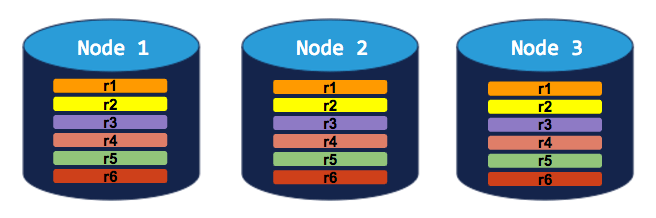
#### 3-node cluster with 3-way replication
In this scenario, each range is replicated 3 times, with each replica on a different node:
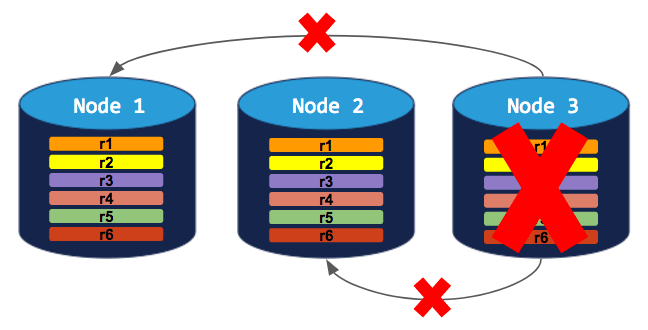
 If you try to decommission a node, the process will hang indefinitely because the cluster cannot move the decommissioning node's replicas to the other 2 nodes, which already have a replica of each range:
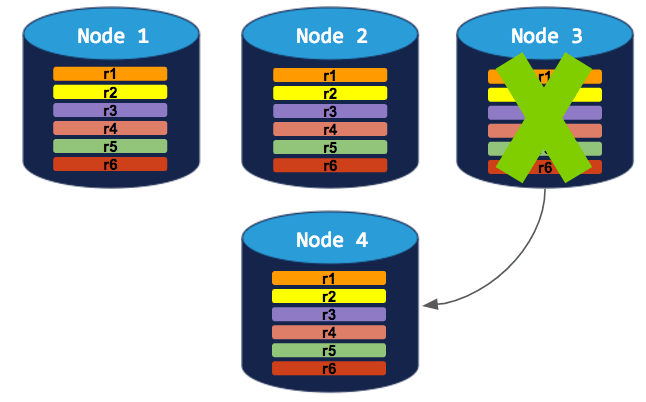
 To successfully decommission a node in this cluster, you need to **add a 4th node**. The decommissioning process can then complete:
 #### 5-node cluster with 3-way replication
In this scenario, like in the scenario above, each range is replicated 3 times, with each replica on a different node:
#### 5-node cluster with 3-way replication
In this scenario, like in the scenario above, each range is replicated 3 times, with each replica on a different node:
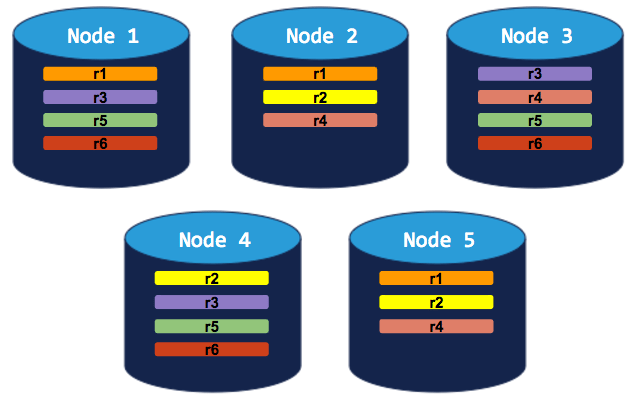 If you decommission a node, the process will run successfully because the cluster will be able to move the node's replicas to other nodes without doubling up any range replicas:
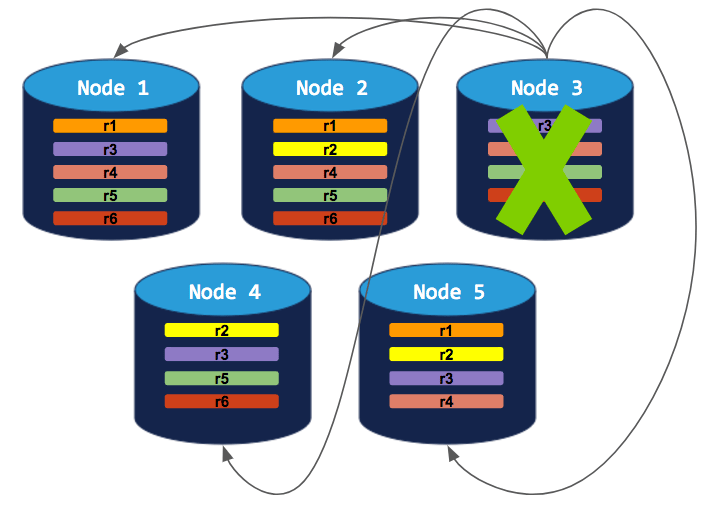 ## Perform node shutdown
After [preparing for graceful shutdown](#prepare-for-graceful-shutdown), do the following to permanently remove a node.
This guidance applies to manual deployments. In a Kubernetes deployment or a CockroachDB Advanced cluster, terminating the `cockroach` process is handled through Kubernetes. Refer to [Decommissioning and draining on Kubernetes](#decommissioning-and-draining-on-kubernetes) and [Decommissioning and draining on CockroachDB Advanced](#decommissioning-and-draining-on-cockroachdb-advanced).
### Drain the node
Although [draining automatically follows decommissioning](#draining), we recommend first running `cockroach node drain` to manually drain the node of active queries, SQL client connections, and leases before decommissioning. This is optional, but prevents possible disruptions in query performance. For specific instructions, see the [example](#drain-a-node-manually).
### Decommission the node
Run `cockroach node decommission` to decommission the node and rebalance its range replicas. For specific instructions and additional guidelines, see the [example](#remove-nodes).
If the rebalancing stalls during decommissioning, replicas that have yet to move are printed to the SQL shell and written to the `OPS` logging channel with the message `possible decommission stall detected`. By default, the `OPS` channel logs output to a `cockroach.log` file.
Do **not** terminate the node process, delete the storage volume, or remove the VM before a `decommissioning` node has [changed its membership status](#status-change) to `decommissioned`. Prematurely terminating the process will prevent the node from rebalancing all of its range replicas onto other nodes gracefully, cause transient query errors in client applications, and leave the remaining ranges under-replicated and vulnerable to loss of quorum if another node goes down.
By default, CockroachDB will perform a set of "decommissioning pre-flight checks". That is, decommission pre-checks look over the ranges with replicas on the to-be-decommissioned node, and check that each replica can be moved to some other node in the cluster. If errors are detected that would result in the inability to complete node decommissioning, they will be printed to `STDERR` and the command will exit *without attempting to perform node decommissioning*. For example, ranges that require a certain number of voting replicas in a region but do not have any available nodes in the region not already containing a replica will block the decommissioning process.
The error format is shown below:
```
ranges blocking decommission detected
n1 has 44 replicas blocked with error: "0 of 1 live stores are able to take a new replica for the range (2 already have a voter, 0 already have a non-voter); likely not enough nodes in cluster"
n2 has 27 replicas blocked with error: "0 of 1 live stores are able to take a new replica for the range (2 already have a voter, 0 already have a non-voter); likely not enough nodes in cluster"
ERROR: Cannot decommission nodes.
Failed running "node decommission"
```
These checks can be skipped by passing the flag `--checks=skip` to `cockroach node decommission`.
### Terminate the node process
Cockroach Labs does not recommend terminating the `cockroach` process by sending a `SIGKILL` signal, because it bypasses CockroachDB's [node shutdown logic](#node-shutdown-sequence) and degrades the cluster's health. From the point of view of other cluster nodes, the node will be suddenly unavailable.
* If a decommissioning node is forcibly terminated before decommission completes, ranges will be under-replicated and the cluster is at risk of loss of quorum if an additional node experiences an outage in the window before up-replication completes.
* If a draining or decommissioning node is forcibly terminated before the operation completes, it can corrupt log files and, in certain edge cases, can result in temporary data unavailability, latency spikes, uncertainty errors, ambiguous commit errors, or query timeouts.
* On production deployments, use the process manager, orchestration system, or other deployment tooling to send `SIGTERM` to the process. For example, with [`systemd`](https://www.freedesktop.org/wiki/Software/systemd/), run `systemctl stop {systemd config filename}`.
* If you run CockroachDB in the foreground for local testing, you can use `ctrl-c` in the terminal to terminate the process.
## Monitor shutdown progress
After you initiate a node shutdown or restart, the node's progress is regularly logged to the default logging destination until the operation is complete. The following sections provide additional ways to monitor the operation's progress.
### `OPS`
During node shutdown, progress messages are generated in the `OPS` logging channel. The frequency of these messages is configured with [`server.shutdown.lease_transfer_iteration.timeout`](#server-shutdown-lease_transfer_iteration-timeout). By default, the `OPS` logs output to a `cockroach.log` file.
Node decommission progress is reported in `node_decommissioning` and `node_decommissioned` events:
```shell theme={"theme":{"light":"catppuccin-mocha","dark":"catppuccin-mocha"}}
grep 'decommission' node1/logs/cockroach.log
```
```
I220211 02:14:30.906726 13931 1@util/log/event_log.go:32 ⋮ [-] 1064 ={"Timestamp":1644545670665746000,"EventType":"node_decommissioning","RequestingNodeID":1,"TargetNodeID":4}
I220211 02:14:31.288715 13931 1@util/log/event_log.go:32 ⋮ [-] 1067 ={"Timestamp":1644545670665746000,"EventType":"node_decommissioning","RequestingNodeID":1,"TargetNodeID":5}
I220211 02:16:39.093251 21514 1@util/log/event_log.go:32 ⋮ [-] 1680 ={"Timestamp":1644545798928274000,"EventType":"node_decommissioned","RequestingNodeID":1,"TargetNodeID":4}
I220211 02:16:39.656225 21514 1@util/log/event_log.go:32 ⋮ [-] 1681 ={"Timestamp":1644545798928274000,"EventType":"node_decommissioned","RequestingNodeID":1,"TargetNodeID":5}
```
Node drain progress is reported in unstructured log messages:
```shell theme={"theme":{"light":"catppuccin-mocha","dark":"catppuccin-mocha"}}
grep 'drain' node1/logs/cockroach.log
```
```
I220202 20:51:21.654349 2867 1@server/drain.go:210 ⋮ [n1,server drain process] 299 drain remaining: 15
I220202 20:51:21.654425 2867 1@server/drain.go:212 ⋮ [n1,server drain process] 300 drain details: descriptor leases: 7, liveness record: 1, range lease iterations: 7
I220202 20:51:23.052931 2867 1@server/drain.go:210 ⋮ [n1,server drain process] 309 drain remaining: 1
I220202 20:51:23.053217 2867 1@server/drain.go:212 ⋮ [n1,server drain process] 310 drain details: range lease iterations: 1
W220202 20:51:23.772264 681 sql/stmtdiagnostics/statement_diagnostics.go:162 ⋮ [n1] 313 error polling for statement diagnostics requests: ‹stmt-diag-poll›: cannot acquire lease when draining
E220202 20:51:23.800288 685 jobs/registry.go:715 ⋮ [n1] 314 error expiring job sessions: ‹expire-sessions›: cannot acquire lease when draining
E220202 20:51:23.819957 685 jobs/registry.go:723 ⋮ [n1] 315 failed to serve pause and cancel requests: could not query jobs table: ‹cancel/pause-requested›: cannot acquire lease when draining
I220202 20:51:24.672435 2867 1@server/drain.go:210 ⋮ [n1,server drain process] 320 drain remaining: 0
I220202 20:51:24.984089 1 1@cli/start.go:868 ⋮ [n1] 332 server drained and shutdown completed
```
### `cockroach node status`
Draining and decommissioning statuses are reflected in the `cockroach node status --decommission` output:
```shell theme={"theme":{"light":"catppuccin-mocha","dark":"catppuccin-mocha"}}
cockroach node status --decommission --certs-dir=certs --host={address of any live node}
```
```
id | address | sql_address | build | started_at | updated_at | locality | is_available | is_live | gossiped_replicas | is_decommissioning | membership | is_draining
-----+-----------------+-----------------+-----------------+----------------------------+----------------------------+----------+--------------+---------+-------------------+--------------------+----------------+--------------
1 | localhost:26257 | localhost:26257 | v22.2.0-alpha.1 | 2022-09-01 02:11:55.07734 | 2022-09-01 02:17:28.202777 | | true | true | 73 | false | active | false
2 | localhost:26258 | localhost:26258 | v22.2.0-alpha.1 | 2022-09-01 02:11:56.203535 | 2022-09-01 02:17:29.465841 | | true | true | 73 | false | active | false
3 | localhost:26259 | localhost:26259 | v22.2.0-alpha.1 | 2022-09-01 02:11:56.406667 | 2022-09-01 02:17:29.588486 | | true | true | 73 | false | active | false
4 | localhost:26260 | localhost:26260 | v22.2.0-alpha.1 | 2022-09-01 02:11:56.914003 | 2022-09-01 02:16:39.032709 | | false | false | 0 | true | decommissioned | true
5 | localhost:26261 | localhost:26261 | v22.2.0-alpha.1 | 2022-09-01 02:11:57.613508 | 2022-09-01 02:16:39.615783 | | false | false | 0 | true | decommissioned | true
(5 rows)
```
* `is_draining == true` indicates that the node is either undergoing or has completed the draining process.
* `is_decommissioning == true` indicates that the node is either undergoing or has completed the decommissioning process.
* When a node completes decommissioning, its `membership` [status changes](#status-change) from `decommissioning` to `decommissioned`.
### `stderr`
When CockroachDB receives a signal to [terminate the node process](#terminate-the-node-process), this message is printed to `stderr`:
```
initiating graceful shutdown of server
```
After the `cockroach` process has stopped, this message is printed to `stderr`:
```
server drained and shutdown completed
```
## Examples
These examples assume that you have already prepared for a [graceful node shutdown](#prepare-for-graceful-shutdown).
### Drain a node manually
You can use `cockroach node drain` to drain a node separately from decommissioning the node or terminating the node process.
1. Run the `cockroach node drain` command, specifying the ID of the node to drain (and optionally a custom [drain timeout](#drain-timeout) to allow draining more time to complete). You can optionally pass the `--shutdown` flag to `cockroach node drain` to automatically terminate the `cockroach` process after draining completes.
```shell theme={"theme":{"light":"catppuccin-mocha","dark":"catppuccin-mocha"}}
cockroach node drain 1 --host={address of any live node} --drain-wait=15m --certs-dir=certs
```
You will see the draining status print to `stderr`:
```
node is draining... remaining: 50
node is draining... remaining: 0 (complete)
ok
```
2. Filter the logs for shutdown progress messages. By default, the `OPS` logs output to a `cockroach.log` file:
```shell theme={"theme":{"light":"catppuccin-mocha","dark":"catppuccin-mocha"}}
grep 'drain' node1/logs/cockroach.log
```
```
I220204 00:08:57.382090 1596 1@server/drain.go:110 ⋮ [n1] 77 drain request received with doDrain = true, shutdown = false
E220204 00:08:59.732020 590 jobs/registry.go:749 ⋮ [n1] 78 error processing claimed jobs: could not query for claimed jobs: ‹select-running/get-claimed-jobs›: cannot acquire lease when draining
I220204 00:09:00.711459 1596 kv/kvserver/store.go:1571 ⋮ [drain] 79 waiting for 1 replicas to transfer their lease away
I220204 00:09:01.103881 1596 1@server/drain.go:210 ⋮ [n1] 80 drain remaining: 50
I220204 00:09:01.103999 1596 1@server/drain.go:212 ⋮ [n1] 81 drain details: liveness record: 2, range lease iterations: 42, descriptor leases: 6
I220204 00:09:01.104128 1596 1@server/drain.go:134 ⋮ [n1] 82 drain request completed without server shutdown
I220204 00:09:01.307629 2150 1@server/drain.go:110 ⋮ [n1] 83 drain request received with doDrain = true, shutdown = false
I220204 00:09:02.459197 2150 1@server/drain.go:210 ⋮ [n1] 84 drain remaining: 0
I220204 00:09:02.459272 2150 1@server/drain.go:134 ⋮ [n1] 85 drain request completed without server shutdown
```
The `drain request completed without server shutdown` message indicates that the node was drained.
### Remove nodes
* [Prerequisites](#prerequisites)
* [Step 1. Get the IDs of the nodes to decommission](#step-1-get-the-ids-of-the-nodes-to-decommission)
* [Step 2. Drain the nodes manually](#step-2-drain-the-nodes-manually)
* [Step 3. Decommission the nodes](#step-3-decommission-the-nodes)
* [Step 4. Confirm the nodes are decommissioned](#step-4-confirm-the-nodes-are-decommissioned)
* [Step 5. Terminate the process on decommissioned nodes](#step-5-terminate-the-process-on-decommissioned-nodes)
#### Prerequisites
In addition to the [graceful node shutdown](#prepare-for-graceful-shutdown) requirements, observe the following guidelines:
* Before decommissioning nodes, verify that there are no under-replicated or unavailable ranges on the cluster.
* Do **not** terminate the node process, delete the storage volume, or remove the VM before a `decommissioning` node has [changed its membership status](#status-change) to `decommissioned`. Prematurely terminating the process will prevent the node from rebalancing all of its range replicas onto other nodes gracefully, cause transient query errors in client applications, and leave the remaining ranges under-replicated and vulnerable to loss of quorum if another node goes down.
* When removing nodes, decommission all nodes at once. Do not decommission the nodes one-by-one. This will incur unnecessary data movement costs due to replicas being passed between decommissioning nodes. **All** nodes must be fully `decommissioned` before terminating the node process and removing the data storage.
* If you have a decommissioning node that appears to be hung, you can [recommission](#recommission-nodes) the node.
#### Step 1. Get the IDs of the nodes to decommission
Open the **Cluster Overview** page of the DB Console and note the node IDs of the nodes you want to decommission.
This example assumes you will decommission node IDs `4` and `5` of a 5-node cluster.
#### Step 2. Drain the nodes manually
Run the `cockroach node drain` command for each node to be removed, specifying the ID of the node to drain. Optionally, pass the `--shutdown` flag of `cockroach node drain` to automatically terminate the `cockroach` process after draining completes.
```shell theme={"theme":{"light":"catppuccin-mocha","dark":"catppuccin-mocha"}}
cockroach node drain 4 --host={address of any live node} --certs-dir=certs
```
```shell theme={"theme":{"light":"catppuccin-mocha","dark":"catppuccin-mocha"}}
cockroach node drain 5 --host={address of any live node} --certs-dir=certs
```
You will see the draining status of each node print to `stderr`:
```
node is draining... remaining: 50
node is draining... remaining: 0 (complete)
ok
```
Manually draining before decommissioning nodes is optional, but prevents possible disruptions in query performance.
#### Step 3. Decommission the nodes
Run the `cockroach node decommission` command with the IDs of the nodes to decommission:
```shell theme={"theme":{"light":"catppuccin-mocha","dark":"catppuccin-mocha"}}
$ cockroach node decommission 4 5 --certs-dir=certs --host={address of any live node}
```
You'll then see the decommissioning status print to `stderr` as it changes:
```
id | is_live | replicas | is_decommissioning | membership | is_draining
-----+---------+----------+--------------------+-----------------+--------------
4 | true | 39 | true | decommissioning | true
5 | true | 34 | true | decommissioning | true
(2 rows)
```
The `is_draining` field is `true` because the nodes were previously drained.
Once the nodes have been fully decommissioned, you'll see zero `replicas` and a confirmation:
```
id | is_live | replicas | is_decommissioning | membership | is_draining
-----+---------+----------+--------------------+-----------------+--------------
4 | true | 0 | true | decommissioning | true
5 | true | 0 | true | decommissioning | true
(2 rows)
No more data reported on target nodes. Please verify cluster health before removing the nodes.
```
The `is_decommissioning` field remains `true` after all replicas have been removed from each node.
Do **not** terminate the node process, delete the storage volume, or remove the VM before a `decommissioning` node has [changed its membership status](#status-change) to `decommissioned`. Prematurely terminating the process will prevent the node from rebalancing all of its range replicas onto other nodes gracefully, cause transient query errors in client applications, and leave the remaining ranges under-replicated and vulnerable to loss of quorum if another node goes down.
By default, CockroachDB will perform a set of "decommissioning pre-flight checks". That is, decommission pre-checks look over the ranges with replicas on the to-be-decommissioned node, and check that each replica can be moved to some other node in the cluster. If errors are detected that would result in the inability to complete node decommissioning, they will be printed to `STDERR` and the command will exit *without attempting to perform node decommissioning*. For example, ranges that require a certain number of voting replicas in a region but do not have any available nodes in the region not already containing a replica will block the decommissioning process.
The error format is shown below:
```
ranges blocking decommission detected
n1 has 44 replicas blocked with error: "0 of 1 live stores are able to take a new replica for the range (2 already have a voter, 0 already have a non-voter); likely not enough nodes in cluster"
n2 has 27 replicas blocked with error: "0 of 1 live stores are able to take a new replica for the range (2 already have a voter, 0 already have a non-voter); likely not enough nodes in cluster"
ERROR: Cannot decommission nodes.
Failed running "node decommission"
```
These checks can be skipped by passing the flag `--checks=skip` to `cockroach node decommission`.
#### Step 4. Confirm the nodes are decommissioned
Check the status of the decommissioned nodes:
```shell theme={"theme":{"light":"catppuccin-mocha","dark":"catppuccin-mocha"}}
$ cockroach node status --decommission --certs-dir=certs --host={address of any live node}
```
```
id | address | sql_address | build | started_at | updated_at | locality | is_available | is_live | gossiped_replicas | is_decommissioning | membership | is_draining
-----+-----------------+-----------------+-----------------+----------------------------+----------------------------+----------+--------------+---------+-------------------+--------------------+----------------+--------------
1 | localhost:26257 | localhost:26257 | v22.2.0-alpha.1 | 2022-09-01 02:11:55.07734 | 2022-09-01 02:17:28.202777 | | true | true | 73 | false | active | false
2 | localhost:26258 | localhost:26258 | v22.2.0-alpha.1 | 2022-09-01 02:11:56.203535 | 2022-09-01 02:17:29.465841 | | true | true | 73 | false | active | false
3 | localhost:26259 | localhost:26259 | v22.2.0-alpha.1 | 2022-09-01 02:11:56.406667 | 2022-09-01 02:17:29.588486 | | true | true | 73 | false | active | false
4 | localhost:26260 | localhost:26260 | v22.2.0-alpha.1 | 2022-09-01 02:11:56.914003 | 2022-09-01 02:16:39.032709 | | false | false | 0 | true | decommissioned | true
5 | localhost:26261 | localhost:26261 | v22.2.0-alpha.1 | 2022-09-01 02:11:57.613508 | 2022-09-01 02:16:39.615783 | | false | false | 0 | true | decommissioned | true
(5 rows)
```
* Membership on the decommissioned nodes should have changed from `decommissioning` to `decommissioned`.
* `0` replicas should remain on these nodes.
Once the nodes complete decommissioning, they will appear in the list of **Recently Decommissioned Nodes** in the DB Console.
#### Step 5. Terminate the process on decommissioned nodes
Cockroach Labs does not recommend terminating the `cockroach` process by sending a `SIGKILL` signal, because it bypasses CockroachDB's [node shutdown logic](#node-shutdown-sequence) and degrades the cluster's health. From the point of view of other cluster nodes, the node will be suddenly unavailable.
* If a decommissioning node is forcibly terminated before decommission completes, ranges will be under-replicated and the cluster is at risk of loss of quorum if an additional node experiences an outage in the window before up-replication completes.
* If a draining or decommissioning node is forcibly terminated before the operation completes, it can corrupt log files and, in certain edge cases, can result in temporary data unavailability, latency spikes, uncertainty errors, ambiguous commit errors, or query timeouts.
* On production deployments, use the process manager, orchestration system, or other deployment tooling to send `SIGTERM` to the process. For example, with [`systemd`](https://www.freedesktop.org/wiki/Software/systemd/), run `systemctl stop {systemd config filename}`.
* If you run CockroachDB in the foreground for local testing, you can use `ctrl-c` in the terminal to terminate the process.
The following messages will be printed:
```
initiating graceful shutdown of server
server drained and shutdown completed
```
### Remove a dead node
If a node is offline for the duration set by `server.time_until_store_dead` (5 minutes by default), the cluster considers the node "dead" and starts to rebalance its range replicas onto other nodes.
However, if the dead node is restarted, the cluster will rebalance replicas and leases onto the node. To prevent the cluster from rebalancing data to a dead node that comes back online, do the following:
#### Step 1. Confirm the node is dead
Check the status of your nodes:
```shell theme={"theme":{"light":"catppuccin-mocha","dark":"catppuccin-mocha"}}
$ cockroach node status --decommission --certs-dir=certs --host={address of any live node}
```
```
id | address | sql_address | build | started_at | updated_at | locality | is_available | is_live | gossiped_replicas | is_decommissioning | membership | is_draining
-----+-----------------+-----------------+-----------------+----------------------------+----------------------------+----------+--------------+---------+-------------------+--------------------+----------------+--------------
1 | localhost:26257 | localhost:26257 | v22.2.0-alpha.1 | 2022-09-01 02:45:45.970862 | 2022-09-01 05:32:43.233458 | | false | false | 0 | false | active | true
2 | localhost:26258 | localhost:26258 | v22.2.0-alpha.1 | 2022-09-01 02:46:40.32999 | 2022-09-01 05:42:28.577662 | | true | true | 73 | false | active | false
3 | localhost:26259 | localhost:26259 | v22.2.0-alpha.1 | 2022-09-01 02:46:47.20388 | 2022-09-01 05:42:27.467766 | | true | true | 73 | false | active | false
4 | localhost:26260 | localhost:26260 | v22.2.0-alpha.1 | 2022-09-01 02:11:56.914003 | 2022-09-01 02:16:39.032709 | | true | true | 73 | false | active | false
(4 rows)
```
The `is_live` field of the dead node will be `false`.
Alternatively, open the **Cluster Overview** page of the DB Console and check that the node status of the node is `DEAD`.
#### Step 2. Decommission the dead node
Run the `cockroach node decommission` command against the address of any live node, specifying the ID of the dead node:
```shell theme={"theme":{"light":"catppuccin-mocha","dark":"catppuccin-mocha"}}
$ cockroach node decommission 1 --certs-dir=certs --host={address of any live node}
```
```
id | is_live | replicas | is_decommissioning | membership | is_draining
-----+---------+----------+--------------------+-----------------+--------------
1 | false | 0 | true | decommissioning | true
(1 row)
No more data reported on target nodes. Please verify cluster health before removing the nodes.
```
#### Step 3. Confirm the node is decommissioned
Check the status of the decommissioned node:
```shell theme={"theme":{"light":"catppuccin-mocha","dark":"catppuccin-mocha"}}
$ cockroach node status --decommission --certs-dir=certs --host={address of any live node}
```
```
id | address | sql_address | build | started_at | updated_at | locality | is_available | is_live | gossiped_replicas | is_decommissioning | membership | is_draining
-----+-----------------+-----------------+-----------------+----------------------------+----------------------------+----------+--------------+---------+-------------------+--------------------+----------------+--------------
1 | localhost:26257 | localhost:26257 | v22.2.0-alpha.1 | 2022-09-01 02:45:45.970862 | 2022-09-01 06:07:40.697734 | | false | false | 0 | true | decommissioned | true
2 | localhost:26258 | localhost:26258 | v22.2.0-alpha.1 | 2022-09-01 02:46:40.32999 | 2022-09-01 05:42:28.577662 | | true | true | 73 | false | active | false
3 | localhost:26259 | localhost:26259 | v22.2.0-alpha.1 | 2022-09-01 02:46:47.20388 | 2022-09-01 05:42:27.467766 | | true | true | 73 | false | active | false
4 | localhost:26260 | localhost:26260 | v22.2.0-alpha.1 | 2022-09-01 02:11:56.914003 | 2022-09-01 02:16:39.032709 | | true | true | 73 | false | active | false
(4 rows)
```
* Membership on the decommissioned node should have changed from `active` to `decommissioned`.
Once the node completes decommissioning, it will appear in the list of **Recently Decommissioned Nodes** in the DB Console.
### Recommission nodes
If you accidentally started decommissioning a node, or have a node with a hung decommissioning process, you can recommission the node. This cancels replica removal from the decommissioning node.
Recommissioning can only cancel an active decommissioning process. If a node has [completed decommissioning](#status-change), you must start a new node. A fully decommissioned node is permanently decommissioned, and cannot be recommissioned.
#### Step 1. Cancel the decommissioning process
Press `ctrl-c` in each terminal with an ongoing decommissioning process that you want to cancel.
#### Step 2. Recommission the decommissioning nodes
Run the `cockroach node recommission` command with the ID of the node to recommission:
```shell theme={"theme":{"light":"catppuccin-mocha","dark":"catppuccin-mocha"}}
$ cockroach node recommission 1 --certs-dir=certs --host={address of any live node}
```
The value of `is_decommissioning` will change back to `false`:
```
id | is_live | replicas | is_decommissioning | membership | is_draining
-----+---------+----------+--------------------+------------+--------------
1 | false | 73 | false | active | true
(1 row)
```
If the decommissioning node has already reached the [draining stage](#draining), you may need to restart the node after it is recommissioned.
On the **Cluster Overview** page of the DB Console, the node status of the node should be `LIVE`. After a few minutes, you should see replicas rebalanced to the nodes.
## Decommissioning and draining on Kubernetes
Most of the guidance in this page is most relevant to manual deployments that don't use Kubernetes. If you use Kubernetes to deploy CockroachDB, draining and decommissioning work the same way for the `cockroach` process, but Kubernetes handles them on your behalf. In a deployment without Kubernetes, an administrator initiates decommissioning or draining directly. In a Kubernetes deployment, an administrator modifies the desired configuration of the Kubernetes cluster and Kubernetes makes the required changes to the cluster, including decommissioning or draining nodes as required.
* Whether you deployed a cluster using the CockroachDB operator, Helm, or a manual StatefulSet, the resulting deployment is a StatefulSet. Due to the nature of StatefulSets, it's safe to decommission **only** the Cockroach node with the highest StatefulSet ordinal in preparation for scaling down the StatefulSet. If you think you need to decommission any other node, consider the following recommendations and [contact Support](https://support.cockroachlabs.com/hc/en-us) for assistance.
* If you deployed a cluster using the CockroachDB Kubernetes Operator, the best way to scale down a cluster is to update the specification for the Kubernetes deployment to reduce the value of `nodes:` and apply the change using a [rolling update](https://kubernetes.io/docs/tutorials/kubernetes-basics/update/update-intro/). Kubernetes will notice that there are now too many nodes and will reduce them and clean up their storage automatically.
* If you deployed the cluster using Helm or a manual StatefulSet, the best way to scale down a cluster is to interactively decommission and drain the highest-order node. After that node is decommissioned, drained, and terminated, you can repeat the process to further reduce the cluster's size.
Refer to Cluster Scaling.
* There is generally no need to interactively drain a node that is not being decommissioned, regardless of how you deployed the cluster in Kubernetes. When you upgrade, downgrade, or change the configuration of a CockroachDB deployment on Kubernetes, you apply the changes using a [rolling update](https://kubernetes.io/docs/tutorials/kubernetes-basics/update/update-intro/), which applies the change to one node at a time. On a given node, Kubernetes sends a `SIGTERM` signal to the `cockroach` process. When the `cockroach` process receives this signal, it starts draining itself. After draining is complete or the [termination grace period](#termination-grace-period-on-kubernetes) expires (whichever happens first), Kubernetes terminates the `cockroach` process and then removes the node from the Kubernetes cluster. Kubernetes then applies the updated deployment to the cluster node, restarts the `cockroach` process, and re-joins the cluster. Refer to Cluster Upgrades.
* Although the `kubectl drain` command is used for manual maintenance of Kubernetes clusters, it has little direct relevance to the concept of draining a node in a CockroachDB cluster. The `kubectl drain` command gracefully terminates each pod running on a Kubernetes node so that the node can be shut down (in the case of physical hardware) or deleted (in the case of a virtual machine). For details on this command, see the [Kubernetes documentation](https://kubernetes.io/docs/tasks/administer-cluster/safely-drain-node/).
Refer to [Termination grace period on Kubernetes](#termination-grace-period-on-kubernetes). For more details about managing CockroachDB on Kubernetes, refer to Cluster upgrades and Cluster scaling.
### Termination grace period on Kubernetes
After Kubernetes issues a termination request to the `cockroach` process on a cluster node, it waits for a maximum of the deployment's [`terminationGracePeriodSeconds`](https://kubernetes.io/docs/concepts/workloads/pods/pod-lifecycle/#pod-termination) before forcibly terminating the process. If `terminationGracePeriodSeconds` is too short, the `cockroach` process may be terminated before it can shut down cleanly and client applications may be disrupted.
If undefined, Kubernetes sets `terminationGracePeriodSeconds` to 30 seconds. This is too short for the `cockroach` process to stop gracefully before Kubernetes terminates it forcibly. Do not set `terminationGracePeriodSeconds` to `0`, which prevents Kubernetes from detecting and terminating a stuck pod.
For clusters deployed using the CockroachDB Public operator, `terminationGracePeriodSeconds` defaults to 300 seconds (5 minutes).
For clusters deployed using the CockroachDB Helm chart or a manual StatefulSet, the default depends upon the values file or manifest you used when you created the cluster.
Cockroach Labs recommends that you:
* Set `terminationGracePeriodSeconds` to no shorter than 300 seconds (5 minutes). This recommendation has been validated over time for many production workloads. In most cases, a value higher than 300 seconds (5 minutes) is not required. If CockroachDB takes longer than 5 minutes to gracefully stop, this may indicate an underlying configuration problem. Test the value you select against representative workloads before rolling out the change to production clusters.
* Set `terminationGracePeriodSeconds` to be at least 5 seconds longer than the configured [drain timeout](#server-shutdown-connections-timeout), to allow the node to complete draining before Kubernetes removes the Kubernetes pod for the CockroachDB node.
* Ensure that the **sum** of the following `server.shutdown.*` settings for the CockroachDB cluster do not exceed the deployment's `terminationGracePeriodSeconds`, to reduce the likelihood that a node must be terminated forcibly.
* [`server.shutdown.initial_wait`](#server-shutdown-initial_wait)
* [`server.shutdown.connections.timeout`](#server-shutdown-connections-timeout)
* [`server.shutdown.transactions.timeout`](#server-shutdown-transactions-timeout) times two
* [`server.shutdown.lease_transfer_iteration.timeout`](#server-shutdown-lease_transfer_iteration-timeout)
For more information about these settings, refer to [Cluster settings](#cluster-settings). Refer also to the [Kubernetes documentation about pod termination](https://kubernetes.io/docs/concepts/workloads/pods/pod-lifecycle/#pod-termination).
A client application's connection pool should have a maximum lifetime that is shorter than the Kubernetes deployment's [`server.shutdown.connections.timeout`](#server-shutdown-connections-timeout) setting.
## Decommissioning and draining on CockroachDB Advanced
Most of the guidance in this page is most relevant to manual deployments, although decommissioning and draining work the same way behind the scenes in a CockroachDB Advanced cluster. CockroachDB Advanced clusters are deployed with the [server.shutdown.connections.timeout](#server-shutdown-connections-timeout) setting at its default value of `0s`, and have a termination grace period that is slightly longer than 30 minutes. This grace period is not configurable.
You can adjust the [`server.shutdown.connections.timeout`](#server-shutdown-connections-timeout) setting for client applications or application servers that connect to CockroachDB Advanced clusters. Ensure that the connection pool maximum lifetime is shorter than that value, as per the [Cluster settings](#server-shutdown-connections-timeout) guidance.
## Known limitations
* There is no guaranteed state switch from `DECOMMISSIONING` to `DECOMMISSIONED` if `node decommission` is interrupted in one of the following ways:
* The `cockroach node decommission --wait-all` command was run and then interrupted
* The `cockroach node decommission --wait=none` command was run
This is because the state flip is effected by the CLI program at the end. Only the CLI (or its underlying API call) is able to finalize the "decommissioned" state. If the command is interrupted, or `--wait=none` is used, the state will only flip to "decommissioned" when the CLI program is run again after decommissioning has done all its work.
## See also
* Upgrade CockroachDB
* `cockroach node`
* `cockroach start`
* Node status
* Replication Layer
* Decommissioning issues
## Perform node shutdown
After [preparing for graceful shutdown](#prepare-for-graceful-shutdown), do the following to permanently remove a node.
This guidance applies to manual deployments. In a Kubernetes deployment or a CockroachDB Advanced cluster, terminating the `cockroach` process is handled through Kubernetes. Refer to [Decommissioning and draining on Kubernetes](#decommissioning-and-draining-on-kubernetes) and [Decommissioning and draining on CockroachDB Advanced](#decommissioning-and-draining-on-cockroachdb-advanced).
### Drain the node
Although [draining automatically follows decommissioning](#draining), we recommend first running `cockroach node drain` to manually drain the node of active queries, SQL client connections, and leases before decommissioning. This is optional, but prevents possible disruptions in query performance. For specific instructions, see the [example](#drain-a-node-manually).
### Decommission the node
Run `cockroach node decommission` to decommission the node and rebalance its range replicas. For specific instructions and additional guidelines, see the [example](#remove-nodes).
If the rebalancing stalls during decommissioning, replicas that have yet to move are printed to the SQL shell and written to the `OPS` logging channel with the message `possible decommission stall detected`. By default, the `OPS` channel logs output to a `cockroach.log` file.
Do **not** terminate the node process, delete the storage volume, or remove the VM before a `decommissioning` node has [changed its membership status](#status-change) to `decommissioned`. Prematurely terminating the process will prevent the node from rebalancing all of its range replicas onto other nodes gracefully, cause transient query errors in client applications, and leave the remaining ranges under-replicated and vulnerable to loss of quorum if another node goes down.
By default, CockroachDB will perform a set of "decommissioning pre-flight checks". That is, decommission pre-checks look over the ranges with replicas on the to-be-decommissioned node, and check that each replica can be moved to some other node in the cluster. If errors are detected that would result in the inability to complete node decommissioning, they will be printed to `STDERR` and the command will exit *without attempting to perform node decommissioning*. For example, ranges that require a certain number of voting replicas in a region but do not have any available nodes in the region not already containing a replica will block the decommissioning process.
The error format is shown below:
```
ranges blocking decommission detected
n1 has 44 replicas blocked with error: "0 of 1 live stores are able to take a new replica for the range (2 already have a voter, 0 already have a non-voter); likely not enough nodes in cluster"
n2 has 27 replicas blocked with error: "0 of 1 live stores are able to take a new replica for the range (2 already have a voter, 0 already have a non-voter); likely not enough nodes in cluster"
ERROR: Cannot decommission nodes.
Failed running "node decommission"
```
These checks can be skipped by passing the flag `--checks=skip` to `cockroach node decommission`.
### Terminate the node process
Cockroach Labs does not recommend terminating the `cockroach` process by sending a `SIGKILL` signal, because it bypasses CockroachDB's [node shutdown logic](#node-shutdown-sequence) and degrades the cluster's health. From the point of view of other cluster nodes, the node will be suddenly unavailable.
* If a decommissioning node is forcibly terminated before decommission completes, ranges will be under-replicated and the cluster is at risk of loss of quorum if an additional node experiences an outage in the window before up-replication completes.
* If a draining or decommissioning node is forcibly terminated before the operation completes, it can corrupt log files and, in certain edge cases, can result in temporary data unavailability, latency spikes, uncertainty errors, ambiguous commit errors, or query timeouts.
* On production deployments, use the process manager, orchestration system, or other deployment tooling to send `SIGTERM` to the process. For example, with [`systemd`](https://www.freedesktop.org/wiki/Software/systemd/), run `systemctl stop {systemd config filename}`.
* If you run CockroachDB in the foreground for local testing, you can use `ctrl-c` in the terminal to terminate the process.
## Monitor shutdown progress
After you initiate a node shutdown or restart, the node's progress is regularly logged to the default logging destination until the operation is complete. The following sections provide additional ways to monitor the operation's progress.
### `OPS`
During node shutdown, progress messages are generated in the `OPS` logging channel. The frequency of these messages is configured with [`server.shutdown.lease_transfer_iteration.timeout`](#server-shutdown-lease_transfer_iteration-timeout). By default, the `OPS` logs output to a `cockroach.log` file.
Node decommission progress is reported in `node_decommissioning` and `node_decommissioned` events:
```shell theme={"theme":{"light":"catppuccin-mocha","dark":"catppuccin-mocha"}}
grep 'decommission' node1/logs/cockroach.log
```
```
I220211 02:14:30.906726 13931 1@util/log/event_log.go:32 ⋮ [-] 1064 ={"Timestamp":1644545670665746000,"EventType":"node_decommissioning","RequestingNodeID":1,"TargetNodeID":4}
I220211 02:14:31.288715 13931 1@util/log/event_log.go:32 ⋮ [-] 1067 ={"Timestamp":1644545670665746000,"EventType":"node_decommissioning","RequestingNodeID":1,"TargetNodeID":5}
I220211 02:16:39.093251 21514 1@util/log/event_log.go:32 ⋮ [-] 1680 ={"Timestamp":1644545798928274000,"EventType":"node_decommissioned","RequestingNodeID":1,"TargetNodeID":4}
I220211 02:16:39.656225 21514 1@util/log/event_log.go:32 ⋮ [-] 1681 ={"Timestamp":1644545798928274000,"EventType":"node_decommissioned","RequestingNodeID":1,"TargetNodeID":5}
```
Node drain progress is reported in unstructured log messages:
```shell theme={"theme":{"light":"catppuccin-mocha","dark":"catppuccin-mocha"}}
grep 'drain' node1/logs/cockroach.log
```
```
I220202 20:51:21.654349 2867 1@server/drain.go:210 ⋮ [n1,server drain process] 299 drain remaining: 15
I220202 20:51:21.654425 2867 1@server/drain.go:212 ⋮ [n1,server drain process] 300 drain details: descriptor leases: 7, liveness record: 1, range lease iterations: 7
I220202 20:51:23.052931 2867 1@server/drain.go:210 ⋮ [n1,server drain process] 309 drain remaining: 1
I220202 20:51:23.053217 2867 1@server/drain.go:212 ⋮ [n1,server drain process] 310 drain details: range lease iterations: 1
W220202 20:51:23.772264 681 sql/stmtdiagnostics/statement_diagnostics.go:162 ⋮ [n1] 313 error polling for statement diagnostics requests: ‹stmt-diag-poll›: cannot acquire lease when draining
E220202 20:51:23.800288 685 jobs/registry.go:715 ⋮ [n1] 314 error expiring job sessions: ‹expire-sessions›: cannot acquire lease when draining
E220202 20:51:23.819957 685 jobs/registry.go:723 ⋮ [n1] 315 failed to serve pause and cancel requests: could not query jobs table: ‹cancel/pause-requested›: cannot acquire lease when draining
I220202 20:51:24.672435 2867 1@server/drain.go:210 ⋮ [n1,server drain process] 320 drain remaining: 0
I220202 20:51:24.984089 1 1@cli/start.go:868 ⋮ [n1] 332 server drained and shutdown completed
```
### `cockroach node status`
Draining and decommissioning statuses are reflected in the `cockroach node status --decommission` output:
```shell theme={"theme":{"light":"catppuccin-mocha","dark":"catppuccin-mocha"}}
cockroach node status --decommission --certs-dir=certs --host={address of any live node}
```
```
id | address | sql_address | build | started_at | updated_at | locality | is_available | is_live | gossiped_replicas | is_decommissioning | membership | is_draining
-----+-----------------+-----------------+-----------------+----------------------------+----------------------------+----------+--------------+---------+-------------------+--------------------+----------------+--------------
1 | localhost:26257 | localhost:26257 | v22.2.0-alpha.1 | 2022-09-01 02:11:55.07734 | 2022-09-01 02:17:28.202777 | | true | true | 73 | false | active | false
2 | localhost:26258 | localhost:26258 | v22.2.0-alpha.1 | 2022-09-01 02:11:56.203535 | 2022-09-01 02:17:29.465841 | | true | true | 73 | false | active | false
3 | localhost:26259 | localhost:26259 | v22.2.0-alpha.1 | 2022-09-01 02:11:56.406667 | 2022-09-01 02:17:29.588486 | | true | true | 73 | false | active | false
4 | localhost:26260 | localhost:26260 | v22.2.0-alpha.1 | 2022-09-01 02:11:56.914003 | 2022-09-01 02:16:39.032709 | | false | false | 0 | true | decommissioned | true
5 | localhost:26261 | localhost:26261 | v22.2.0-alpha.1 | 2022-09-01 02:11:57.613508 | 2022-09-01 02:16:39.615783 | | false | false | 0 | true | decommissioned | true
(5 rows)
```
* `is_draining == true` indicates that the node is either undergoing or has completed the draining process.
* `is_decommissioning == true` indicates that the node is either undergoing or has completed the decommissioning process.
* When a node completes decommissioning, its `membership` [status changes](#status-change) from `decommissioning` to `decommissioned`.
### `stderr`
When CockroachDB receives a signal to [terminate the node process](#terminate-the-node-process), this message is printed to `stderr`:
```
initiating graceful shutdown of server
```
After the `cockroach` process has stopped, this message is printed to `stderr`:
```
server drained and shutdown completed
```
## Examples
These examples assume that you have already prepared for a [graceful node shutdown](#prepare-for-graceful-shutdown).
### Drain a node manually
You can use `cockroach node drain` to drain a node separately from decommissioning the node or terminating the node process.
1. Run the `cockroach node drain` command, specifying the ID of the node to drain (and optionally a custom [drain timeout](#drain-timeout) to allow draining more time to complete). You can optionally pass the `--shutdown` flag to `cockroach node drain` to automatically terminate the `cockroach` process after draining completes.
```shell theme={"theme":{"light":"catppuccin-mocha","dark":"catppuccin-mocha"}}
cockroach node drain 1 --host={address of any live node} --drain-wait=15m --certs-dir=certs
```
You will see the draining status print to `stderr`:
```
node is draining... remaining: 50
node is draining... remaining: 0 (complete)
ok
```
2. Filter the logs for shutdown progress messages. By default, the `OPS` logs output to a `cockroach.log` file:
```shell theme={"theme":{"light":"catppuccin-mocha","dark":"catppuccin-mocha"}}
grep 'drain' node1/logs/cockroach.log
```
```
I220204 00:08:57.382090 1596 1@server/drain.go:110 ⋮ [n1] 77 drain request received with doDrain = true, shutdown = false
E220204 00:08:59.732020 590 jobs/registry.go:749 ⋮ [n1] 78 error processing claimed jobs: could not query for claimed jobs: ‹select-running/get-claimed-jobs›: cannot acquire lease when draining
I220204 00:09:00.711459 1596 kv/kvserver/store.go:1571 ⋮ [drain] 79 waiting for 1 replicas to transfer their lease away
I220204 00:09:01.103881 1596 1@server/drain.go:210 ⋮ [n1] 80 drain remaining: 50
I220204 00:09:01.103999 1596 1@server/drain.go:212 ⋮ [n1] 81 drain details: liveness record: 2, range lease iterations: 42, descriptor leases: 6
I220204 00:09:01.104128 1596 1@server/drain.go:134 ⋮ [n1] 82 drain request completed without server shutdown
I220204 00:09:01.307629 2150 1@server/drain.go:110 ⋮ [n1] 83 drain request received with doDrain = true, shutdown = false
I220204 00:09:02.459197 2150 1@server/drain.go:210 ⋮ [n1] 84 drain remaining: 0
I220204 00:09:02.459272 2150 1@server/drain.go:134 ⋮ [n1] 85 drain request completed without server shutdown
```
The `drain request completed without server shutdown` message indicates that the node was drained.
### Remove nodes
* [Prerequisites](#prerequisites)
* [Step 1. Get the IDs of the nodes to decommission](#step-1-get-the-ids-of-the-nodes-to-decommission)
* [Step 2. Drain the nodes manually](#step-2-drain-the-nodes-manually)
* [Step 3. Decommission the nodes](#step-3-decommission-the-nodes)
* [Step 4. Confirm the nodes are decommissioned](#step-4-confirm-the-nodes-are-decommissioned)
* [Step 5. Terminate the process on decommissioned nodes](#step-5-terminate-the-process-on-decommissioned-nodes)
#### Prerequisites
In addition to the [graceful node shutdown](#prepare-for-graceful-shutdown) requirements, observe the following guidelines:
* Before decommissioning nodes, verify that there are no under-replicated or unavailable ranges on the cluster.
* Do **not** terminate the node process, delete the storage volume, or remove the VM before a `decommissioning` node has [changed its membership status](#status-change) to `decommissioned`. Prematurely terminating the process will prevent the node from rebalancing all of its range replicas onto other nodes gracefully, cause transient query errors in client applications, and leave the remaining ranges under-replicated and vulnerable to loss of quorum if another node goes down.
* When removing nodes, decommission all nodes at once. Do not decommission the nodes one-by-one. This will incur unnecessary data movement costs due to replicas being passed between decommissioning nodes. **All** nodes must be fully `decommissioned` before terminating the node process and removing the data storage.
* If you have a decommissioning node that appears to be hung, you can [recommission](#recommission-nodes) the node.
#### Step 1. Get the IDs of the nodes to decommission
Open the **Cluster Overview** page of the DB Console and note the node IDs of the nodes you want to decommission.
This example assumes you will decommission node IDs `4` and `5` of a 5-node cluster.
#### Step 2. Drain the nodes manually
Run the `cockroach node drain` command for each node to be removed, specifying the ID of the node to drain. Optionally, pass the `--shutdown` flag of `cockroach node drain` to automatically terminate the `cockroach` process after draining completes.
```shell theme={"theme":{"light":"catppuccin-mocha","dark":"catppuccin-mocha"}}
cockroach node drain 4 --host={address of any live node} --certs-dir=certs
```
```shell theme={"theme":{"light":"catppuccin-mocha","dark":"catppuccin-mocha"}}
cockroach node drain 5 --host={address of any live node} --certs-dir=certs
```
You will see the draining status of each node print to `stderr`:
```
node is draining... remaining: 50
node is draining... remaining: 0 (complete)
ok
```
Manually draining before decommissioning nodes is optional, but prevents possible disruptions in query performance.
#### Step 3. Decommission the nodes
Run the `cockroach node decommission` command with the IDs of the nodes to decommission:
```shell theme={"theme":{"light":"catppuccin-mocha","dark":"catppuccin-mocha"}}
$ cockroach node decommission 4 5 --certs-dir=certs --host={address of any live node}
```
You'll then see the decommissioning status print to `stderr` as it changes:
```
id | is_live | replicas | is_decommissioning | membership | is_draining
-----+---------+----------+--------------------+-----------------+--------------
4 | true | 39 | true | decommissioning | true
5 | true | 34 | true | decommissioning | true
(2 rows)
```
The `is_draining` field is `true` because the nodes were previously drained.
Once the nodes have been fully decommissioned, you'll see zero `replicas` and a confirmation:
```
id | is_live | replicas | is_decommissioning | membership | is_draining
-----+---------+----------+--------------------+-----------------+--------------
4 | true | 0 | true | decommissioning | true
5 | true | 0 | true | decommissioning | true
(2 rows)
No more data reported on target nodes. Please verify cluster health before removing the nodes.
```
The `is_decommissioning` field remains `true` after all replicas have been removed from each node.
Do **not** terminate the node process, delete the storage volume, or remove the VM before a `decommissioning` node has [changed its membership status](#status-change) to `decommissioned`. Prematurely terminating the process will prevent the node from rebalancing all of its range replicas onto other nodes gracefully, cause transient query errors in client applications, and leave the remaining ranges under-replicated and vulnerable to loss of quorum if another node goes down.
By default, CockroachDB will perform a set of "decommissioning pre-flight checks". That is, decommission pre-checks look over the ranges with replicas on the to-be-decommissioned node, and check that each replica can be moved to some other node in the cluster. If errors are detected that would result in the inability to complete node decommissioning, they will be printed to `STDERR` and the command will exit *without attempting to perform node decommissioning*. For example, ranges that require a certain number of voting replicas in a region but do not have any available nodes in the region not already containing a replica will block the decommissioning process.
The error format is shown below:
```
ranges blocking decommission detected
n1 has 44 replicas blocked with error: "0 of 1 live stores are able to take a new replica for the range (2 already have a voter, 0 already have a non-voter); likely not enough nodes in cluster"
n2 has 27 replicas blocked with error: "0 of 1 live stores are able to take a new replica for the range (2 already have a voter, 0 already have a non-voter); likely not enough nodes in cluster"
ERROR: Cannot decommission nodes.
Failed running "node decommission"
```
These checks can be skipped by passing the flag `--checks=skip` to `cockroach node decommission`.
#### Step 4. Confirm the nodes are decommissioned
Check the status of the decommissioned nodes:
```shell theme={"theme":{"light":"catppuccin-mocha","dark":"catppuccin-mocha"}}
$ cockroach node status --decommission --certs-dir=certs --host={address of any live node}
```
```
id | address | sql_address | build | started_at | updated_at | locality | is_available | is_live | gossiped_replicas | is_decommissioning | membership | is_draining
-----+-----------------+-----------------+-----------------+----------------------------+----------------------------+----------+--------------+---------+-------------------+--------------------+----------------+--------------
1 | localhost:26257 | localhost:26257 | v22.2.0-alpha.1 | 2022-09-01 02:11:55.07734 | 2022-09-01 02:17:28.202777 | | true | true | 73 | false | active | false
2 | localhost:26258 | localhost:26258 | v22.2.0-alpha.1 | 2022-09-01 02:11:56.203535 | 2022-09-01 02:17:29.465841 | | true | true | 73 | false | active | false
3 | localhost:26259 | localhost:26259 | v22.2.0-alpha.1 | 2022-09-01 02:11:56.406667 | 2022-09-01 02:17:29.588486 | | true | true | 73 | false | active | false
4 | localhost:26260 | localhost:26260 | v22.2.0-alpha.1 | 2022-09-01 02:11:56.914003 | 2022-09-01 02:16:39.032709 | | false | false | 0 | true | decommissioned | true
5 | localhost:26261 | localhost:26261 | v22.2.0-alpha.1 | 2022-09-01 02:11:57.613508 | 2022-09-01 02:16:39.615783 | | false | false | 0 | true | decommissioned | true
(5 rows)
```
* Membership on the decommissioned nodes should have changed from `decommissioning` to `decommissioned`.
* `0` replicas should remain on these nodes.
Once the nodes complete decommissioning, they will appear in the list of **Recently Decommissioned Nodes** in the DB Console.
#### Step 5. Terminate the process on decommissioned nodes
Cockroach Labs does not recommend terminating the `cockroach` process by sending a `SIGKILL` signal, because it bypasses CockroachDB's [node shutdown logic](#node-shutdown-sequence) and degrades the cluster's health. From the point of view of other cluster nodes, the node will be suddenly unavailable.
* If a decommissioning node is forcibly terminated before decommission completes, ranges will be under-replicated and the cluster is at risk of loss of quorum if an additional node experiences an outage in the window before up-replication completes.
* If a draining or decommissioning node is forcibly terminated before the operation completes, it can corrupt log files and, in certain edge cases, can result in temporary data unavailability, latency spikes, uncertainty errors, ambiguous commit errors, or query timeouts.
* On production deployments, use the process manager, orchestration system, or other deployment tooling to send `SIGTERM` to the process. For example, with [`systemd`](https://www.freedesktop.org/wiki/Software/systemd/), run `systemctl stop {systemd config filename}`.
* If you run CockroachDB in the foreground for local testing, you can use `ctrl-c` in the terminal to terminate the process.
The following messages will be printed:
```
initiating graceful shutdown of server
server drained and shutdown completed
```
### Remove a dead node
If a node is offline for the duration set by `server.time_until_store_dead` (5 minutes by default), the cluster considers the node "dead" and starts to rebalance its range replicas onto other nodes.
However, if the dead node is restarted, the cluster will rebalance replicas and leases onto the node. To prevent the cluster from rebalancing data to a dead node that comes back online, do the following:
#### Step 1. Confirm the node is dead
Check the status of your nodes:
```shell theme={"theme":{"light":"catppuccin-mocha","dark":"catppuccin-mocha"}}
$ cockroach node status --decommission --certs-dir=certs --host={address of any live node}
```
```
id | address | sql_address | build | started_at | updated_at | locality | is_available | is_live | gossiped_replicas | is_decommissioning | membership | is_draining
-----+-----------------+-----------------+-----------------+----------------------------+----------------------------+----------+--------------+---------+-------------------+--------------------+----------------+--------------
1 | localhost:26257 | localhost:26257 | v22.2.0-alpha.1 | 2022-09-01 02:45:45.970862 | 2022-09-01 05:32:43.233458 | | false | false | 0 | false | active | true
2 | localhost:26258 | localhost:26258 | v22.2.0-alpha.1 | 2022-09-01 02:46:40.32999 | 2022-09-01 05:42:28.577662 | | true | true | 73 | false | active | false
3 | localhost:26259 | localhost:26259 | v22.2.0-alpha.1 | 2022-09-01 02:46:47.20388 | 2022-09-01 05:42:27.467766 | | true | true | 73 | false | active | false
4 | localhost:26260 | localhost:26260 | v22.2.0-alpha.1 | 2022-09-01 02:11:56.914003 | 2022-09-01 02:16:39.032709 | | true | true | 73 | false | active | false
(4 rows)
```
The `is_live` field of the dead node will be `false`.
Alternatively, open the **Cluster Overview** page of the DB Console and check that the node status of the node is `DEAD`.
#### Step 2. Decommission the dead node
Run the `cockroach node decommission` command against the address of any live node, specifying the ID of the dead node:
```shell theme={"theme":{"light":"catppuccin-mocha","dark":"catppuccin-mocha"}}
$ cockroach node decommission 1 --certs-dir=certs --host={address of any live node}
```
```
id | is_live | replicas | is_decommissioning | membership | is_draining
-----+---------+----------+--------------------+-----------------+--------------
1 | false | 0 | true | decommissioning | true
(1 row)
No more data reported on target nodes. Please verify cluster health before removing the nodes.
```
#### Step 3. Confirm the node is decommissioned
Check the status of the decommissioned node:
```shell theme={"theme":{"light":"catppuccin-mocha","dark":"catppuccin-mocha"}}
$ cockroach node status --decommission --certs-dir=certs --host={address of any live node}
```
```
id | address | sql_address | build | started_at | updated_at | locality | is_available | is_live | gossiped_replicas | is_decommissioning | membership | is_draining
-----+-----------------+-----------------+-----------------+----------------------------+----------------------------+----------+--------------+---------+-------------------+--------------------+----------------+--------------
1 | localhost:26257 | localhost:26257 | v22.2.0-alpha.1 | 2022-09-01 02:45:45.970862 | 2022-09-01 06:07:40.697734 | | false | false | 0 | true | decommissioned | true
2 | localhost:26258 | localhost:26258 | v22.2.0-alpha.1 | 2022-09-01 02:46:40.32999 | 2022-09-01 05:42:28.577662 | | true | true | 73 | false | active | false
3 | localhost:26259 | localhost:26259 | v22.2.0-alpha.1 | 2022-09-01 02:46:47.20388 | 2022-09-01 05:42:27.467766 | | true | true | 73 | false | active | false
4 | localhost:26260 | localhost:26260 | v22.2.0-alpha.1 | 2022-09-01 02:11:56.914003 | 2022-09-01 02:16:39.032709 | | true | true | 73 | false | active | false
(4 rows)
```
* Membership on the decommissioned node should have changed from `active` to `decommissioned`.
Once the node completes decommissioning, it will appear in the list of **Recently Decommissioned Nodes** in the DB Console.
### Recommission nodes
If you accidentally started decommissioning a node, or have a node with a hung decommissioning process, you can recommission the node. This cancels replica removal from the decommissioning node.
Recommissioning can only cancel an active decommissioning process. If a node has [completed decommissioning](#status-change), you must start a new node. A fully decommissioned node is permanently decommissioned, and cannot be recommissioned.
#### Step 1. Cancel the decommissioning process
Press `ctrl-c` in each terminal with an ongoing decommissioning process that you want to cancel.
#### Step 2. Recommission the decommissioning nodes
Run the `cockroach node recommission` command with the ID of the node to recommission:
```shell theme={"theme":{"light":"catppuccin-mocha","dark":"catppuccin-mocha"}}
$ cockroach node recommission 1 --certs-dir=certs --host={address of any live node}
```
The value of `is_decommissioning` will change back to `false`:
```
id | is_live | replicas | is_decommissioning | membership | is_draining
-----+---------+----------+--------------------+------------+--------------
1 | false | 73 | false | active | true
(1 row)
```
If the decommissioning node has already reached the [draining stage](#draining), you may need to restart the node after it is recommissioned.
On the **Cluster Overview** page of the DB Console, the node status of the node should be `LIVE`. After a few minutes, you should see replicas rebalanced to the nodes.
## Decommissioning and draining on Kubernetes
Most of the guidance in this page is most relevant to manual deployments that don't use Kubernetes. If you use Kubernetes to deploy CockroachDB, draining and decommissioning work the same way for the `cockroach` process, but Kubernetes handles them on your behalf. In a deployment without Kubernetes, an administrator initiates decommissioning or draining directly. In a Kubernetes deployment, an administrator modifies the desired configuration of the Kubernetes cluster and Kubernetes makes the required changes to the cluster, including decommissioning or draining nodes as required.
* Whether you deployed a cluster using the CockroachDB operator, Helm, or a manual StatefulSet, the resulting deployment is a StatefulSet. Due to the nature of StatefulSets, it's safe to decommission **only** the Cockroach node with the highest StatefulSet ordinal in preparation for scaling down the StatefulSet. If you think you need to decommission any other node, consider the following recommendations and [contact Support](https://support.cockroachlabs.com/hc/en-us) for assistance.
* If you deployed a cluster using the CockroachDB Kubernetes Operator, the best way to scale down a cluster is to update the specification for the Kubernetes deployment to reduce the value of `nodes:` and apply the change using a [rolling update](https://kubernetes.io/docs/tutorials/kubernetes-basics/update/update-intro/). Kubernetes will notice that there are now too many nodes and will reduce them and clean up their storage automatically.
* If you deployed the cluster using Helm or a manual StatefulSet, the best way to scale down a cluster is to interactively decommission and drain the highest-order node. After that node is decommissioned, drained, and terminated, you can repeat the process to further reduce the cluster's size.
Refer to Cluster Scaling.
* There is generally no need to interactively drain a node that is not being decommissioned, regardless of how you deployed the cluster in Kubernetes. When you upgrade, downgrade, or change the configuration of a CockroachDB deployment on Kubernetes, you apply the changes using a [rolling update](https://kubernetes.io/docs/tutorials/kubernetes-basics/update/update-intro/), which applies the change to one node at a time. On a given node, Kubernetes sends a `SIGTERM` signal to the `cockroach` process. When the `cockroach` process receives this signal, it starts draining itself. After draining is complete or the [termination grace period](#termination-grace-period-on-kubernetes) expires (whichever happens first), Kubernetes terminates the `cockroach` process and then removes the node from the Kubernetes cluster. Kubernetes then applies the updated deployment to the cluster node, restarts the `cockroach` process, and re-joins the cluster. Refer to Cluster Upgrades.
* Although the `kubectl drain` command is used for manual maintenance of Kubernetes clusters, it has little direct relevance to the concept of draining a node in a CockroachDB cluster. The `kubectl drain` command gracefully terminates each pod running on a Kubernetes node so that the node can be shut down (in the case of physical hardware) or deleted (in the case of a virtual machine). For details on this command, see the [Kubernetes documentation](https://kubernetes.io/docs/tasks/administer-cluster/safely-drain-node/).
Refer to [Termination grace period on Kubernetes](#termination-grace-period-on-kubernetes). For more details about managing CockroachDB on Kubernetes, refer to Cluster upgrades and Cluster scaling.
### Termination grace period on Kubernetes
After Kubernetes issues a termination request to the `cockroach` process on a cluster node, it waits for a maximum of the deployment's [`terminationGracePeriodSeconds`](https://kubernetes.io/docs/concepts/workloads/pods/pod-lifecycle/#pod-termination) before forcibly terminating the process. If `terminationGracePeriodSeconds` is too short, the `cockroach` process may be terminated before it can shut down cleanly and client applications may be disrupted.
If undefined, Kubernetes sets `terminationGracePeriodSeconds` to 30 seconds. This is too short for the `cockroach` process to stop gracefully before Kubernetes terminates it forcibly. Do not set `terminationGracePeriodSeconds` to `0`, which prevents Kubernetes from detecting and terminating a stuck pod.
For clusters deployed using the CockroachDB Public operator, `terminationGracePeriodSeconds` defaults to 300 seconds (5 minutes).
For clusters deployed using the CockroachDB Helm chart or a manual StatefulSet, the default depends upon the values file or manifest you used when you created the cluster.
Cockroach Labs recommends that you:
* Set `terminationGracePeriodSeconds` to no shorter than 300 seconds (5 minutes). This recommendation has been validated over time for many production workloads. In most cases, a value higher than 300 seconds (5 minutes) is not required. If CockroachDB takes longer than 5 minutes to gracefully stop, this may indicate an underlying configuration problem. Test the value you select against representative workloads before rolling out the change to production clusters.
* Set `terminationGracePeriodSeconds` to be at least 5 seconds longer than the configured [drain timeout](#server-shutdown-connections-timeout), to allow the node to complete draining before Kubernetes removes the Kubernetes pod for the CockroachDB node.
* Ensure that the **sum** of the following `server.shutdown.*` settings for the CockroachDB cluster do not exceed the deployment's `terminationGracePeriodSeconds`, to reduce the likelihood that a node must be terminated forcibly.
* [`server.shutdown.initial_wait`](#server-shutdown-initial_wait)
* [`server.shutdown.connections.timeout`](#server-shutdown-connections-timeout)
* [`server.shutdown.transactions.timeout`](#server-shutdown-transactions-timeout) times two
* [`server.shutdown.lease_transfer_iteration.timeout`](#server-shutdown-lease_transfer_iteration-timeout)
For more information about these settings, refer to [Cluster settings](#cluster-settings). Refer also to the [Kubernetes documentation about pod termination](https://kubernetes.io/docs/concepts/workloads/pods/pod-lifecycle/#pod-termination).
A client application's connection pool should have a maximum lifetime that is shorter than the Kubernetes deployment's [`server.shutdown.connections.timeout`](#server-shutdown-connections-timeout) setting.
## Decommissioning and draining on CockroachDB Advanced
Most of the guidance in this page is most relevant to manual deployments, although decommissioning and draining work the same way behind the scenes in a CockroachDB Advanced cluster. CockroachDB Advanced clusters are deployed with the [server.shutdown.connections.timeout](#server-shutdown-connections-timeout) setting at its default value of `0s`, and have a termination grace period that is slightly longer than 30 minutes. This grace period is not configurable.
You can adjust the [`server.shutdown.connections.timeout`](#server-shutdown-connections-timeout) setting for client applications or application servers that connect to CockroachDB Advanced clusters. Ensure that the connection pool maximum lifetime is shorter than that value, as per the [Cluster settings](#server-shutdown-connections-timeout) guidance.
## Known limitations
* There is no guaranteed state switch from `DECOMMISSIONING` to `DECOMMISSIONED` if `node decommission` is interrupted in one of the following ways:
* The `cockroach node decommission --wait-all` command was run and then interrupted
* The `cockroach node decommission --wait=none` command was run
This is because the state flip is effected by the CLI program at the end. Only the CLI (or its underlying API call) is able to finalize the "decommissioned" state. If the command is interrupted, or `--wait=none` is used, the state will only flip to "decommissioned" when the CLI program is run again after decommissioning has done all its work.
## See also
* Upgrade CockroachDB
* `cockroach node`
* `cockroach start`
* Node status
* Replication Layer
* Decommissioning issues